
 A brief becomes a real page.
Give the agent an operating task with a clear stopping point
A WooCommerce AI agent can help inspect a catalog, prepare product changes and coordinate supported store operations. Its usefulness depends on the data and tools it can actually access, the records you intend to change, and how you verify the result. Start with a question that can be answered without changing the store.
A shopping chatbot usually helps a customer find an item or answer a question. This guide concerns an assistant working on the merchant's side: preparing and carrying out permitted operational tasks. A product recommendation, an order-status update and a payment refund have different consequences, even if one client can request all three.
Use this as an operating framework. For a narrow, executed content example, follow our tested WooCommerce product-description workflow. For setup and tool coverage, use the WooCommerce integration page.
Separate inspection, proposals and approved changes
The following is a recommended store policy, not a claim that every integration automatically enforces these boundaries.
| Task | Useful agent contribution | Review before action |
|---|---|---|
| Catalog inspection | Find missing fields, conflicting facts or products needing attention | Confirm the scope and whether each finding is a real problem |
| Descriptions and media | Draft changes using approved product facts | Approve exact copy or attachments and preserve the commercial offer |
| Prices, coupons and stock | Prepare a before-and-after proposal | Approve targets, values, dates and the source of truth |
| Orders and customers | Retrieve only the information needed for the authorized question | Review status changes and any notifications or personal data involved |
| Refunds and deletion | Assemble the facts and identify the required operation | Use an explicit, operation-specific human decision and verification |
A request to improve descriptions should not silently become a request to discount products, change stock or publish drafts. A request to inspect an order should not become a refund. Record both the allowed fields and the fields that must stay unchanged.
Choose a connection that matches the job
There are several ways to connect software to WooCommerce. They are not interchangeable authentication recipes.
- EMCP: its WooCommerce integration supplies Pro read/write dispatchers within the wider WordPress toolkit. Discover the installed operation catalog and its requirements before selecting an action.
- WooCommerce's native MCP route: its current developer documentation describes WooCommerce abilities exposed through the WordPress MCP Adapter and labels the integration developer preview. It also documents the removal of the older WooCommerce-specific endpoint in 11.3. Use the instructions for your installed release, rather than an old copied endpoint.
- Direct REST integration: WooCommerce's merchant REST API guide describes keys linked to a WordPress user, with Read, Write or Read/Write access. Follow the authentication method required by the integration you actually choose.
The Store API is aimed at shopper-facing product, cart and checkout functionality. It does not give an assistant arbitrary access to other customers' orders or administrative settings. Customer session and write requirements still apply; a public product response is not evidence of merchant access.
Compare the two MCP approaches in our WooCommerce MCP comparison. This guide focuses on the operating decisions after you choose a connection.
Start with a small read-only catalog pass
Confirm the site and environment, the person responsible for the task, and a small set of real product and variation IDs. Read current values instead of relying on an old conversation. Keep order and customer data out of a product-only task.
Inspect only the product IDs and variation IDs I approve for this task.
Return their SKU, type, status, current price fields and relevant stock settings.
Identify missing facts and conflicting values. Do not write or publish anything.
Do not retrieve orders or customer records for this catalog task.
Stop if the target records or the active store are unclear.
A variable product needs its variation records when the proposed change affects individual options. A displayed price range does not identify which variation should receive a price. Similarly, a product name is not an adequate substitute for an identifier when two records look alike.
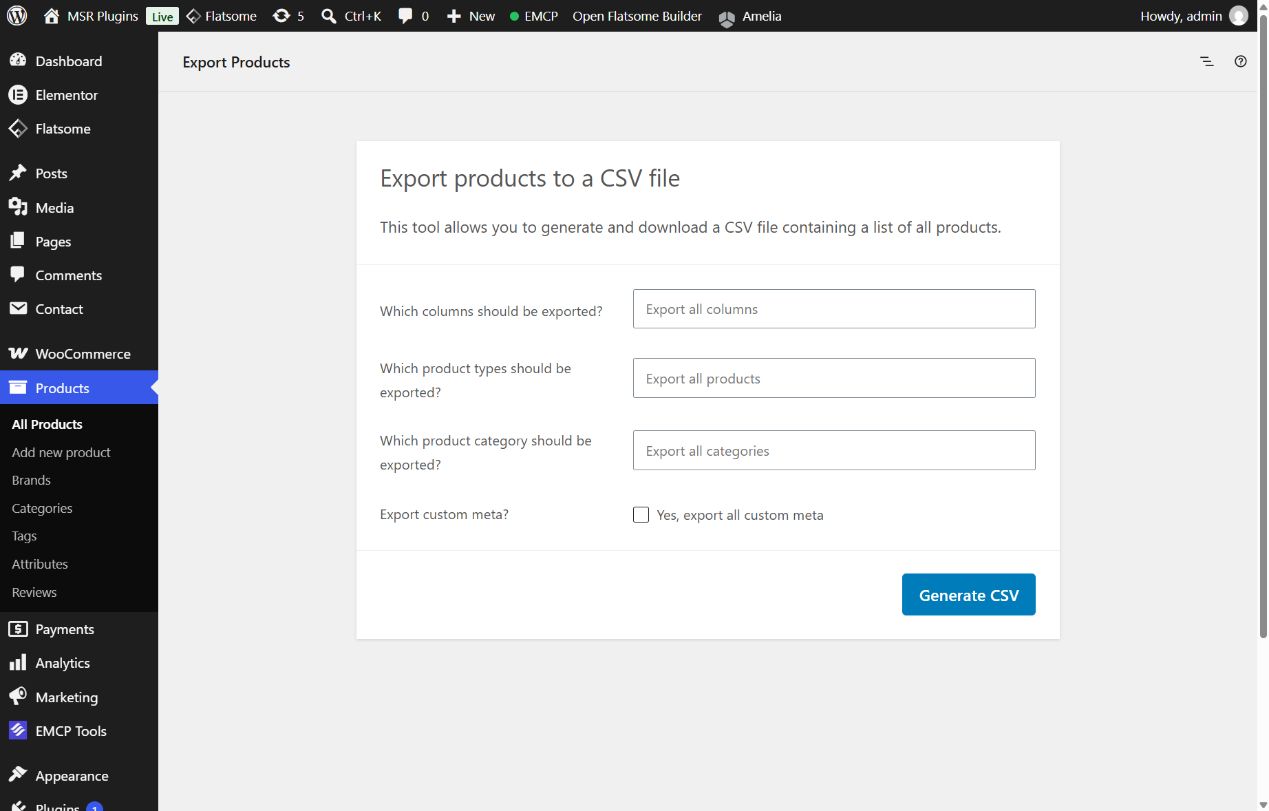
If a direct connection is unavailable, a narrowly selected product export can support a planning pass. WooCommerce's CSV documentation describes exporting from Products → All Products and selecting columns, product types and categories. Export only what the task needs. A file is a snapshot; it does not establish the live state at the time a later change runs.
Turn the request into a proposal someone can approve
For each intended change, show the record ID, the current value, the proposed value and the reason. Include the time of the read. State what stays unchanged, which facts are missing and how the result will be checked.
A promotion request illustrates why this matters. Before changing an item already on sale, resolve whether the new offer replaces the sale, stacks with another discount or excludes it. For a variable item, confirm which variations are eligible. Dates, timezone, rounding and applicable store policies need a responsible owner's decision.
Download the store change-review worksheet. It is a review document, not an executable import or permission grant. Approval should identify the exact revision and target records, rather than give an indefinite instruction to apply future suggestions.
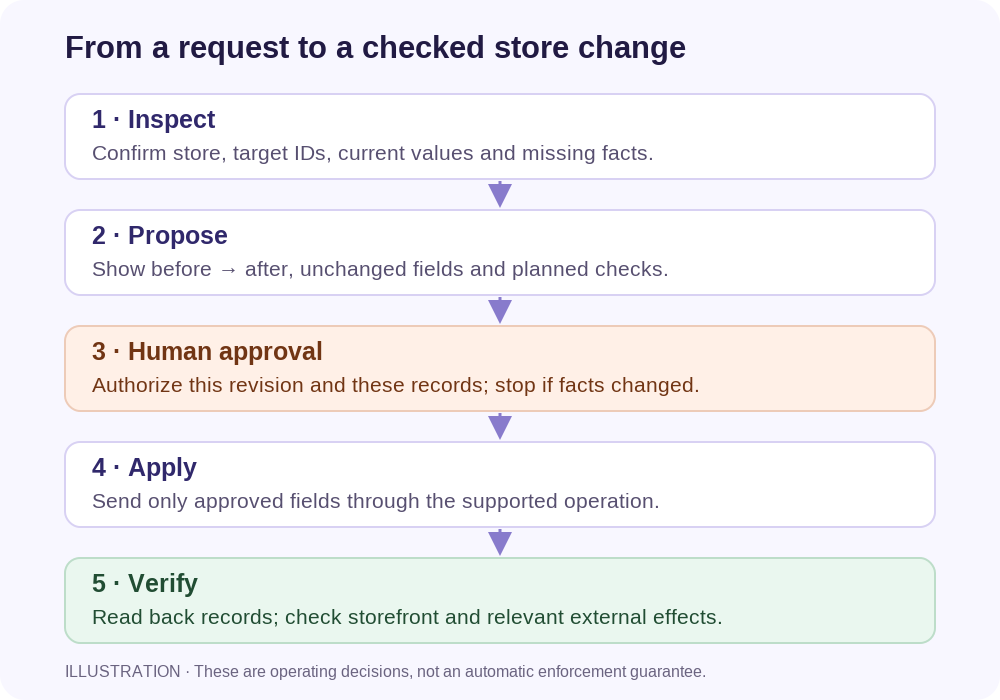
For product imports, EMCP documents a separate plan-and-apply flow. Review the returned plan and use the installed schema's confirmation requirements. The WooCommerce tool reference describes how its plan hash binds the intended batch; do not treat one plan as approval for a different item list.
Recorded planning and practice-store tests
A bounded local planning pass
On 10 November 2026, we tested a planning pass using Claude Code 2.1.302 with its Haiku model alias. The input was a clearly fictional JSON sample, not a WooCommerce export, API response or import payload. Its sample references are not real product IDs.
The file contained two in-scope products and one excluded control. One simple product had both regular and sale prices but no sale dates. One variable product had a displayed price range but no variation records. The task was to identify what needed confirmation before a possible promotion, without calculating new prices.
Read catalog-review-sample.json. Prepare a merchant review for the
promotion request within requested_scope. Identify information that must
be confirmed before any store write. Use only facts in the file.
Do not calculate or propose new prices, change files, or connect to a site.
Label the sample fictional. Exclude out-of-scope records from proposed
actions and stop before any change.
The actual run used plan mode, only Read/Glob/Grep built-in tools, an empty strict MCP configuration, project settings, no session persistence, a six-turn limit and a $0.50 estimated-spend cap. It completed in two turns, raised the existing-sale and missing-variation questions, and excluded the control from proposed actions. It proposed no new prices. A before/after SHA-256 comparison confirmed the input file was unchanged.
The 10 November exercise tests only local planning against fictional data. It does not measure accuracy across stores, time savings, revenue or conversion.
A real practice-store edit, export and recovery
On 12 November 2026, we used the signed-in browser on a local practice store running WordPress 7.1.4 and WooCommerce 11.3.0. The catalog was empty. We created one fictional simple product as a draft, with a regular price of ₨1,200 and a sale price of ₨900. It was never published.
- Read the baseline: recorded the product ID, draft status, description and both price fields.
- Apply a narrow change: saved a description-only revision and read the persisted fields again. Both prices remained 1200 and 900, and the status remained Draft.
- Check the presentation: the signed-in draft storefront preview displayed the revised text and the existing regular/sale prices.
- Export and compare: the native Generate CSV action downloaded one row. Its product ID, revised description, regular price and sale price matched the saved draft; its Published value was -1.
- Recover the text: restored the original description and read it back with both prices still unchanged.
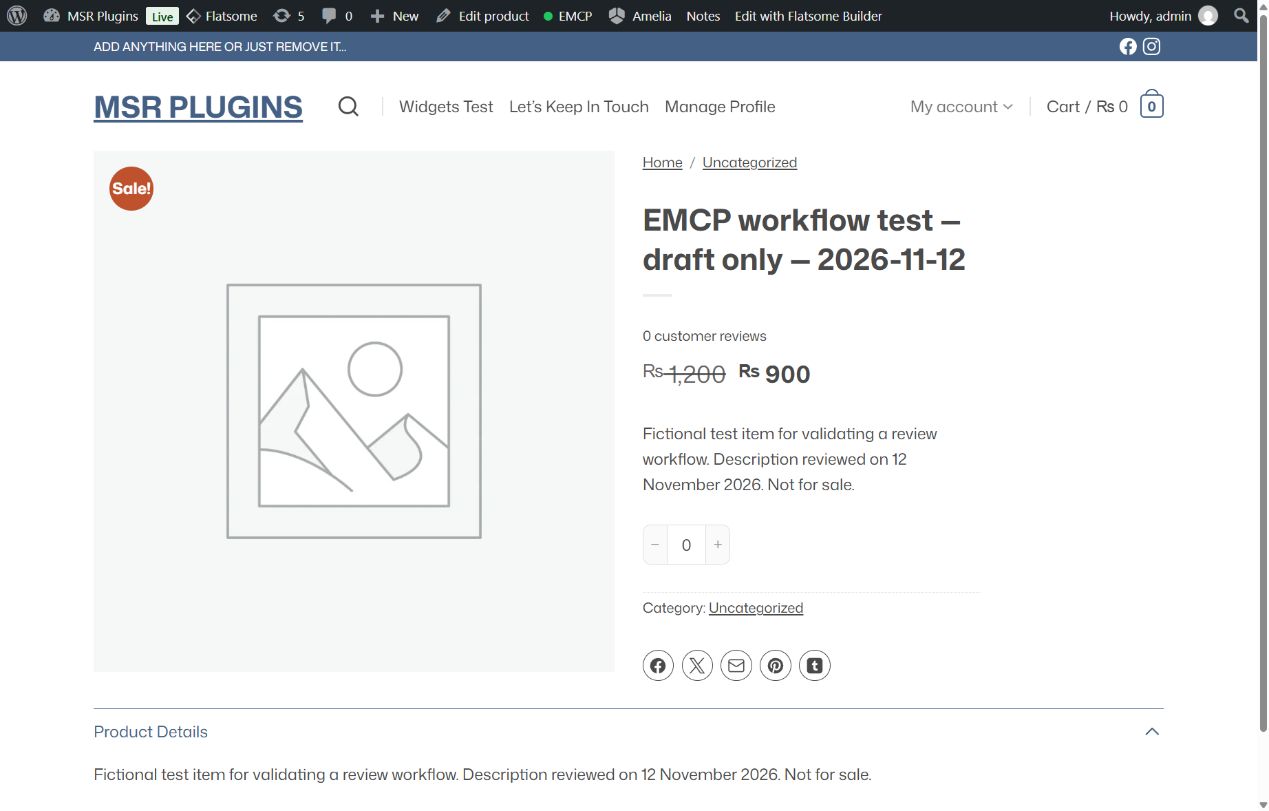
This second test used browser automation of native WooCommerce screens. The local site's EMCP WooCommerce tools were not connected to this chat, so it does not verify an MCP or EMCP tool workflow. No CSV import, variable-product operation, promotion change, stock quantity update, checkout, order action or refund was performed. The test checks these visible fields, not every stored metadata value or external integration.
Apply one approved change, then verify two kinds of evidence
Use a practice or staging store before a production rollout. Save the relevant original values and an appropriate recovery point. Immediately before an approved write, read the affected records again. Stop if the proposal is stale or if a record no longer matches the reviewed state.
Send only the fields authorized for that operation. Do not send an old whole-product snapshot merely because the API accepts it: stock, prices or another field may have changed since the snapshot was taken. Keep the first batch small enough to inspect properly.
- Read back the saved records. Compare intended changes and preserved fields on the same IDs and variations. A successful request is not a full comparison.
- Inspect the relevant presentation or effect. Check the product page and variation selection for content work; inspect the displayed offer and cart behavior for an approved pricing task. Check external systems separately where they are involved.
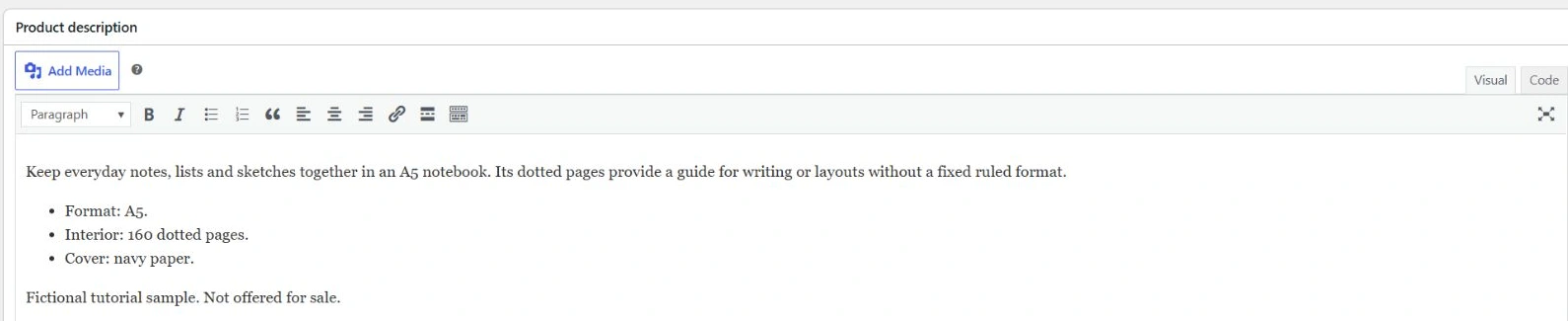
The earlier tutorial compared saved fields as well as storefront previews. Follow it for its executed content-only example rather than assuming a screenshot proves that stock, prices or every hidden field stayed unchanged.
Plan recovery per operation. Restoring description text is different from reversing a notification, synchronizing inventory with another system or recovering a deleted record. Do not promise universal rollback from an agent activity log.
Keep money, inventory and customer actions explicit
A refund status is not proof of returned funds
WooCommerce distinguishes automatic gateway refunds from manual refunds. A manual refund records the store-side refund but requires the money to be returned separately. Directly setting an order to Cancelled or Refunded does not automatically return payment. Confirm the amount, order, line items, payment method and responsible merchant before a refund action, then verify the outcome in the appropriate system. WooCommerce's refund documentation explains that distinction.
Inventory and order changes can affect other systems
Identify whether WooCommerce, a warehouse application or another inventory service owns the quantity you intend to change. An agent should not silently overwrite a replenishment or fulfillment update. For order-status work, establish which notifications and integrations your actual store triggers. Customer data should be limited to what the authorized task requires and omitted from public screenshots and handoff examples.
Permission is narrower than a general instruction to help
Use the account and operation permissions your connection supports, and review the exposed write surface. EMCP documents additional confirmation requirements for refunds, deletions and batches; other changes still need the task's own review boundary. A confirm flag is a technical input, not a record of the merchant's full intent. Our WordPress MCP security guide covers the wider access boundary.
Use EMCP for supported store operations within WordPress
EMCP's WooCommerce integration is a Pro feature. With WooCommerce active, confirm the module and relevant tools are available in your installed version. Start with the read dispatcher, discover its operation catalog, and request a small product sample. Enable the needed write access only for an approved task and inspect the operation's current requirements.
The integration sits alongside WordPress content, builder and supported plugin workflows. A product landing-page task may involve a page builder as well as store data. SEO metadata belongs to the SEO integration actually active on the site. Keep those sources and target fields explicit instead of assuming one store tool controls every visible detail.
Use the integration overview, operation reference and WooCommerce products lesson for the part you need. Check edition requirements in the tool catalog before promising a workflow to a client.
Sources, evidence and your next step
Reviewed 10 November 2026 against the primary sources linked throughout: WooCommerce's Store API, REST key, MCP, CSV and refund documentation, plus EMCP's maintained integration and tool references. Native MCP is documented as developer preview at this review date. The local export and draft-preview images are new captures from the 12 November practice-store test. The native-editor image is a credited reused tutorial capture. The cover and operation diagram are illustrative. The two recorded exercises have separate scopes: a local Claude Code planning pass and a native WooCommerce browser test; neither verifies a new EMCP store connection.
Choose one catalog question, collect the minimum data needed, and evaluate the proposal before allowing a write. If your next task is product copy, continue with the tested description tutorial. If you are choosing the integration itself, use the MCP comparison.
Start with a WordPress connection you can inspect
Get EMCP Lite on WordPress.org and follow a supported client setup. Lite is a starting point for supported WordPress work; the WooCommerce operations discussed here require EMCP Pro. Review that edition's catalog and begin on a practice site before planning a store change.