
 A brief becomes a real page.
Bring your AI to WordPress.
EMCP turns your WordPress site into an MCP server that the AI you already use can work with. Pick your client for a step-by-step setup. The free plugin is enough to connect.

Connect ChatGPT
Add your site to the ChatGPT desktop app as an MCP server and approve it in your browser.
See the setup
Connect Claude
Connect Claude Desktop with a one-click bundle or connector, or Claude Code with one command.
See the setup
Connect Cursor
Install the server into Cursor with one click and approve each tool call in the editor.
See the setupFour ways to connect
The connection wizard picks the right one.
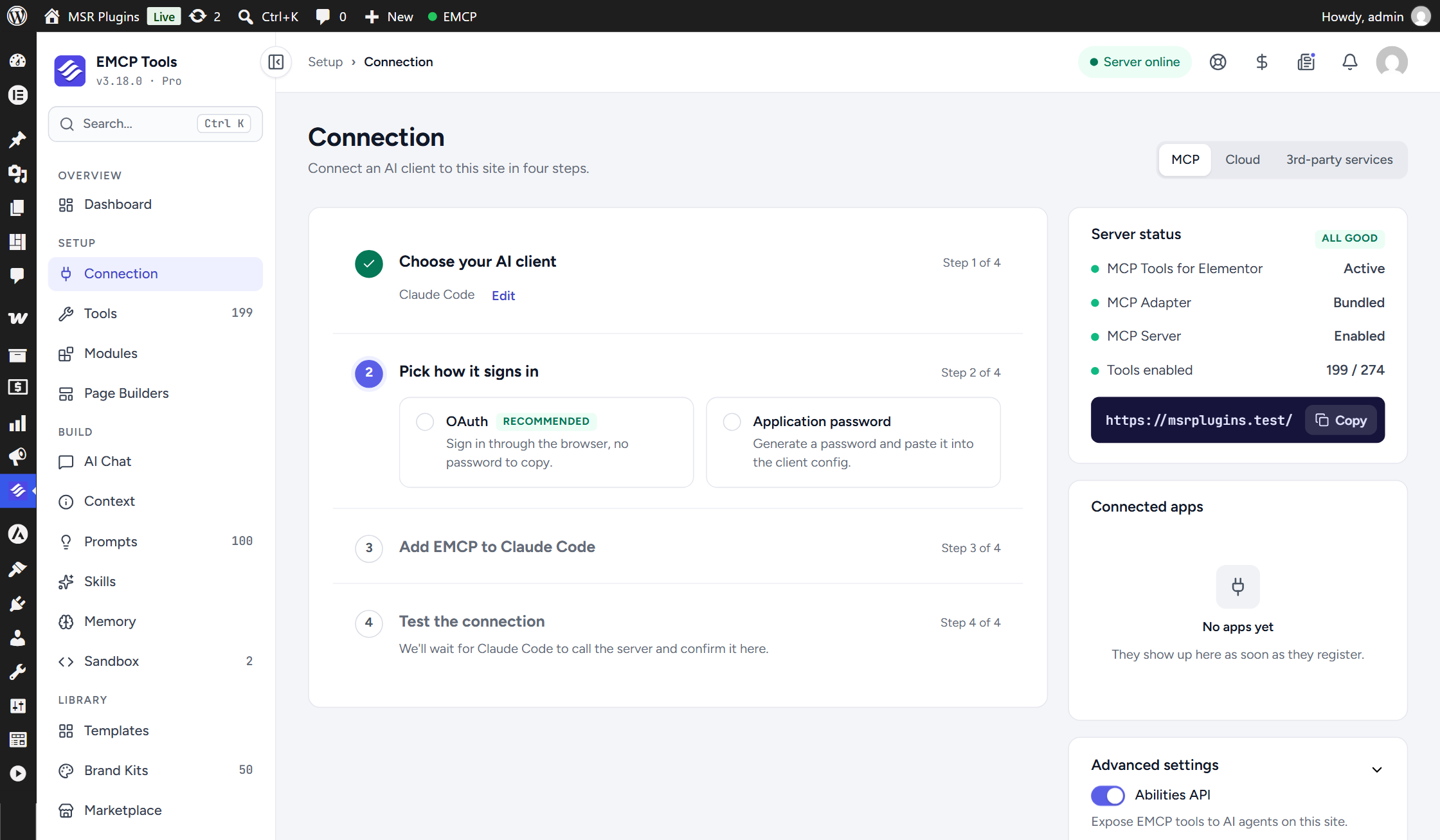
Under EMCP Tools → Connection, a four-step wizard asks which client you use and how it signs in, gives you the exact setup, then waits for the client’s first call and tells you when it arrives.
OAuth sign-in
Free, built in and on by default on HTTPS sites. Approve once in your browser.
Application Password
For plain HTTP sites, or hosts that block the address OAuth needs.
WP-CLI bridge
For local sites: no HTTP and no sign-in when WordPress runs on your computer.
Hosted Gateway
One connection for many sites, with a paid EMCP Cloud plan.
Connected? See what you can build.
Landing pages, courses, bookings, funnels and more, with real examples for each.