
 A brief becomes a real page.
Connect Cursorto your WordPress site.
Work on WordPress from the editor you already code in. With EMCP, a one-click install adds your site to Cursor as an MCP server, you sign in with OAuth, and Cursor asks before each tool call. The free plugin is enough.
- Cursorproject or global MCP config
- Local or live WordPress
- EMCP Free or Pro

Try asking
Ask the way you would brief a person.
“List the tools you can use on my site and my five most recent pages. Do not create, update or delete anything.”
“Find every page that still uses the old pricing table shortcode and list them for me.”
“Read the active theme’s functions.php and explain what each hook does. Do not edit any files.”
One-click install
From the wizard straight into Cursor.
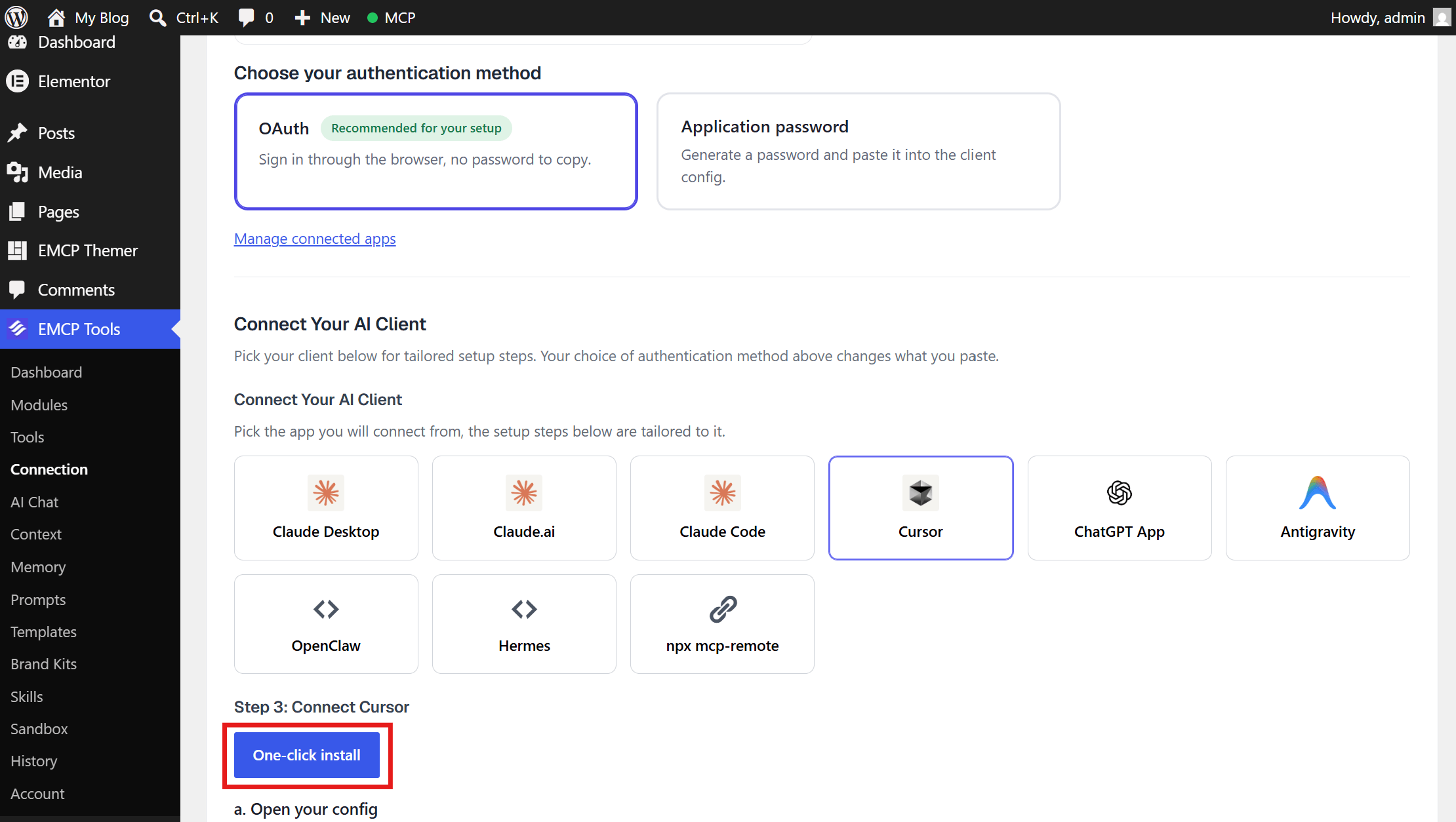
In EMCP Tools → Connection, choose Cursor and OAuth. Step 3 has a One-click install button that opens Cursor with the server already filled in, along with the config block for .cursor/mcp.json in a project or ~/.cursor/mcp.json for every project.
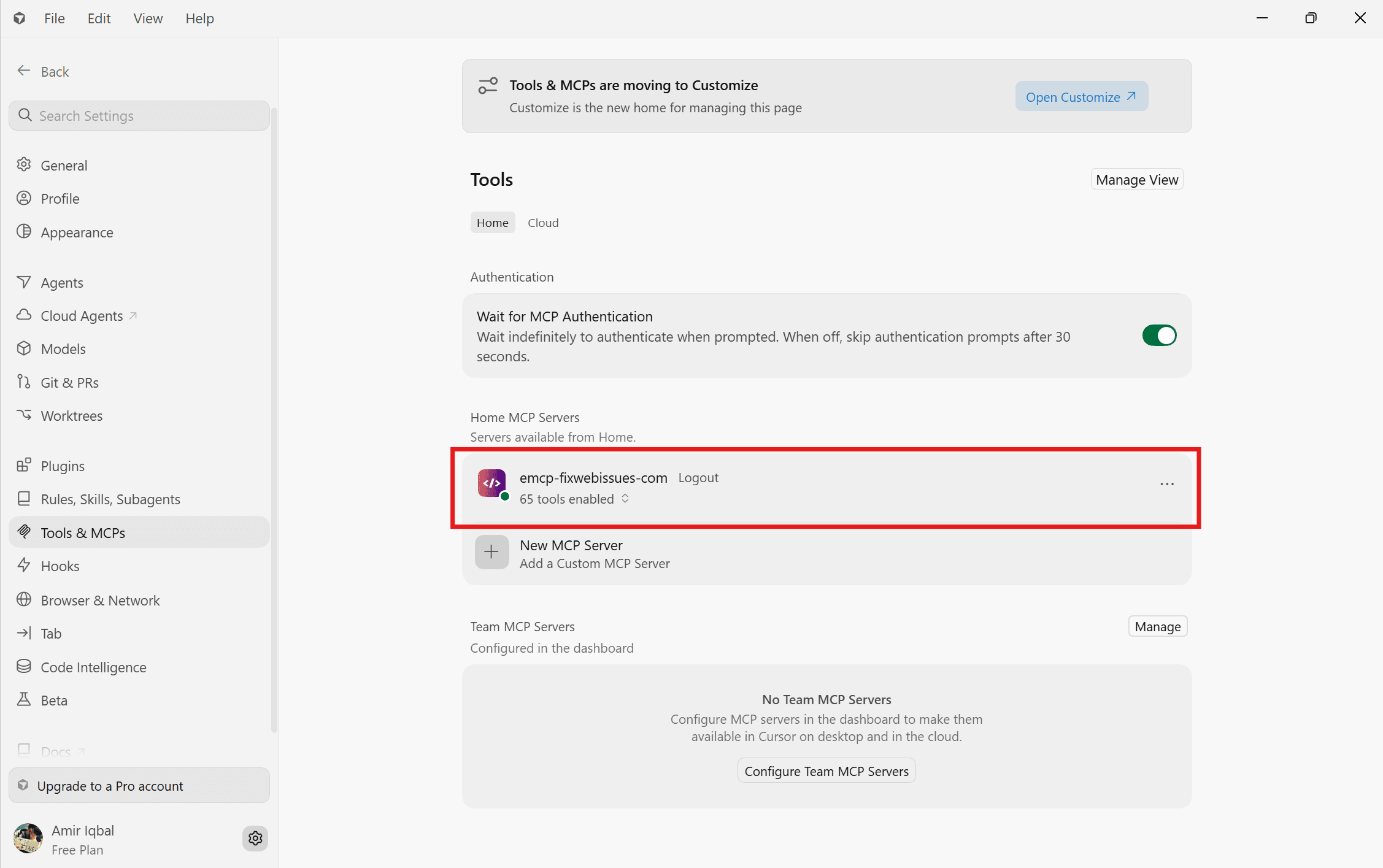
Restart Cursor, approve the sign-in in your browser, and the wizard confirms Cursor’s first call.
Tool budget
Keep Cursor focused.
EMCP can expose hundreds of tools. If Cursor struggles with a long tool list, switch on Compact tool mode: Cursor then sees three dispatcher tools that look up and call the rest on demand.
Cursor asks before it runs a tool, so check the tool and its arguments before you allow an edit.
Built-in safety
Built for working near production.
Every tool call runs as the connected WordPress user. File and database writes, and WP-CLI, ship switched off, and you turn on only what you need.
Free OAuth
No password in your config. Only an administrator can approve the connection.
Guarded files
Filesystem writes start off, back up files first, and secret files such as wp-config.php are protected.
Bounded queries
Read-only SQL is capped at 1,000 rows and 10 seconds. Database writes start off.
History and Undo
Every change is recorded, with Undo for one change or a whole session.

Get started
Up and running in three steps.
You need: Cursor, administrator access on your WordPress site, and EMCP Free or Pro. OAuth needs HTTPS; local sites can use the WP-CLI bridge.
Installation guide- Step 1
Install EMCP
Upload the free plugin zip under Plugins → Add New and activate it.
Installation guide - Step 2
One-click install
Choose Cursor in the connection wizard and use the One-click install button.
Cursor setup guide - Step 3
Approve and ask
Sign in through your browser, then start with a read-only prompt.
Write a useful brief
Questions, answered.
Still stuck? Drop a line at [email protected] or open an issue on GitHub. Most replies are under one business day; Pro tiers go to the front of the queue.
Open the full docsBring WordPress into your editor.
Install the free plugin, use the one-click install for Cursor, and approve the connection.