
 A brief becomes a real page.
- Free
Keep old links working when pages move.
The Redirect Manager sends old addresses to new ones with a 301 or 302. It notices when a published page is renamed or deleted and suggests a redirect, and every change to a redirect can be undone from History.
A suggestion when a page moves, never a surprise redirect.
When the slug of a published page changes, or the page is deleted, a row appears under Suggested redirects. A renamed page comes with its new address as the target. For a deleted page, you choose where it should go.
Nothing is created until you, or your agent, confirm it.
From any path to a URL or a page.
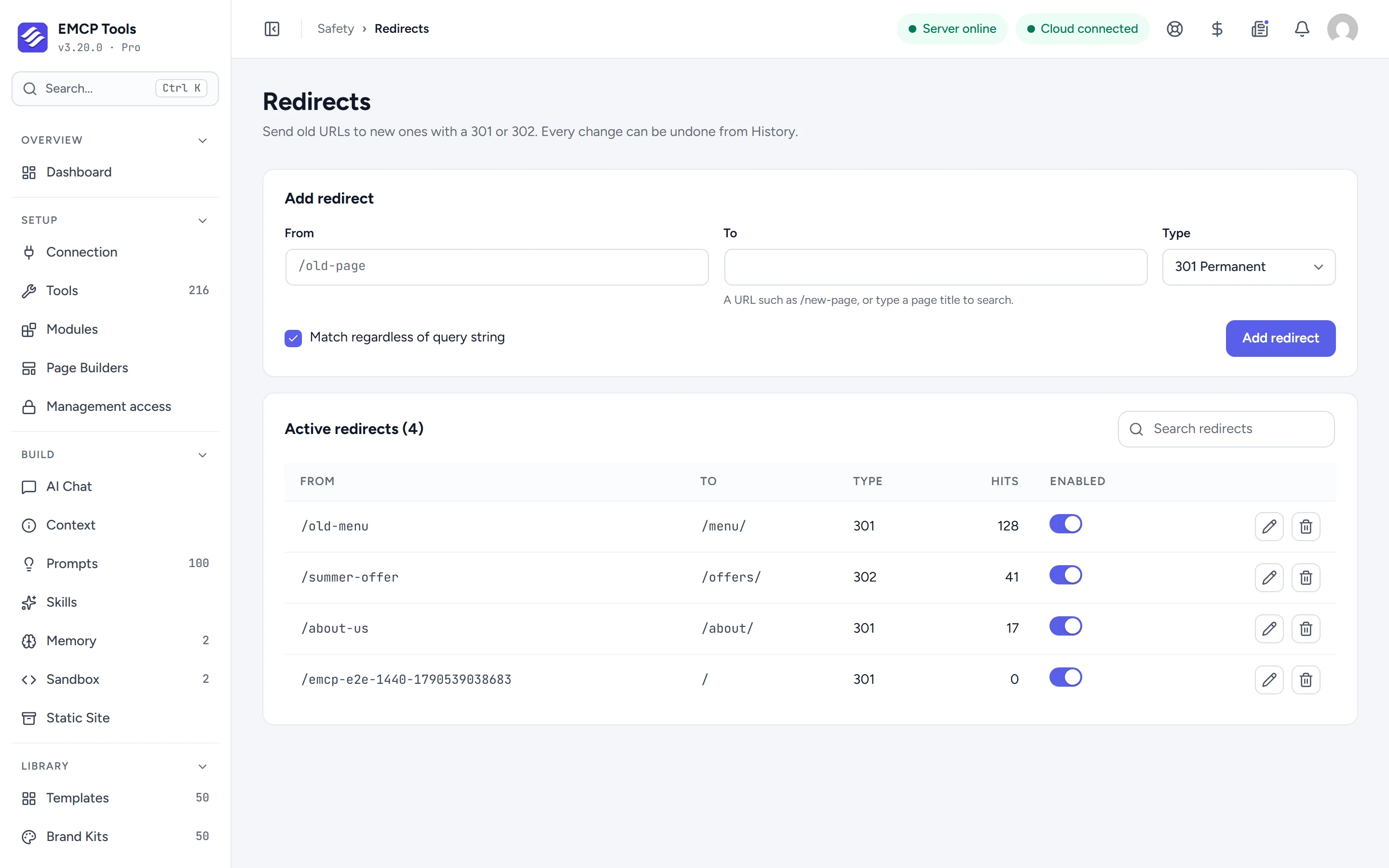
Enter the old path, then a URL or a page picked by search, and choose 301 Permanent or 302 Temporary. When the target is a page, the redirect follows that page if its slug changes later.
Redirects can match a path whatever its query string, or one exact query such as /page?ref=ad, next to a rule for the plain path. The table shows each redirect’s hits, and lets you switch it off, edit or delete it.
Your agent can find broken links and propose the fix.
find-broken-links scans published content for internal links to missing, trashed or already redirected pages, up to 2,000 posts per run, and proposes fixes. list-redirects reads your rules. The tools that create, edit and delete redirects are off until you enable them on the Tools screen.
Every redirect change can be taken back.
Creating, editing and deleting a redirect are all recorded in History, whether you did it on the screen or an agent did it over MCP, so any of them can be undone.
What it does and does not do.
The Redirect Manager is built for keeping your own links working.
- It supports 301 and 302 redirects only, with exact paths: no regular expressions or wildcards.
- Redirects never run in wp-admin, the REST API, cron or the login page.
- Paths are matched lowercase, and a redirect that would point at itself or loop back is refused.
- Switching the module off stops every redirect and removes its tools and screen.
MCP tools this adds 5
What a connected AI agent can call. Tools marked "Off by default" are switched on under EMCP Tools, Tools.
list-redirectsLists the site's managed 301/302 redirects (source → target, code, hits).find-broken-linksScans published content for internal links to dead or already-redirected URLs. Read-only.create-redirectCreates a 301/302 redirect from an old path to a target URL or post. Disabled by default.update-redirectUpdates an existing redirect by id. Disabled by default.delete-redirectDeletes a redirect by id. Reversible from History. Disabled by default.
Questions, answered.
Still stuck? Drop a line at [email protected] or open an issue on GitHub. Most replies are under one business day; Pro tiers go to the front of the queue.
Open the full docsStop losing visitors to old links.
Install EMCP Tools free and open Safety → Redirects.