
 A brief becomes a real page.
FluentCRM MCP integration
Grow the list and send the campaign, with nothing sent by accident.
EMCP Pro runs FluentCRM's own abilities and REST API, so FluentCRM checks its permissions and validation. Manage contacts, tags, lists and notes, import in batches, build templates and campaigns, and schedule sends that must name the recipient count FluentCRM reports. Automations stay still unless you ask.
Pro integrationFluentCRM 3.x (free is enough)
A real run on our test site
A tagged audience, and a campaign that checks its count.
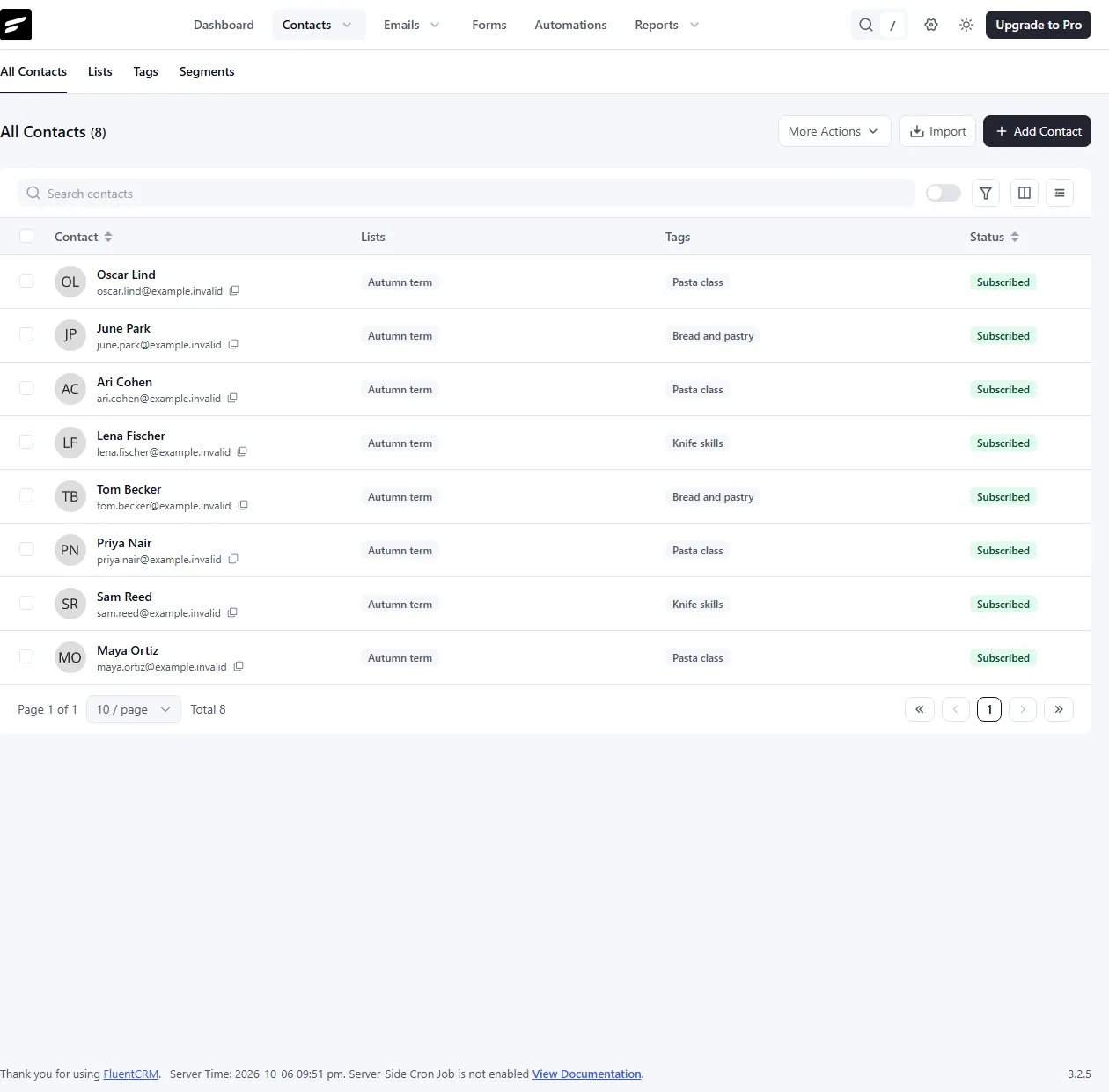
The assistant created tags and a list, imported eight contacts, added a note, wrote a campaign and scheduled it for exactly the number of recipients FluentCRM counted.
In FluentCRM, tag our autumn students by class, put them on an Autumn term list, add a note to Maya’s profile, and draft a campaign announcing the autumn term to that list. Schedule it for 12 October at 9.
- Recorded
- Plugin
- FluentCRM 3.2.5
- Connection
- EMCP 3.19.0 over MCP (WP-CLI stdio)
- Calls shown
- 8, in the order they ran
- schedule-campaign needs expected_recipients equal to FluentCRM’s live estimate (8 here) and confirm: true.
- The first import nested the names under a fields key, which was ignored; the merge import shown here filled them in.
- The campaign was unscheduled again after the screenshots, so nothing was sent.
- 01
fluentcrm-write · create-tag{"title": "Pasta class"}Answer: {"tag_id": 1, "version": "aea10928d0ff34f9", "change_id": "4ba30b167493"} - 02
fluentcrm-write · create-list{"title": "Autumn term", "description": "Students who booked a class this autumn"}Answer: {"list_id": 1, "version": "942878661d6e1eed", "change_id": "74acf7cfb574"} - 03
fluentcrm-write · import-contacts{"if_exists": "merge", "contacts": [{"email": "[email protected]", "tags": ["Pasta class"], "lists": ["Autumn term"], "first_name": "Maya", "last_name": "Ortiz", "status": "subscribed"}, {"email": "[email protected]", "tags": ["Knife skills"], "lists": ["Autumn term"], "first_name": "Sam", "last_name": "Reed", "status": "subscribed"}, {"email": "[email protected]", "tags": ["Pasta class"], "lists": ["Autumn term"], "first_name": "Priya", "last_name": "Nair", "status": "subscribed"}, "… 5 more"]}Answer: {"summary": {"created": 0, "updated": 8, "skipped": 0, "invalid": 0, "warnings": 0}, "created": [], "updated": [{"id": 1, "email": "[email protected]", "status": "subscribed"}, {"id": 2, "email": "[email protected]", "status": "subscribed"}, {"id": 3, "email": "[email protected]", "status": "subscribed"}, "… 5 more"], "skipped": [], "emails": {"sent": 0, "queued": 0}, "automations": [], "change_id": "20314c26243b"} - 04
fluentcrm-write · add-note{"contact_id": 1, "title": "Private lesson booked", "description": "Booked a private risotto lesson for 14 October. Prefers Satur…"}Answer: {"note_id": 1, "version": "c32d4ed74bdff8f1", "change_id": "028c01a10fd5"} - 05
fluentcrm-write · create-campaign{"title": "Autumn term is open", "email_subject": "Your autumn classes are ready to book", "email_pre_header": "Students from last term book a week early", "email_body": "<h2>The autumn term is open</h2><p>Hi {{contact.first_name}},…", "recipients": {"lists": [1]}}Answer: {"campaign_id": 1, "version": "0f93ea81bc517f22", "emails": {"sent": 0, "queued": 0}, "change_id": "1c99a5b4f931"} - 06
fluentcrm-read · get-campaign{"campaign_id": 1, "include": ["recipients_estimate"]}Answer: {"id": 1, "title": "Autumn term is open", "email_subject": "Your autumn classes are ready to book", "email_pre_header": "Students from last term book a week early", "status": "draft", "design_template": "simple", "body_html": "<h2>The autumn term is open</h2><p>Hi {{contact.first_name}},…", "…": "9 more fields"} - 07
fluentcrm-write · schedule-campaign{"campaign_id": 1, "version": "0f93ea81bc517f22", "scheduled_at": "2026-10-12 09:00", "expected_recipients": 8, "confirm": true}Answer: {"campaign_id": 1, "version": "27a5bd3e363a4663", "emails": {"sent": 0, "queued": 0}, "change_id": "1ade0cd7b4cc", "status": "pending-scheduled", "scheduled_at": "2026-10-12 09:00", "recipients": 8} - 08
fluentcrm-write · unschedule-campaign{"campaign_id": 1}Answer: {"campaign_id": 1, "status": "draft", "change_id": "797b068eb526"}
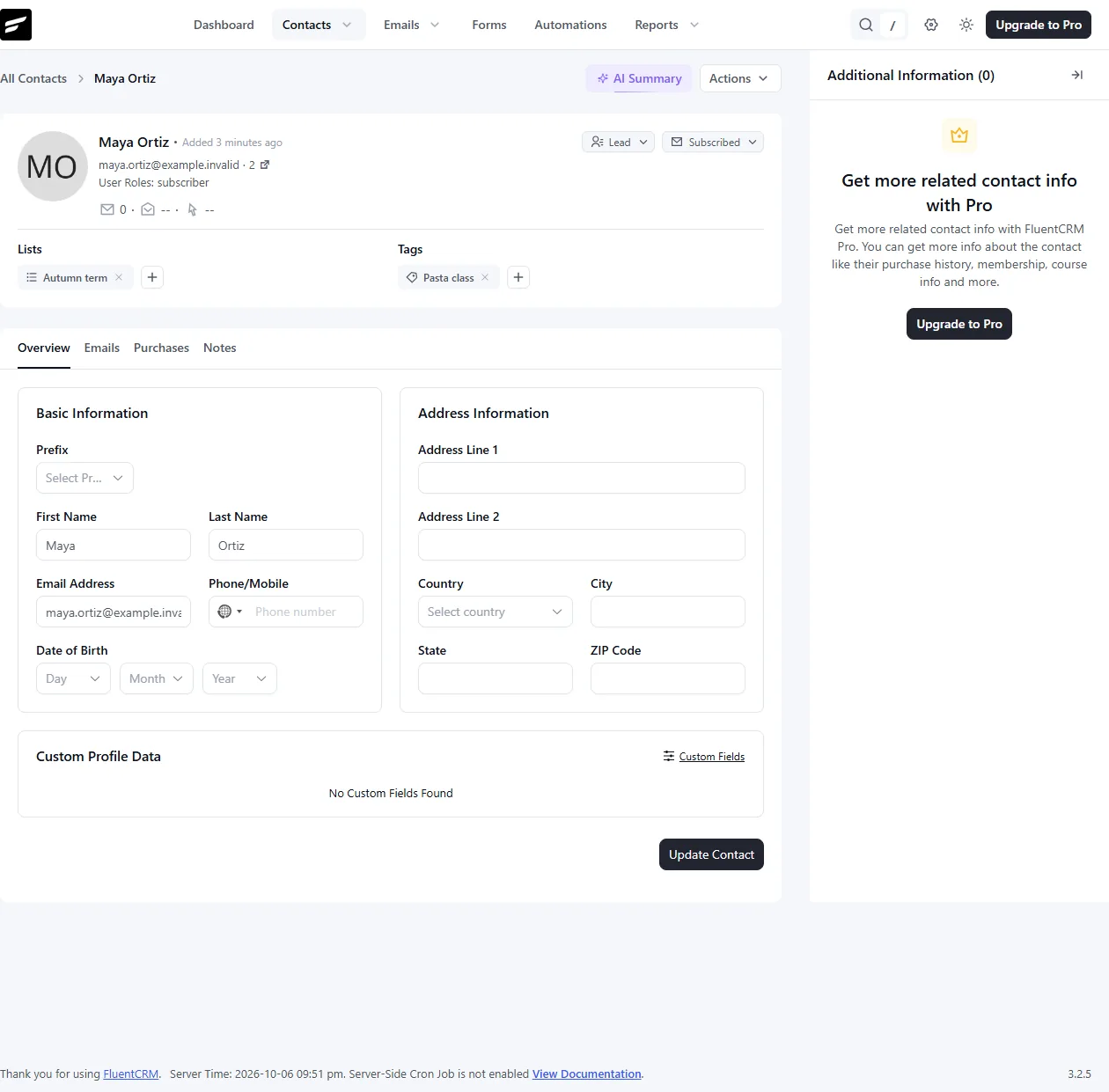
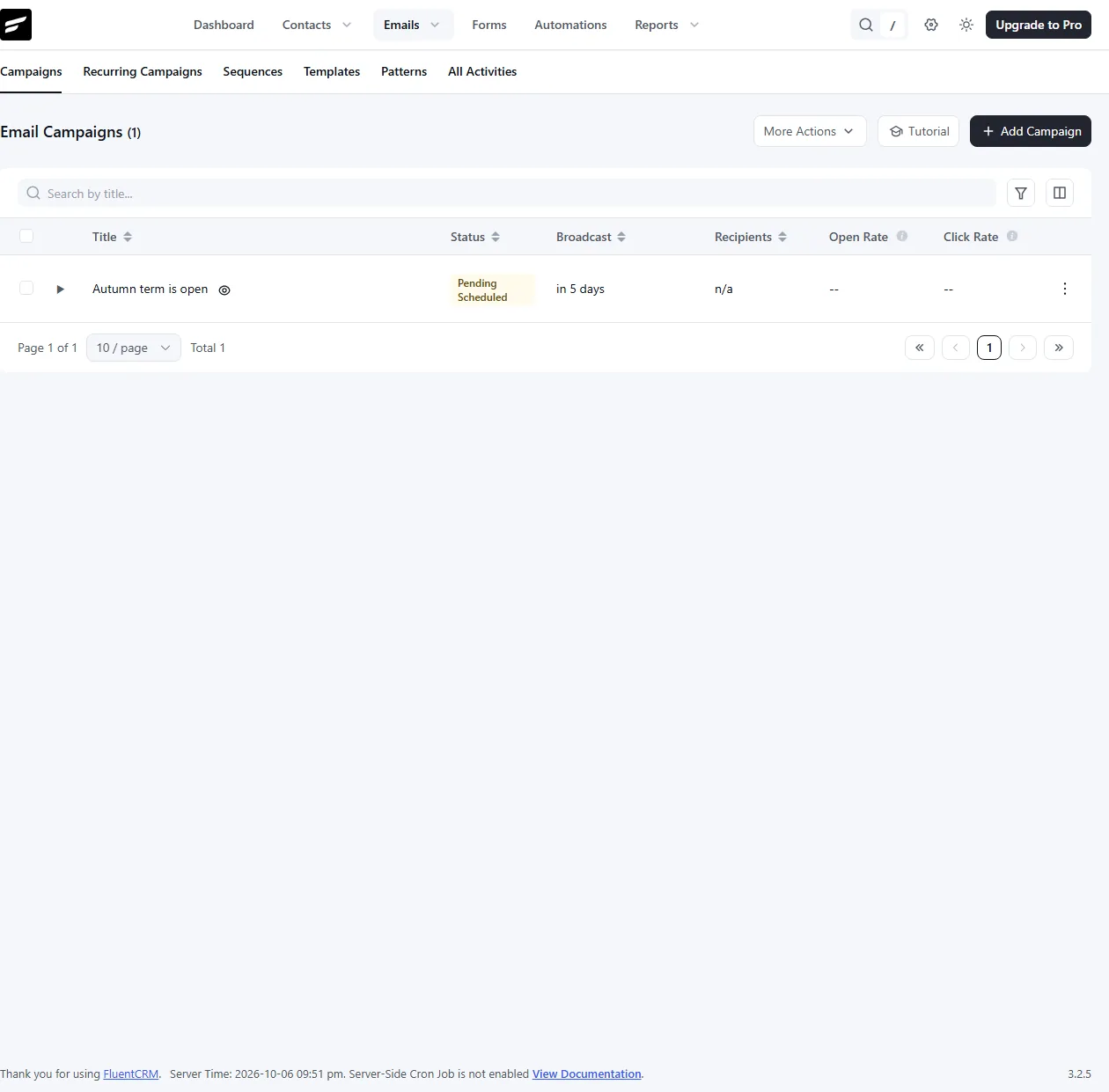
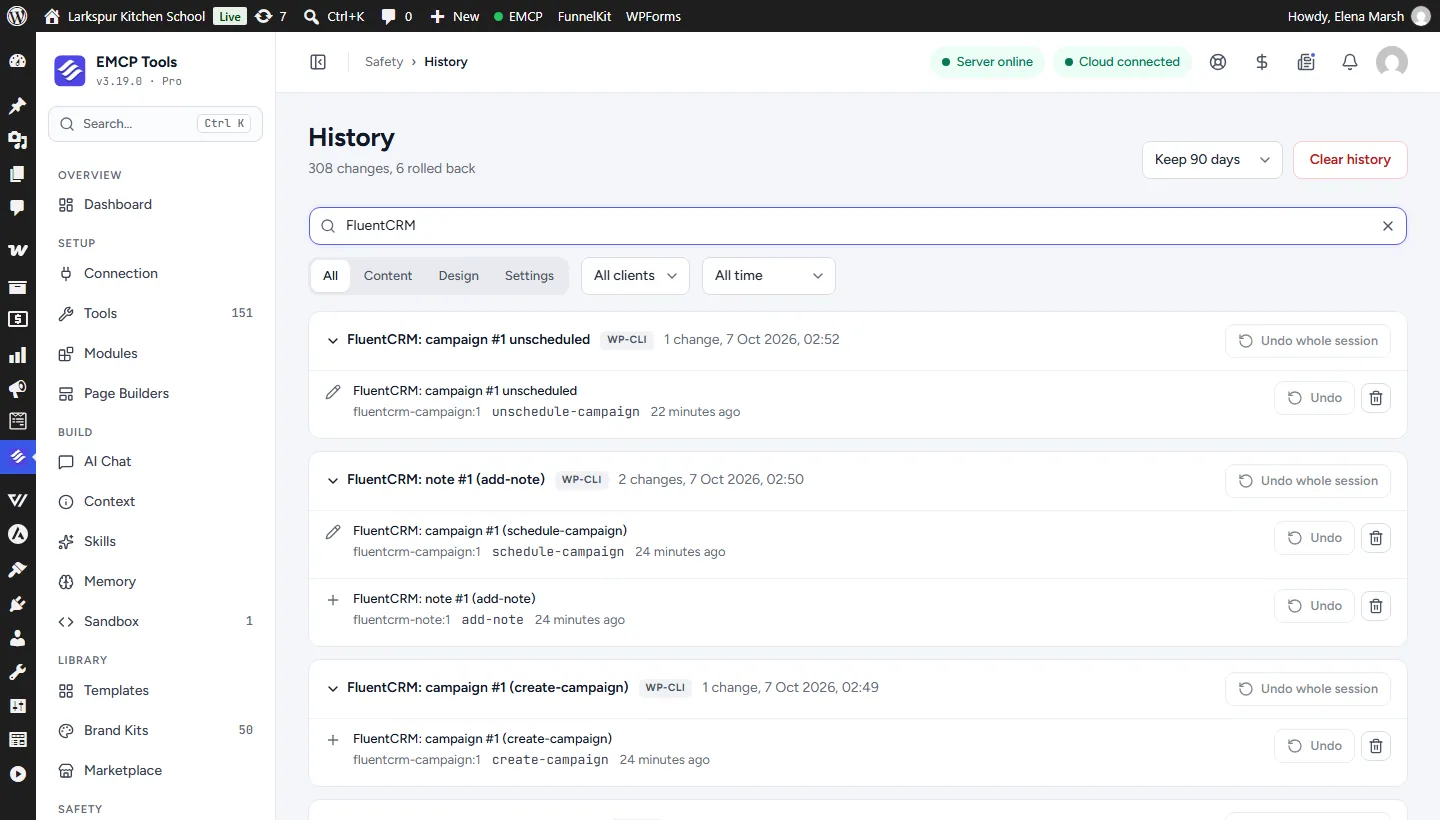
Larkspur Kitchen School is a fictional demonstration, and so are its staff and students. Recorded on our test site on October 7, 2026 with EMCP 3.19.0 and FluentCRM 3.2.5, over a real MCP connection. Email was held on the test site, so nothing was sent. The FluentCRM screens are the plugin’s own; values and ids in the calls are the ones this run returned, with long text shortened.
A practical place to start
From a lead list to a scheduled campaign.
- 01
Bring the contacts in
import-contacts takes up to 200 rows with fields, custom fields, tags and lists. Automations do not start unless run_automations is true.
- 02
Draft the campaign
Build a template and a draft campaign for the right tags and lists. get-campaign reports the recipient estimate, and preview-email renders it for one contact.
- 03
Schedule with a check
schedule-campaign needs confirm and the exact recipient count. If the live count differs, nothing is queued.
Built for FluentCRM
FluentCRM’s own code, with a safety net
EMCP calls FluentCRM’s abilities and its REST API in-process, so every FluentCRM permission and rule applies. On top, every contact, tag, list, campaign and automation answers a version, every write is read back, and History can undo it.
Automations and emails on your word
Tagging a contact can start an automation that emails them in the same call. EMCP holds FluentCRM’s automation triggers for every write unless you pass run_automations: true, and then the answer lists what started and what was sent. Campaign schedules must match FluentCRM’s live recipient count, and an unschedule withdraws the queue only while no email has left it.
Consent and erasure
Undo never restores a contact who unsubscribed, bounced or complained since, and never puts back a list they left. Deleting a contact erases them from FluentCRM and from every earlier History entry. Every change is in History in EMCP Tools.
Use the FluentCRM tool reference for operation names and arguments. MailPoet sites use the MailPoet integration.
Get connected
Put FluentCRM in your AI’s toolkit.
- 1
Install FluentCRM
Install EMCP Pro 3.19 or later with FluentCRM 3.x. The free edition is enough.
- 2
Switch on FluentCRM's AI access
EMCP respects FluentCRM > Settings > MCP: while it is off, only get-setup answers.
- 3
Enable the write tool
fluentcrm-read is on; fluentcrm-write starts disabled. Enable it under EMCP Tools > Tools > Plugins > FluentCRM and reconnect your AI client.
Then connect Claude Code, Claude Desktop, or Cursor to use the FluentCRM tools enabled on your site. Compare Free and Pro access.
A few useful details
Before you connect.
Questions about FluentCRM, supported operations, and the workflow on your site.
FluentCRM has its own MCP server. Which should I use?
Use EMCP's tools for anything that needs versions, History or the safeguards. EMCP respects FluentCRM's AI access switch, and get-setup names FluentCRM's own endpoint when it is on.
Can it email people by accident?
Nothing is emailed without confirm. Test emails go only to your own address, and a schedule must name the recipient count FluentCRM reports, or nothing is queued.
Do automations run when tags change?
Not unless the call passes run_automations: true. EMCP holds FluentCRM's automation triggers for every write and refuses when it cannot hold one.
What can be undone?
Most writes. Sends, unschedules, pauses, contact automation moves and erasures are recorded for the audit trail only, and undo never resubscribes anyone.
Your tools. Your WordPress site.