
 A brief becomes a real page.
MailPoet MCP integration
Write the newsletter, check who gets it, then send.
EMCP Pro drives MailPoet's own code in-process: its API for lists, tags and custom fields, its save controller for subscribers, and its endpoints for newsletters and sending. Manage subscribers, build newsletters in MailPoet's block email editor and send or schedule them with a recipient check. Consent stays with the subscriber.
Pro integrationMailPoet 5.x (free is enough)
A real run on our test site
A newsletter that refuses the wrong count.
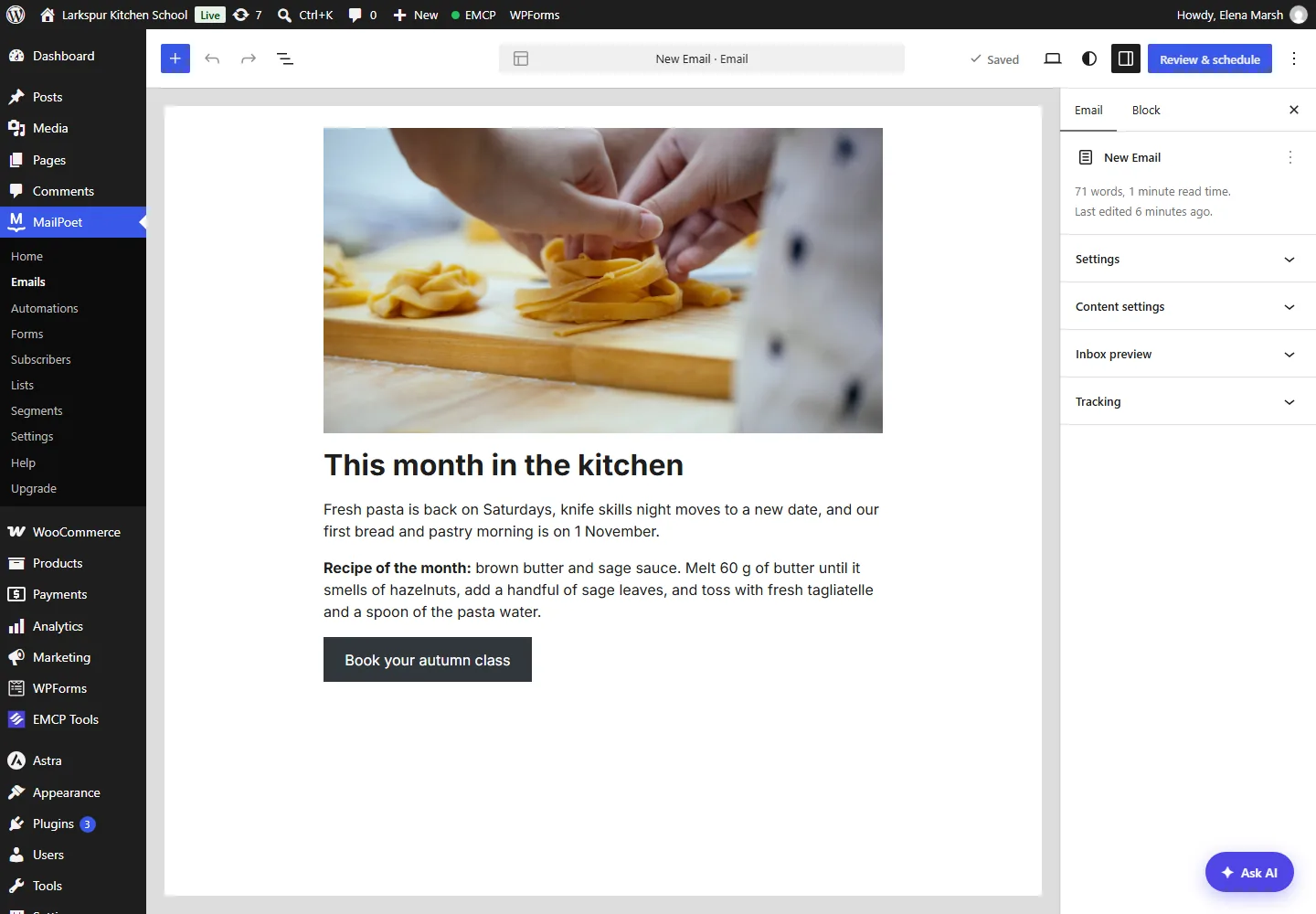
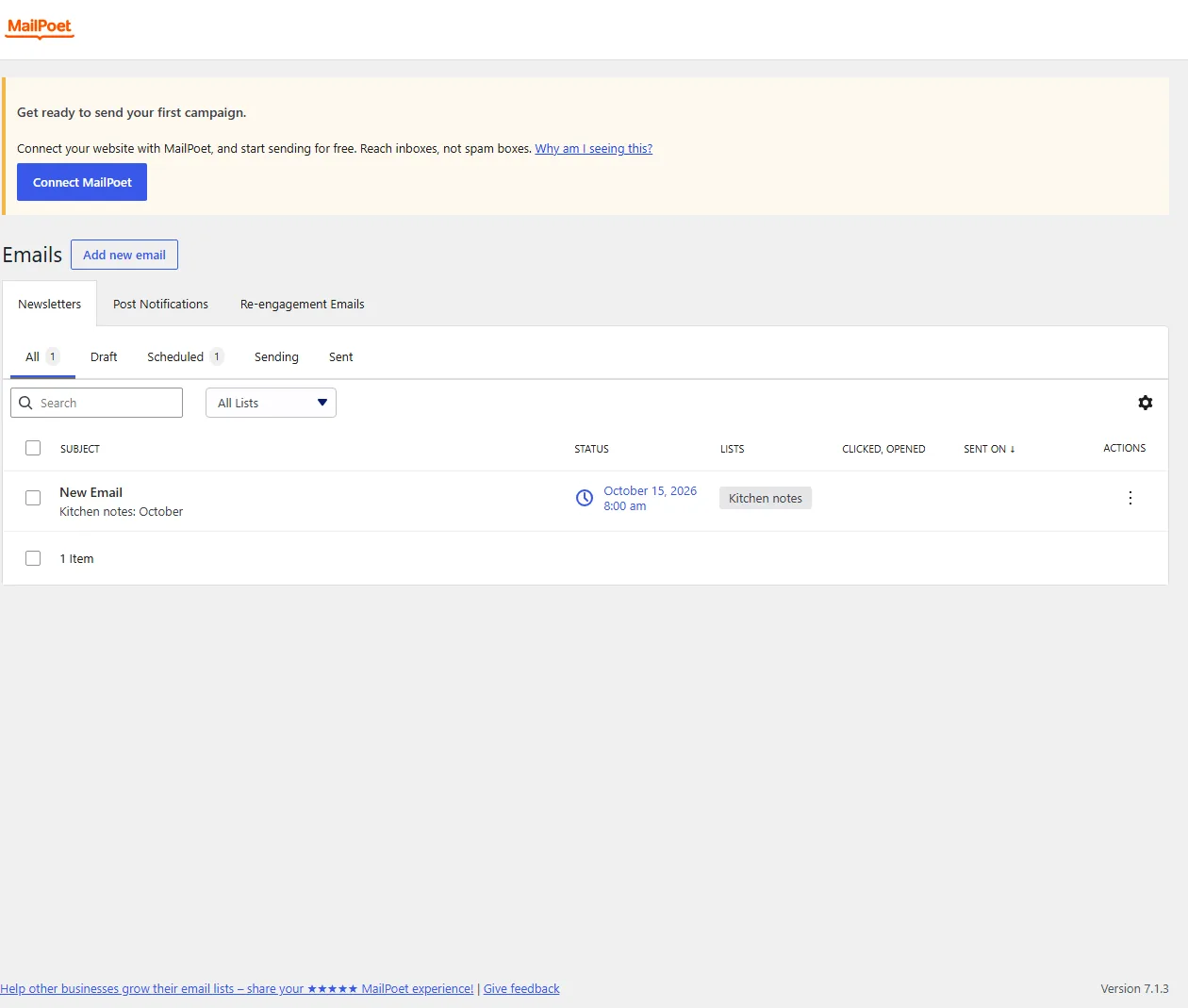
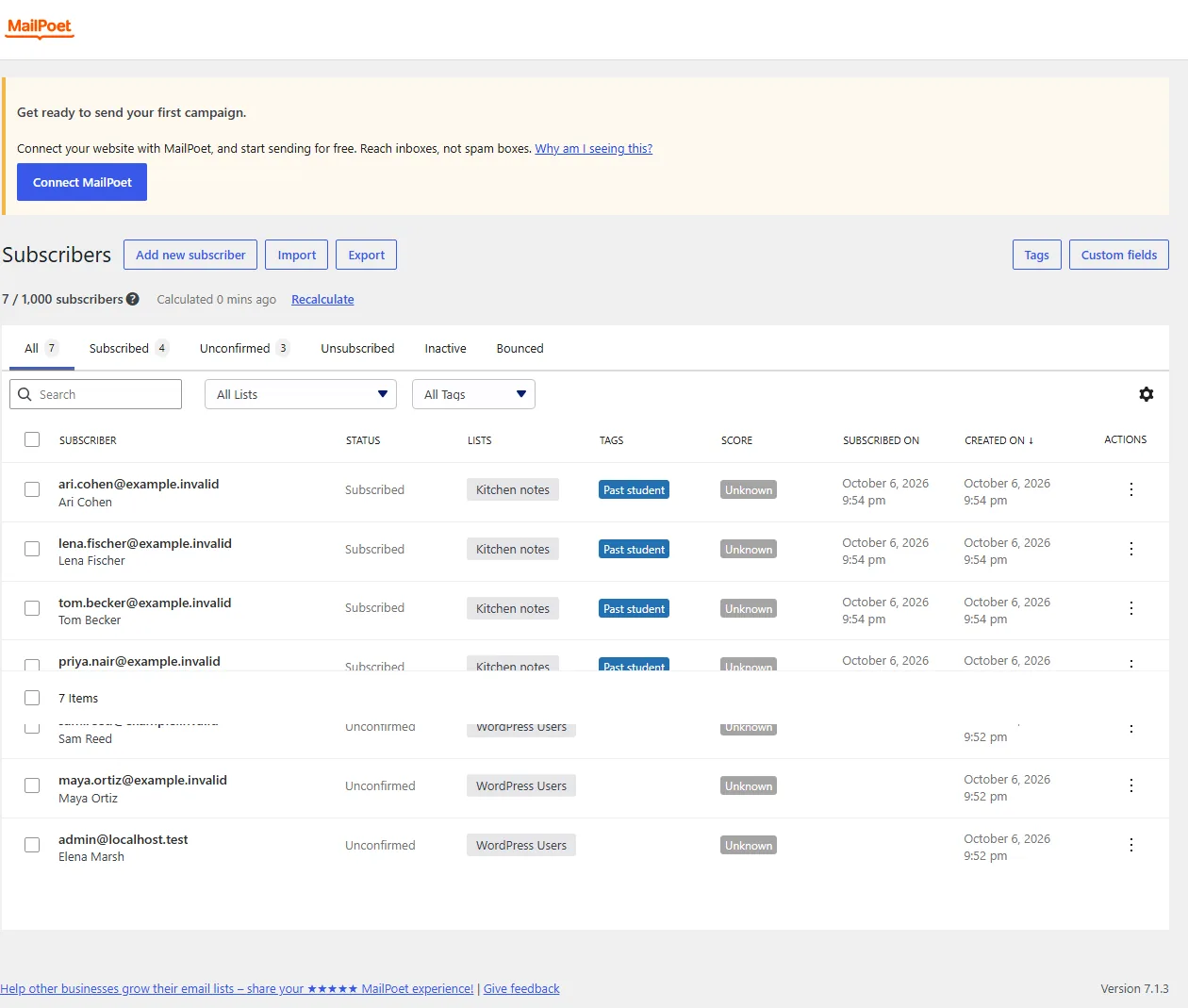
The assistant created a list and a tag, imported subscribers, wrote the October newsletter in MailPoet’s block email editor, sent itself a test and scheduled it.
In MailPoet, create a Kitchen notes list and a Past student tag, add our students, and write the October newsletter with the pasta photo, the class news and a sage butter recipe. Send me a test, then schedule it for 15 October at 8.
- Recorded
- Plugin
- MailPoet 5.41.0
- Connection
- EMCP 3.19.0 over MCP (WP-CLI stdio)
- Calls shown
- 10, in the order they ran
- Maya and Sam were already in MailPoet as unconfirmed WordPress users. EMCP refused the whole first import rather than change their consent; the second import left them out.
- A send with expected_recipients 3 was refused because the list had 4 subscribers. With 4 it was scheduled, and it was unscheduled again after the screenshots.
- send-test-email goes to the current user only.
- 01
mailpoet-write · create-list{"name": "Kitchen notes", "description": "Monthly recipes and class news from Larkspur Kitchen School"}Answer: {"id": 4, "name": "Kitchen notes", "change_id": "a61c3a6f328e"} - 02
mailpoet-write · create-tag{"name": "Past student", "description": "Has taken at least one class"}Answer: {"id": 1, "name": "Past student", "change_id": "6b2e91c297ac"} - 03
mailpoet-write · import-subscribersRefused{"subscribers": [{"email": "[email protected]", "first_name": "Maya", "last_name": "Ortiz", "list_ids": [4], "tag_ids": [1]}, {"email": "[email protected]", "first_name": "Sam", "last_name": "Reed", "list_ids": [4], "tag_ids": [1]}, {"email": "[email protected]", "first_name": "Priya", "last_name": "Nair", "list_ids": [4], "tag_ids": [1]}, "… 3 more"]}Refusal: 2 of these subscribers cannot be added to a list without changing their consent (unsubscribed, bounced, inactive, trashed, or unconfirmed with double opt-in off); nothing was written. Leave them out, for example with a filter on status subscribed. - 04
mailpoet-write · import-subscribers{"subscribers": [{"email": "[email protected]", "first_name": "Priya", "last_name": "Nair", "list_ids": [4], "tag_ids": [1]}, {"email": "[email protected]", "first_name": "Tom", "last_name": "Becker", "list_ids": [4], "tag_ids": [1]}, {"email": "[email protected]", "first_name": "Lena", "last_name": "Fischer", "list_ids": [4], "tag_ids": [1]}, "… 1 more"]}Answer: {"created": [4, 5, 6, "… 1 more"], "updated": [], "skipped": [], "emails": {"sent": 0, "queued": 0}, "automations": [], "change_id": "abac73c89c74"} - 05
mailpoet-write · create-newsletter{"subject": "Kitchen notes: October", "preheader": "Pasta Saturdays are back, plus a sage butter recipe", "sender_name": "Larkspur Kitchen School", "sender_address": "[email protected]", "list_ids": [4], "content": "<!-- wp:image {\"sizeSlug\":\"large\"} --> <figure class=\"wp-bloc…"}Answer: {"id": 1, "status": "draft", "editor": "block", "change_id": "408cc0f6e9c1"} - 06
mailpoet-read · get-recipient-count{"newsletter_id": 1}Answer: {"list_ids": [4], "count": 4} - 07
mailpoet-write · send-test-email{"newsletter_id": 1, "confirm": true}Answer: {"id": 1, "sent_to": "[email protected]"} - 08
mailpoet-write · send-newsletterRefused{"newsletter_id": 1, "version": "f40e0a130dbe97b9", "expected_recipients": 3, "scheduled_at": "2026-10-15 08:00", "confirm": true}Refusal: This send would reach 4 subscribers, not 3; nothing was queued. Check get-recipient-count and send again with that number. - 09
mailpoet-write · send-newsletter{"newsletter_id": 1, "version": "f40e0a130dbe97b9", "expected_recipients": 4, "scheduled_at": "2026-10-15 08:00", "confirm": true}Answer: {"status": "scheduled", "scheduled_at": "2026-10-15 08:00:00", "change_id": "1d156ae26a70"} - 10
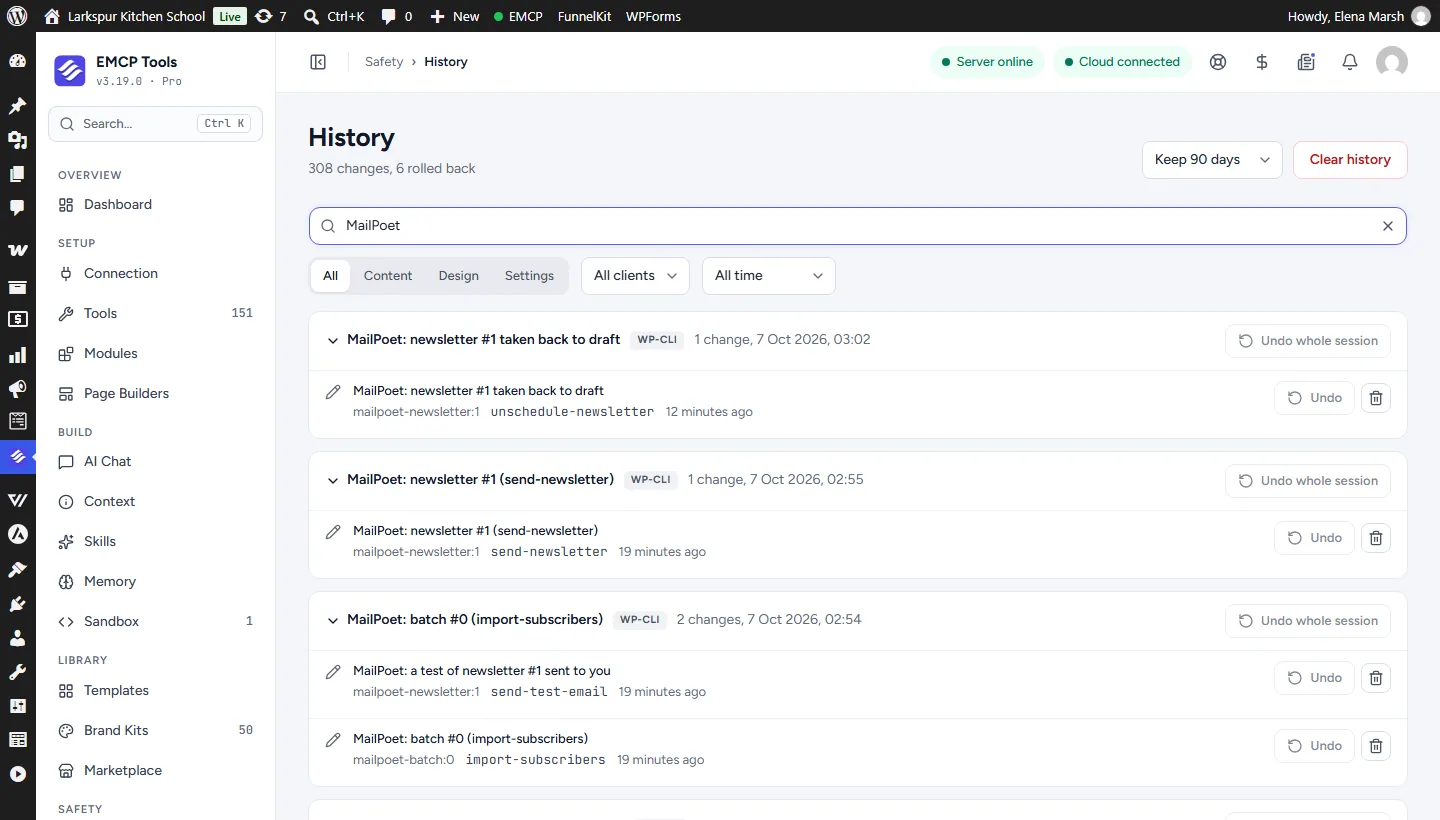
mailpoet-write · unschedule-newsletter{"newsletter_id": 1}Answer: {"status": "draft", "scheduled_at": "2026-10-15 08:00:00", "change_id": "170827c97b3b"}
Larkspur Kitchen School is a fictional demonstration, and so are its staff and students. Recorded on our test site on October 7, 2026 with EMCP 3.19.0 and MailPoet 5.41.0, over a real MCP connection. Food photos from Pexels. Email was held on the test site, so nothing was sent. The MailPoet screens are the plugin’s own; values and ids in the calls are the ones this run returned, with long text shortened.
A practical place to start
From new subscribers to a sent newsletter.
- 01
Add the subscribers
Create or import up to 200 subscribers with their lists, tags and custom fields. Welcome emails and automations run only with run_automations: true.
- 02
Build the newsletter
create-newsletter writes a standard newsletter in MailPoet's block email editor. send-test-email sends a preview to your own address only.
- 03
Send with a check
send-newsletter needs confirm and the recipient count from get-recipient-count. Send now, or schedule in site time; a schedule can be taken back until two minutes before.
Built for MailPoet
MailPoet’s own code, no shortcuts
EMCP never writes MailPoet’s tables for a normal write. Lists, tags and memberships go through MailPoet’s public API, subscriber profiles through its save controller, and newsletters through the endpoints its admin uses. Every subscriber, list, tag, newsletter and automation answers a version, and every write is read back.
Consent belongs to the subscriber
MailPoet’s consent record, the source, sign-up and confirmation IPs and dates, is never written. Adding a list to someone who opted out is refused before MailPoet is called, because MailPoet’s own list add would make them sendable again. A subscriber marked subscribed by hand needs confirm, and only from unconfirmed.
Sends you can check first
A send names the recipient count it expects, counted the way MailPoet counts: globally subscribed, untrashed members, each once. A mismatch queues nothing. Every change is in History in EMCP Tools, and erasure removes a subscriber from History as well.
Use the MailPoet tool reference for operation names and arguments. FluentCRM sites use the FluentCRM integration.
Get connected
Put MailPoet in your AI’s toolkit.
- 1
Install MailPoet
Install EMCP Pro 3.19 or later with MailPoet 5.x. The free edition is enough.
- 2
Enable the write tool
mailpoet-read is on; mailpoet-write starts disabled. Enable it under EMCP Tools > Tools > Plugins > MailPoet and reconnect your AI client.
- 3
Check the sending setup
get-setup reports double opt-in, the sending method, the sender, the subscriber limit and the active automations.
Then connect Claude Code, Claude Desktop, or Cursor to use the MailPoet tools enabled on your site. Compare Free and Pro access.
A few useful details
Before you connect.
Questions about MailPoet, supported operations, and the workflow on your site.
Will it resubscribe people who unsubscribed?
No. Adding a list to someone who unsubscribed, bounced or went inactive is refused with consent_required, and undo never makes anyone sendable again, force included.
Do welcome emails and automations run?
Only with run_automations: true. Otherwise EMCP holds MailPoet's automation triggers and welcome emails for the call.
How are schedules handled?
You give the site's local time. MailPoet stores it in UTC, and EMCP converts it, so the send goes out when you asked on any site time zone.
What happens when I erase a subscriber?
delete-subscriber erases them with their memberships, custom field values and tags, and removes their data from every earlier History entry. A WordPress privacy erasure does the same.
Your tools. Your WordPress site.