
Redirect Manager
New in v3.11.0. Free, and on by default. It is treated as a safety feature (a deleted or renamed page shouldn’t leave a dead URL), so it ships active rather than opt-in, though you can switch the Redirect Manager module off on EMCP Tools → Modules. Five tools, a Redirects admin screen, and an automatic suggestion queue that watches every content delete and rename. Version 3.18.0 adds query-string rules and rebuilds the screen.
emcp-tools/list-redirects
Section titled “emcp-tools/list-redirects”Read-only, enabled by default. Lists configured redirects.
Input (all optional): enabled: filter to on or off redirects. search: match against source or target. per_page: 1 to 500, default 100. page: default 1.
Returns: { redirects: [...], total }.
emcp-tools/find-broken-links
Section titled “emcp-tools/find-broken-links”Read-only, enabled by default. Scans published content for internal links that are dead or already redirected.
Input (all optional): max_posts: 1 to 2000, default 200. max_seconds: 1 to 60, default 10.
Returns: { scanned, findings: [{ post_id, post_title, href, kind, suggestion }], partial }. kind is dead (404 or trashed target), redirected (the link works but already has a redirect, so link straight to the target instead), or ok/external. partial: true if the scan hit its time cap before finishing.
emcp-tools/create-redirect
Section titled “emcp-tools/create-redirect”Write, disabled by default. Requires manage_options.
Input: source (required), for example /old-page, or /page?ref=ad for a query-string rule. target (a URL) or target_post_id, mutually exclusive. status_code: 301 or 302, default 301. ignore_query: match regardless of the query string, default true. Set it to false to match only the query string given in source.
Returns: { redirect, warning? }. It still creates the redirect if source shadows a live, published page, but returns a warning flagging that, since redirecting a URL that’s still in use will make the live page unreachable.
emcp-tools/update-redirect
Section titled “emcp-tools/update-redirect”Write, disabled by default. Patch-style: id (required) plus any of source / target / target_post_id / status_code / ignore_query / enabled. Only the fields you supply change.
emcp-tools/delete-redirect
Section titled “emcp-tools/delete-redirect”Write, disabled by default, destructive. id (required). Reversible from History, see Change History & Rollback.
Automatic redirect suggestions
Section titled “Automatic redirect suggestions”Deleting a post or changing a published post’s slug pushes a suggestion, never a redirect outright, into a de-duplicated queue capped at 50 entries (option emcp_tools_redirect_suggestions). The tool response also carries a redirect_suggestion field, so an agent can offer to create it. Suggestions surface in the Suggested redirects card on the Redirects screen:
- A renamed page reads “Renamed. Suggested target:” followed by the page’s new URL. Create redirect adds a 301 from the old path to that page straight away.
- A deleted page reads “Deleted. Choose where it should go.” Create redirect puts the old path in the From field of the Add redirect form, so you pick the target.
- Dismiss removes a suggestion without creating anything.
The Redirects screen
Section titled “The Redirects screen”Open EMCP Tools → Safety → Redirects (admin.php?page=emcp-tools-redirects). The entry shows only while the Redirect Manager module is on. Every add, edit, toggle and delete is recorded, so you can undo it from History.
Add a redirect
Section titled “Add a redirect”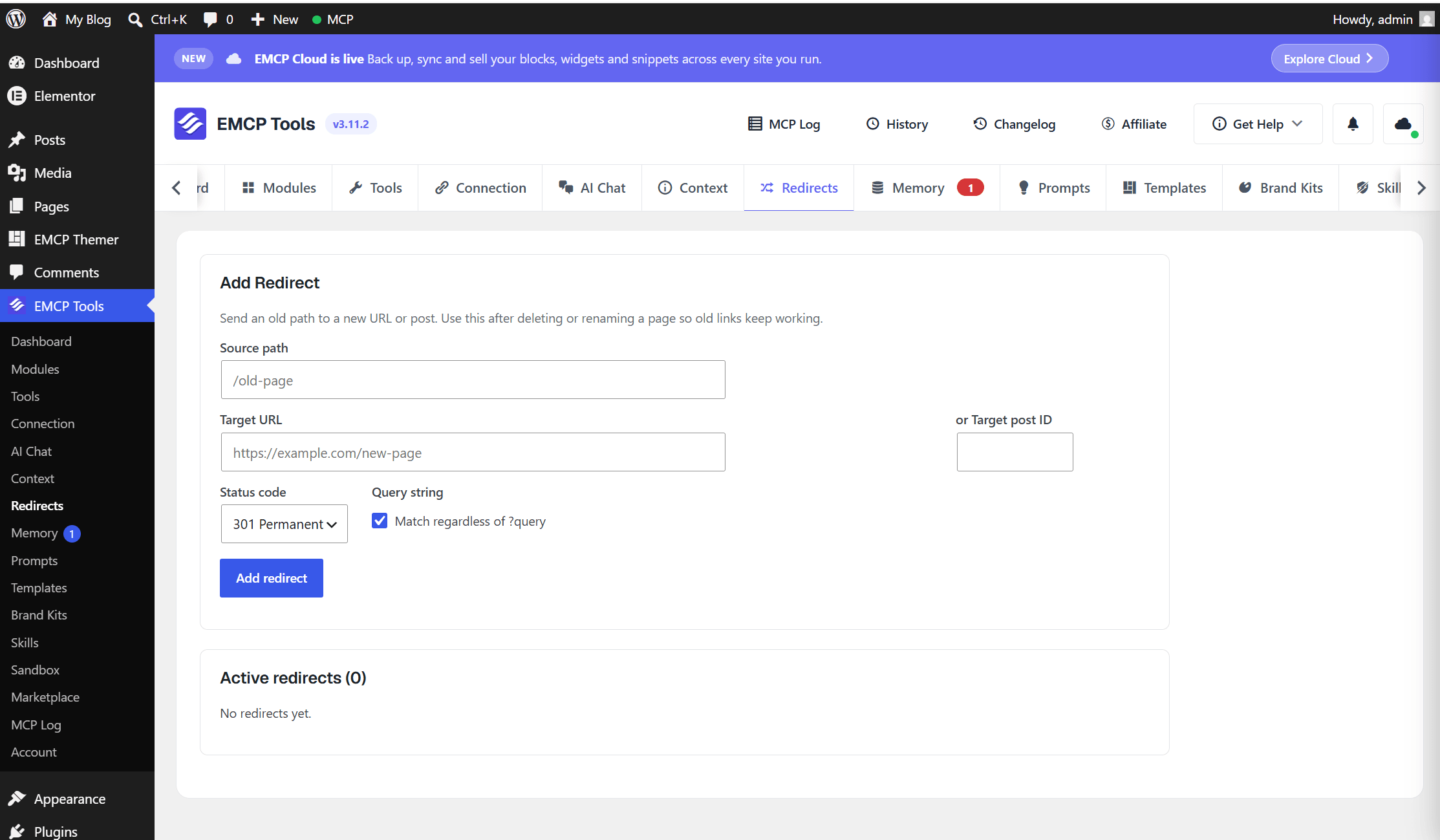
- From: the old path, for example
/old-page. It may include a query string, such as/page?ref=ad. - To: a URL such as
/new-pageorhttps://example.com/, or start typing a page title and pick the page from the list. A redirect to a picked page follows that page if its slug changes later. - Type: 301 Permanent or 302 Temporary.
- Match regardless of query string (ticked by default): the redirect matches the path whatever query string the visitor adds, and forwards that query string to a target that has none. Untick it to match only the exact query string you entered in From; the form then asks for a query string if From has none. While the box is ticked, a query string typed in From is dropped and a path rule is saved, so untick it first when you want a query rule.
- Click Add redirect.
When both kinds of rule exist for the same path, an enabled rule for the exact query string wins; a path rule catches every other request. A query-string rule may point at its own path (/page?ref=ad to /page) without counting as a loop.
Manage redirects
Section titled “Manage redirects”
Active redirects (N) lists every redirect, 20 per page, with Search redirects above it. Columns are From, To (the page title for a picked page), Type, Hits and Enabled.
- The Enabled switch turns a redirect off without deleting it.
- The pencil button (Edit redirect) opens a drawer with the same fields; click Save.
- The bin button (Delete redirect) asks for confirmation. You can undo a delete from History.
Scope and safety
Section titled “Scope and safety”- Read tools (
list-redirects,find-broken-links) are enabled by default; write tools are off until turned on, same convention as every other write-capable tool family. - All five require
manage_options. - Every create, update and delete, from the screen or over MCP, is recorded to the change ledger and reversible from History. See Change History & Rollback.
create-redirectwarns rather than blocks when a source shadows a live page, so a careless redirect can still make a published page unreachable. Check thewarningfield.