
Sandbox
New in v3.7.0. The Sandbox is where code your AI agent generates through the MCP tools actually lives: custom Gutenberg blocks, custom Elementor widgets, and PHP snippets. Everything is isolated under wp-content/emcp-sandbox, never your theme, WordPress core, or another plugin, and every artifact is created inactive. A human has to review and activate it before it runs. That review step is the whole point: the AI never writes raw PHP or JS directly into your site.
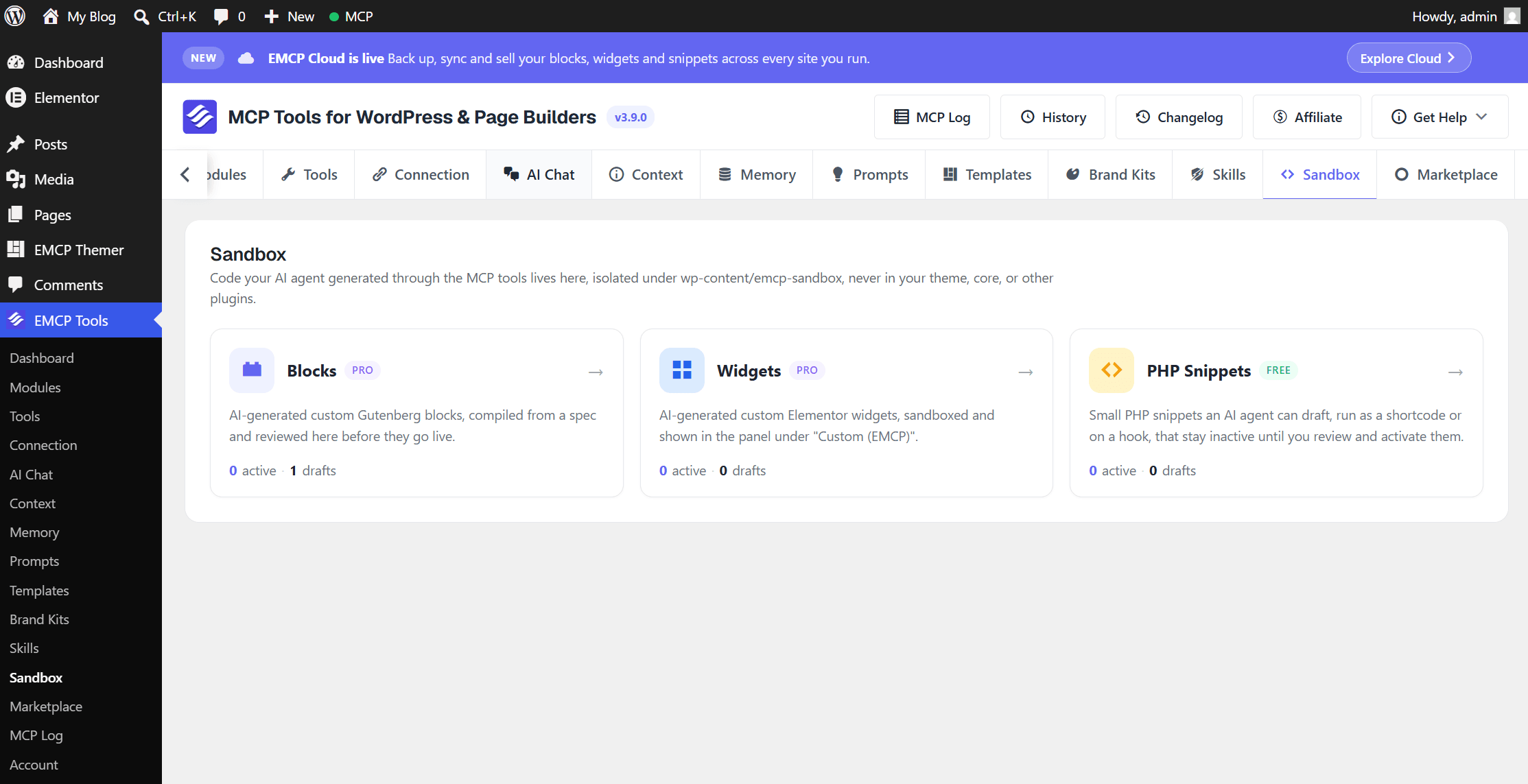
EMCP Tools → Sandbox is a three-card overview (Blocks / Widgets / PHP Snippets), each opening its own management screen.
| Pillar | Tier | What it is |
|---|---|---|
| Blocks | Pro | AI-generated custom Gutenberg blocks, compiled from a spec. Active blocks appear in the block editor inserter under “EMCP Custom.” |
| Widgets | Pro | AI-generated custom Elementor widgets, sandboxed and shown in the panel under “Custom (EMCP).” Tool reference: Widget Builder. |
| PHP Snippets | Free (capability-gated) | Small PHP snippets an AI agent can draft, run as a shortcode or on a hook, that stay inactive until reviewed. |
This page covers the PHP Snippets tools (undocumented elsewhere) and the admin review workflow shared by all three pillars. For creating custom Elementor widgets, see Widget Builder; for custom Gutenberg blocks, the tool reference is below.
PHP Snippets tools
Section titled “PHP Snippets tools”A snippet runs as a shortcode ([emcp_snippet id="N"]), on a WordPress hook, or both. Code is validated on every create/update, and rejected only if it trips a critical finding, the kind that blocks activation outright (eval, file writes, network calls, and similar). create-php-snippet always produces an inactive draft; it never runs until an admin activates it in the Sandbox.
Findings come in three levels (severity on each finding), so routine code doesn’t get lost in noise: critical blocks activation; warning doesn’t block but is worth a reviewer’s attention (writing a site option, sending email); notice is routine and expected in working code (exiting after a redirect, reading request input). Only critical findings stop a snippet from saving or activating; warnings and notices come back alongside a successful save so an agent or reviewer can see them without being blocked by them.
| Tool | Purpose |
|---|---|
emcp-tools/validate-php-snippet | Dry-run validation, no code is saved. |
emcp-tools/create-php-snippet | Create a snippet as an inactive draft. |
emcp-tools/update-php-snippet | Update code/settings; re-validates. An active snippet is recompiled, or demoted to draft if it no longer passes. |
emcp-tools/get-php-snippet | Return a snippet’s code, settings, and status. |
emcp-tools/list-php-snippets | List snippets (id, title, status). |
emcp-tools/delete-php-snippet | Delete a snippet. |
create-php-snippet / update-php-snippet input:
title— a label for the snippet.code(required on create) — PHP code, no<?phptag needed, runs inside an isolated function. Usereturnorechofor shortcode output.context—"shortcode","hook", or"both". Defaults to shortcode.hook— the WordPress action to attach to when context is hook/both (e.g.wp_footer,init).priority— hook priority, default10.
Activation always requires a human, in the Sandbox UI, regardless of who created the draft.
Custom Gutenberg Blocks tools
Section titled “Custom Gutenberg Blocks tools”Same shape as Widget Builder, for the block editor instead of Elementor: the agent submits a JSON spec plus an HTML template with {{control}} placeholders, never raw JS, and the plugin compiles a real block.
| Tool | Purpose |
|---|---|
emcp-tools/list-block-control-types | List supported attribute types + template syntax, call first. |
emcp-tools/validate-block-spec | Dry-run the generator, no code saved. |
emcp-tools/create-custom-block | Generate a block as an inactive draft from a spec. |
emcp-tools/update-custom-block | Replace a block’s spec, regenerate, re-validate. |
emcp-tools/get-custom-block | Return a block’s spec, generated code, and status. |
emcp-tools/list-custom-blocks | List generated blocks (id, title, block name, status). |
emcp-tools/set-block-status | Activate or deactivate a block. |
emcp-tools/delete-custom-block | Delete a block (record + sandbox files). |
Template syntax matches the Widget Builder: {{attribute_name}} for values, {{#if name}}…{{/if}} for conditionals, {{#each repeater}}…{{/each}} for loops, every value escaped by its declared attribute type. A runtime safety net isolates compile failures, a malformed block is demoted to draft with a recorded error rather than breaking the block editor.
The Sandbox admin screens
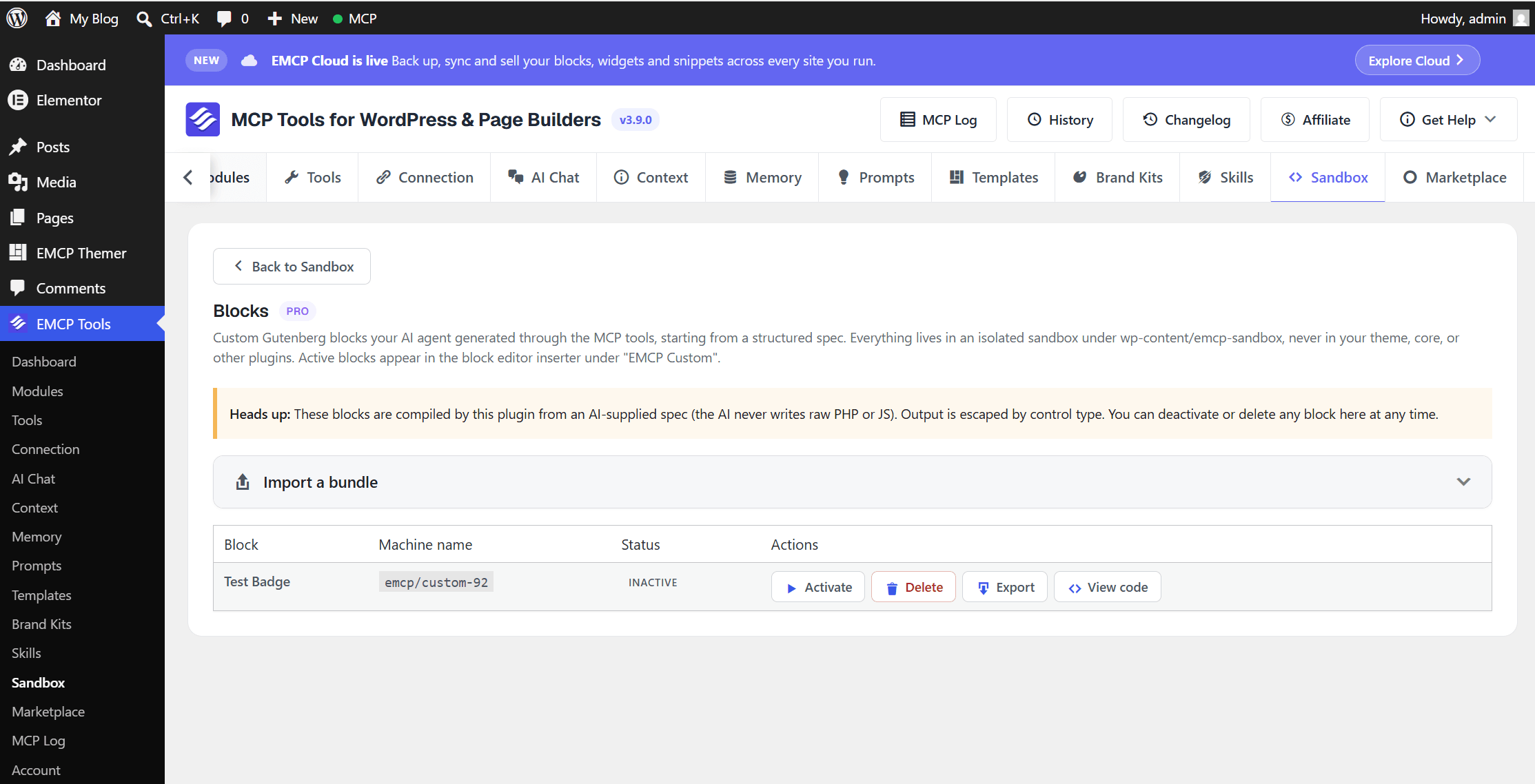
Section titled “The Sandbox admin screens”Each pillar’s management screen (Blocks, Widgets, PHP Snippets) shows a table of that pillar’s artifacts with the same core actions:
- Activate / Deactivate — the human review gate. Nothing an agent creates runs until this happens.
- Delete — removes the record and its sandbox files.
- Export — download a
.jsonbundle of the artifact. - Import a bundle — upload a
.jsonbundle exported from another site (or from Export); imports always land as a new inactive draft. - View code — inspect the generated PHP/JS before deciding whether to activate it.
Cloud Library and Marketplace
Section titled “Cloud Library and Marketplace”If the EMCP Cloud module is connected, each pillar also gets:
- Save to Cloud — back up an artifact to your EMCP Cloud account.
- Cloud Library — browse and import artifacts you’ve saved from any of your connected sites into the current one, as a new inactive draft to review.
- Publish — publish an artifact to the EMCP Marketplace for others to install.
- Push update — publish a new version of something you already published; artifacts published before update-tracking existed self-heal to offer this on their first push.
These buttons, and the plain Export / Import a bundle buttons above, are calls to MCP tools an agent can also use directly: export-sandbox-artifact / import-sandbox-artifact for the general portable-bundle mechanism (no Cloud connection needed), and cloud-backup / cloud-pull / cloud-marketplace-list / cloud-marketplace-install for the Cloud-connected versions. Full tool reference: EMCP Cloud & Marketplace.
Permissions
Section titled “Permissions”Creating, updating, activating, and deleting any Sandbox artifact requires manage_options plus unfiltered_html, the same bar as site-wide custom code. Read/validate tools require edit_posts.