
Project Memory
New in v3.7.0. Pro. Every new agent session starts from zero: it doesn’t know your site’s conventions, your guardrails, or what the last session did. Project Memory fixes that. Agents capture what they did, propose durable guidance, and, once you approve it, that guidance gets composed into a ## Project memory block injected into every future session’s discovery context.
Turning the module off disables capture, injection, and all three memory tools in one switch.
The three tools
Section titled “The three tools”emcp-tools/recall
Section titled “emcp-tools/recall”Reads this site’s project memory: approved guidance plus recent session summaries. Call it at the start of a task so the agent doesn’t re-guess site-specific context. Read-only.
Input:
type— optional filter:guardrail,fact,convention, orinstruction.topic— optional case-insensitive substring filter over guidance text and session summaries.limit— max session records to return (default 10).
Returns: { guidance: [...], sessions: [...] }.
emcp-tools/remember
Section titled “emcp-tools/remember”Proposes one piece of durable guidance. Stored pending, never injected until a human approves it on the Memory tab (unless you’ve turned Require approval off).
Input:
type(required) —guardrail,fact,convention, orinstruction.text(required) — the guidance itself, e.g. “never edit the header template” or “checkout is page 42.”title— optional short label; defaults to the first 8 words oftext.scope— optional, e.g.global,elementor,woocommerce.target— optional concrete target for enforcement, e.g.post_type:elementor-hforpost_id:42. See Guardrail enforcement for the full matching rules.severity— optional hint:info,warn, orblock. As of v3.10.0, an approvedblock-severity entry with a target is actually enforced, not just advisory — see below.
Returns: { id, status }, status is "pending" or "publish" depending on the Require approval setting.
emcp-tools/save-session-summary
Section titled “emcp-tools/save-session-summary”Records a short summary of what the agent did this session. The plugin attaches a factual digest of the actual changes made (built from the change ledger) automatically, no need to describe every edit by hand.
Input:
summary(required) — a 2–4 sentence summary for a future agent.takeaways— optional array of{ type, text }durable-guidance proposals; each becomes a pending entry, same as callingremember.
Returns: { recorded: true, proposed: <count> }.
The approval gate
Section titled “The approval gate”This is the whole trust model: nothing an agent proposes reaches another session until a human approves it. remember and the takeaways on save-session-summary both create pending guidance. Only guidance with status publish is composed into the injected block.
Approved guidance is grouped by type into a compact block, capped at 1,500 characters, and cached (rebuilt only when guidance changes):
## Project memoryGuardrails: never edit the header template; ...Site facts: checkout is page 42; ...Conventions: ...Instructions: ...(Call recall for session history and full detail.)Guardrail enforcement
Section titled “Guardrail enforcement”New in v3.10.0. A memory entry with severity: block isn’t just injected as text for the agent to (hopefully) respect — once it’s approved (publish status) and has a non-empty target, it’s enforced server-side: a matching write is refused before it runs, regardless of which client is calling (an external MCP tool or the built-in AI Chat), with a blocked_by_memory error.
The target string is matched as key:value, or a bare value treated as a tool slug:
tool:<slug>(or just the bare slug/full name, e.g.create-useroremcp-tools/create-user) — matches that specific tool.post_id:<id>(orid:<id>) — matches when the call’spost_id/idinput equals it exactly.post_type:<type>— resolves the call’spost_id/idinput to a post and matches on its post type, e.g.post_type:elementor-hfblocks writes to any header/footer template.- Any other key never matches — an unrecognized target key means the guardrail simply never blocks anything, so a typo in
targetfails safe (open) rather than fails blocking.
A pending (unapproved) block-severity proposal is inert — approving it on the Memory tab is what activates enforcement, same gate as regular guidance injection.
The Memory admin tab
Section titled “The Memory admin tab”EMCP Tools → Memory is the whole control surface, four sections:
-
Settings — Require approval (on by default: agent proposals stay pending until you approve them) and Auto-summarize sessions (off by default: when an agent doesn’t leave a summary, generate one with your configured AI Chat provider; costs tokens).
-
Pending review — every proposal from
rememberor asave-session-summarytakeaway, with Approve / Reject buttons per row. The section header shows a live count badge for how many are waiting.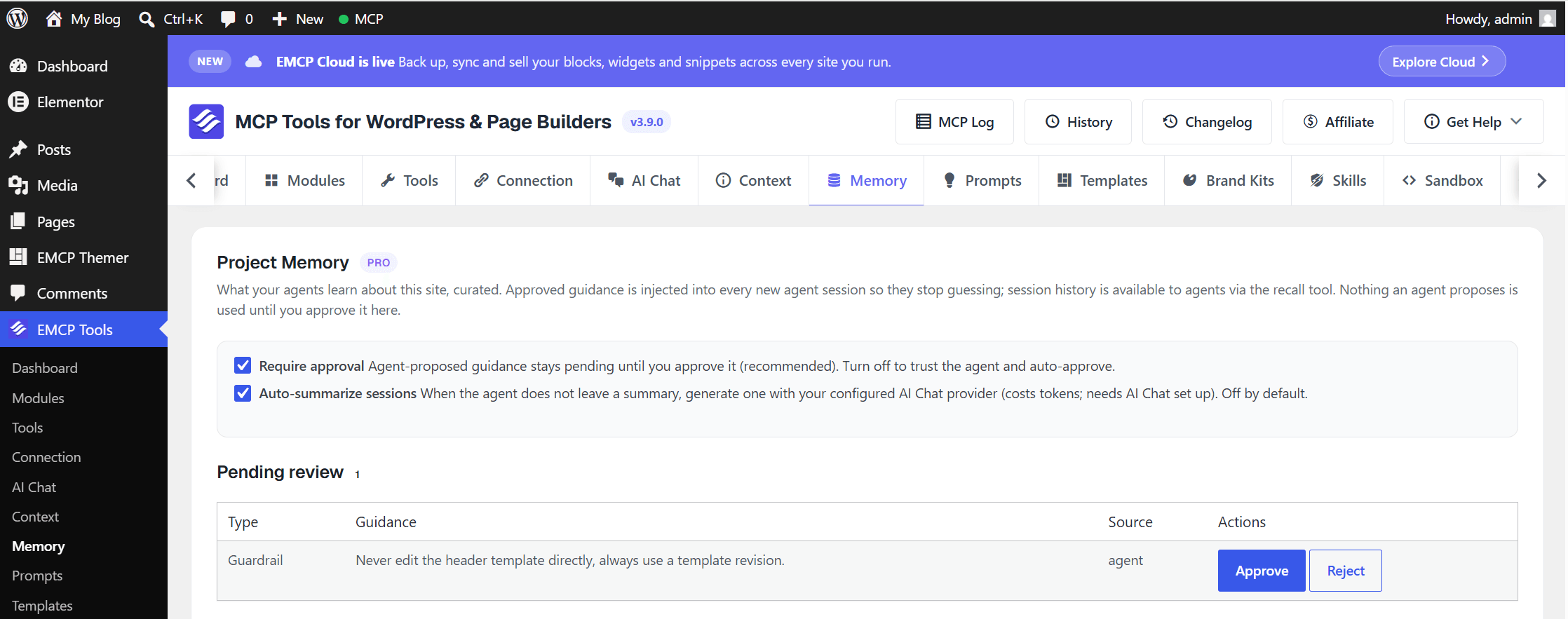
-
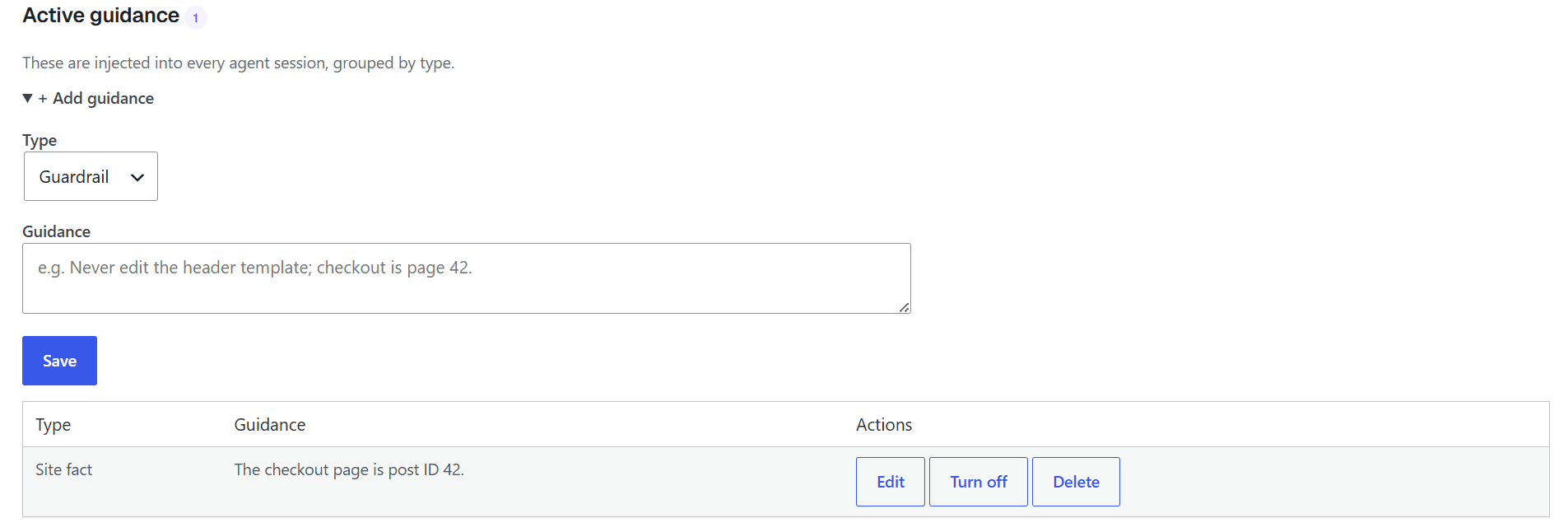
Active guidance — everything currently injected, grouped by type, with Edit / Turn off / Delete per row. A + Add guidance disclosure lets you add guidance by hand too, no agent required.
-
Session history — a read-only log of
save-session-summarycalls: when, the summary text (or “(digest only)” if none was given), and how many changes the attached digest covers.
Permissions
Section titled “Permissions”Both recall and remember/save-session-summary require edit_posts (the writes are inert proposals, so the bar matches read). Curating on the Memory tab itself requires manage_options and an active Pro license.