
Export as plugin
New in 3.18.0, Pro. Export as plugin packages every active Sandbox widget, block and PHP snippet as a standalone WordPress plugin ZIP. Install that plugin and the custom elements your AI agent built keep working after EMCP Tools is removed, on this site or another one.
Turning it on
Section titled “Turning it on”The feature is the Sandbox Plugin Export module, on by default on Pro. Switch it on or off in the Site & safety group of EMCP Tools → Modules. While it is on, the Sandbox overview shows an Export as plugin button, and the export screen is at admin.php?page=emcp-tools-widgets&view=export.
Build the plugin
Section titled “Build the plugin”Open EMCP Tools → Build → Sandbox and click Export as plugin.
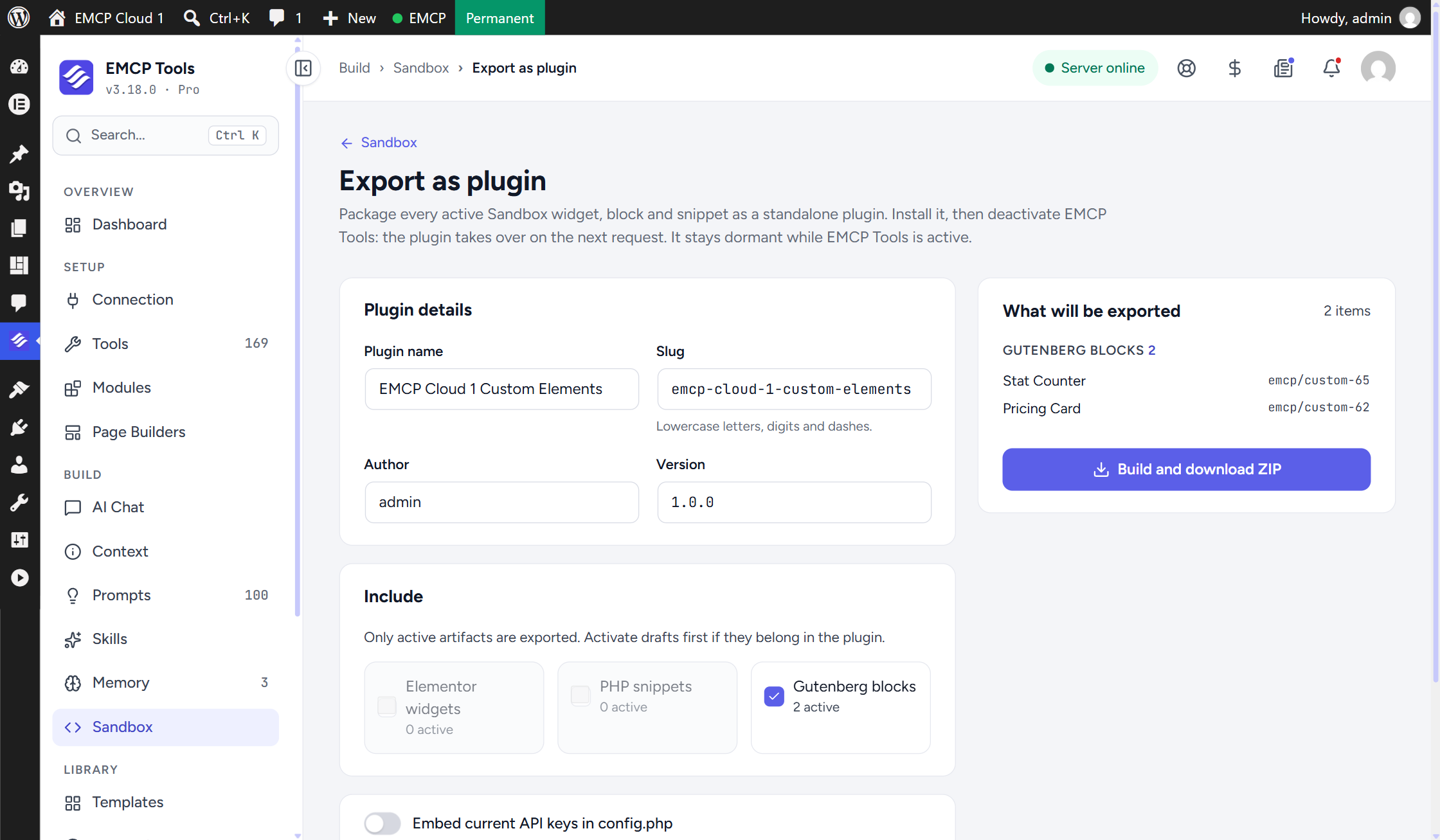
- Plugin details: Plugin name (defaults to your site name plus “Custom Elements”), Slug (“Lowercase letters, digits and dashes.”, suggested from the name), Author (your display name) and Version (default
1.0.0). - Include: tick Elementor widgets, PHP snippets and Gutenberg blocks. Each shows how many are active; a kind with none active cannot be ticked. “Only active artifacts are exported. Activate drafts first if they belong in the plugin.”
- Embed current API keys in config.php: leave it off unless you have a reason (see API keys below).
- Check What will be exported: every item with its identifier, the Bundled runtime it needs, the API key constants the plugin will read, and anything Skipped.
- Click Build and download ZIP. The file is named
<slug>-<version>.zip.
What is in the plugin
Section titled “What is in the plugin”Every active artifact of the kinds you ticked, copied exactly as it is running now. An artifact whose files no longer match the checksum EMCP recorded when it compiled them is listed under Skipped instead of being exported. If an artifact changes between loading the screen and building, the build stops and asks you to reload.
Identities are preserved
Section titled “Identities are preserved”The export keeps every name EMCP uses, so pages built with these elements keep working with no edits:
| Kept as-is | Example |
|---|---|
| Elementor widget types | emcp_custom_1366 |
| Block names | emcp/custom-{id} |
| Snippet functions and the shortcode | emcp_php_snippet_1357, [emcp_snippet id="N"] |
| Widget style and script handles | emcp-widget-{id}-* |
| Elementor panel category | Custom (EMCP) |
Blocks are exported as ordinary block folders with their block.json, editor script and style, so the block editor loads and edits them normally.
Runtime for data widgets
Section titled “Runtime for data widgets”Widgets built with the Widget Builder’s data controls need EMCP code at render time. The export works out what each widget needs from its stored spec and bundles it:
- A widget with a query control (posts, products, terms, menus, breadcrumbs, cart, site data or remote data) gets the query runtime, the remote data sources and the key reader.
- A widget with a shortcode control gets the shortcode registry (saved Elementor templates and the supported form plugins).
These files are exact copies of EMCP’s own, loaded only when EMCP Tools is not, so they never clash.
How the handover works
Section titled “How the handover works”The exported plugin decides what to do once all plugins have loaded:
- Install and activate it while EMCP Tools is still active. It stays dormant and shows a notice: “<Plugin name> is dormant while EMCP Tools is active. Deactivate EMCP Tools to let it take over.”
- Deactivate EMCP Tools. From the next request on, the exported plugin registers the widgets, blocks and snippets itself.
- Reactivate EMCP Tools and the exported plugin goes back to sleep automatically.
Because the decision happens after every plugin has loaded, the order in which WordPress loads EMCP and the export does not matter, and nothing is ever declared twice.
One export per site
Section titled “One export per site”Only one export can own the Sandbox artifacts on a site. A second active export stays dormant and its notice names the export that owns them. On the Export screen, if an export is already installed on this site, a notice says so and asks you to replace it rather than add a second. Build a new version and install it over the old one.
The slugs emcp-tools, emcp-pro, elementor-mcp and emcp-migrate-connector are refused, because they would collide with EMCP’s own install folders.
The plugin’s own constants are named after its slug: EMCP_EXPORT_{IDENT}_VERSION, EMCP_EXPORT_{IDENT}_DIR and EMCP_EXPORT_{IDENT}_URL, where {IDENT} is the slug in upper case with dashes as underscores (msr-plugins-custom-elements becomes MSR_PLUGINS_CUSTOM_ELEMENTS).
API keys
Section titled “API keys”Remote-data widgets (OpenWeather, Google Reviews, Yelp, the generic JSON presets) need their API keys. The exported plugin reads keys only from constants, never from the keys stored on the Connection screen, which are encrypted for this site and would be useless elsewhere. The constants are the same ones EMCP reads:
| Provider | Constant |
|---|---|
| OpenWeather | EMCP_TOOLS_REMOTE_KEY_OPENWEATHER |
| Google Places | EMCP_TOOLS_REMOTE_KEY_GOOGLE_PLACES |
| Yelp Fusion | EMCP_TOOLS_REMOTE_KEY_YELP |
| Generic API keys | EMCP_TOOLS_REMOTE_KEY_JSON_1 to _JSON_3 |
The export lists only the constants its widgets use, under API key constants the plugin will read, with a note saying whether a value is stored on this site. Its config.php and readme list them too.
-
Embed off (default):
config.phpholds commented placeholders. Define each constant inwp-config.phpon the site that runs the plugin:define( 'EMCP_TOOLS_REMOTE_KEY_OPENWEATHER', 'your-key' );wp-config.phpwins overconfig.phpbecause it loads first. -
Embed on: the current keys are written into
config.phpas plain text inside the ZIP. Anyone with the ZIP has the keys, so only use it for a file you keep private.
A key that stays undefined makes its widget report a missing key instead of data.
Where the ZIP is built
Section titled “Where the ZIP is built”The ZIP is written to a temporary directory that EMCP can prove is outside every web-served path (the WordPress directory, wp-content, uploads and the document root), so a half-built archive can never be downloaded by URL. When no such directory is available the screen shows Cannot build here: with the reason, and the build button stays disabled.
To fix it, set WP_TEMP_DIR in wp-config.php to a writable directory outside the web root, beside public_html rather than inside it:
define( 'WP_TEMP_DIR', '/home/account/tmp' );The PHP ZipArchive extension is also required.
Limits
Section titled “Limits”- A lapsed licence does not hand over. If the EMCP Pro licence lapses while EMCP Tools stays active, EMCP stops registering Pro artifacts and the exported plugin stays dormant, so custom widgets and blocks disappear. Deactivate EMCP Tools and the export takes over.
- Early hooks. The export takes over on
plugins_loadedat priority 50, so a snippet bound to a hook that has already fired by then cannot run from the plugin. The screen shows a warning for each one. - Errors in snippets. A snippet that throws is logged and skipped; the export does not deactivate it the way EMCP’s Sandbox does.
- Do not edit the exported files. They are generated. Edit the artifacts on the source site and export again.
- The generated plugin requires WordPress 6.0 and PHP 8.1. Widgets still need Elementor, and blocks the block editor.
Related
Section titled “Related”- Sandbox: where the widgets, blocks and snippets are reviewed and activated.
- Widget Builder: building custom Elementor widgets, including the data controls.