
 A brief becomes a real page.
Updating a title is easy. Updating a batch of WordPress SEO metadata without accidentally changing indexing settings needs a repeatable check.
The cover is an illustrative SEO-editor mockup. The focused editor screenshot below is from the actual test.
We tested that process with EMCP Pro 3.18.0 and Rank Math 1.0.279 on a WordPress demo site. An AI client used the Rank Math MCP tools to change the SEO title and description on three pages. We then read every value back and inspected the HTML returned by each public URL. All three matched the intended copy, with their existing indexing settings preserved.
This tutorial records the actual test. The pages describe Example Studio, a fictional business, and deliberately remain noindex. It demonstrates metadata editing and verification, not a ranking improvement or a production SEO audit.
Prepare the connection and one page
You need WordPress with Rank Math active, EMCP Pro, and an MCP-compatible AI client connected to the intended site. In EMCP Tools → Tools → Plugins → SEO, enable the Rank Math read and write tools needed for the task. Writes are opt-in; check the site’s saved settings rather than assuming defaults.
Our demo ran WordPress 7.1.2 with Bricks 2.4.1 active. These were ordinary WordPress pages; no Bricks layout operation was involved. The SEO adapter edits metadata independently of the page-building demonstration in our Bricks tutorial.
Start on staging and record the target page IDs and URLs. Save the current metadata so you can restore the original copy if needed. For our three-page batch, the targets were website design (54), site care (55), and a project preparation guide (56). Use your own verified IDs.
Discover the tools and read the existing content
Ask the client to inspect the installed operation catalog first. In this test, emcp-tools-rankmath-read exposed get-post-seo, and emcp-tools-rankmath-write exposed update-post-seo. Calling either dispatcher without an operation listed its supported operations.
Use this prompt for the review stage:
Confirm the connected site and discover its Rank Math operations.Read the content and SEO metadata for these page IDs: [your IDs].Record title, description, canonical, noindex and nofollow.
Propose a title and description for each page using only claims supportedby its content. Explain what each proposal clarifies.Do not change anything yet.
Reading content matters. Our design page described page planning, responsive WordPress builds, content approval and a handover guide. The proposal could name those steps. It could not claim awards, a delivery guarantee, or a price absent from the page.
Review a small, specific change set
These are the actual title changes from the test:
| Page | Before | After |
|---|---|---|
| Website design · 54 | Services | Example Studio | WordPress Website Design | Example Studio |
| Site care · 55 | Care | Example Studio | WordPress Site Care & Maintenance | Example Studio |
| Project guide · 56 | Guide | Example Studio | WordPress Website Project Checklist | Example Studio |
We also replaced three generic descriptions with summaries grounded in each page:
- Website design: “Explore Example Studio’s WordPress design process: page planning, responsive builds, content review, and a handover guide for your team.”
- Site care: “See how Example Studio approaches WordPress site care with scheduled plugin updates, backup checks, and a monthly maintenance summary.”
- Project guide: “Prepare for a WordPress website project: gather brand assets and page content, list required features, and choose who will approve the work.”
The original descriptions were “Learn more about our services.”, “We help with websites.”, and “Read our latest guide.” The replacements tell a visitor what to expect. They do not make these short demonstration pages complete service pages.
Update only the approved fields
After reviewing the proposal, tell the agent to apply only the title and description, preserving the other metadata and page content. This is the operation payload we used for page 54 with the Rank Math write tool:
{ "operation": "update-post-seo", "arguments": { "post_id": 54, "title": "WordPress Website Design | Example Studio", "description": "Explore Example Studio's WordPress design process: page planning, responsive builds, content review, and a handover guide for your team." }}The update operation changes supplied fields. We omitted canonical, noindex, nofollow, focus keywords and social overrides. A title rewrite did not require changing them. See the SEO tools reference for the supported field vocabulary and plugin differences.
Apply the first page, verify it, then continue with a reviewed batch. For a large site, keep a record with the URL, old copy, new copy, reason and verification result for every page.
Verify saved values and the frontend separately
First, read the page again using the read tool:
{ "operation": "get-post-seo", "arguments": { "post_id": 54 }}Then inspect the page’s server response with get-page-html, or inspect the appropriate staging preview. Compare decoded HTML values: an apostrophe may be emitted as ' and an ampersand as & without changing the text.
Our checks produced these results:
| Check | Result on all three pages |
|---|---|
| Saved title and description | Matched the intended copy |
| Public response | HTTP 200; title and description matched saved values |
| Stored canonical override | Empty before and after |
| Rendered canonical link | Absent before and after in this noindex configuration |
| Stored robots flags | noindex: true, nofollow: false before and after |
| Rendered robots tag | follow, noindex before and after |
| Other returned SEO fields | Unchanged |
An empty canonical override is not the same thing as an empty canonical tag. Inspect the rendered output; do not infer it from a single saved field. On a production page intended for search, verify its appropriate canonical and indexing state separately. Our demo’s noindex setting is intentional and should not be copied to your service pages.
We also opened page 54 in WordPress and checked Rank Math’s snippet editor:
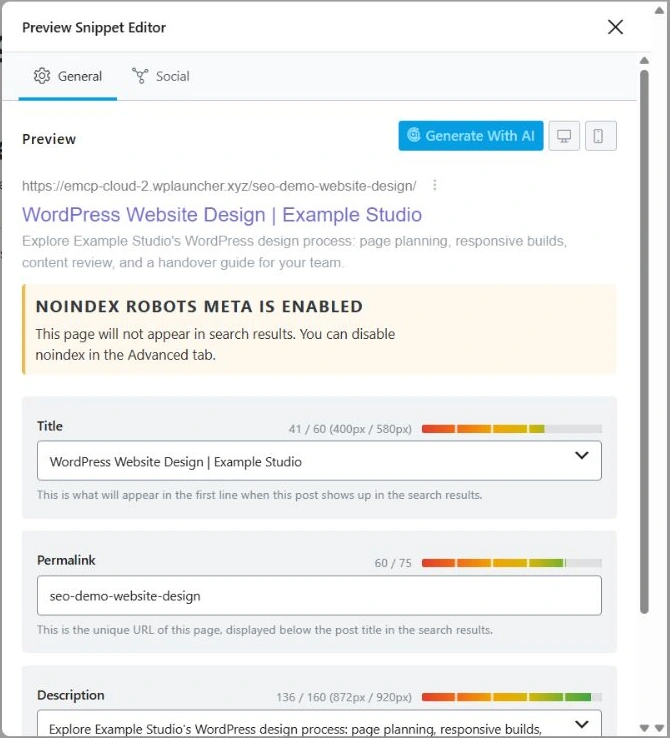
Actual editor screenshot from the test. This is Rank Math’s preview, not a Google search result. The noindex warning is expected for these demo pages.
Troubleshooting: saved metadata, missing frontend tags
We encountered this during setup. The read tool returned the saved Rank Math values, but the frontend still showed the ordinary WordPress title and no Rank Math description.
The newly installed plugin was still at its account-connection step. We used its supported Skip Step option and returned to the dashboard. Rank Math then emitted the expected tags. We captured the frontend baseline after that setup step and before applying the copy changes.
If your saved values and public output disagree, check plugin setup, which SEO plugin is active, and any relevant caching before repeating writes. A successful metadata save alone does not verify the page a visitor or crawler receives.
What this workflow proves
The test verifies three metadata edits through MCP, their saved values, and their frontend output. It does not measure search rankings, clicks, or purchases. We did not change focus keywords or optimize for Rank Math’s numerical score.
For your production pages, review search performance separately after publication and recrawling. Keep the page content useful and accurate, and assess query relevance alongside clicks and business outcomes.
Start with the Rank Math integration, check Free vs Pro, and follow the Claude Code connection guide to connect your client. The EMCP marketing site uses Astro; this workflow is for WordPress sites running Rank Math.