
 A brief becomes a real page.
TranslatePress MCP integration
Translate what visitors see, sentence by sentence.
EMCP Pro reads a page the way TranslatePress sees it: every string in page order, header, menus and footer included, each with the full sentence it belongs to. Your AI translates whole sentences and writes them back in one call, saved for review in TranslatePress's visual editor.
Pro integrationTranslatePress 3.x (free is enough)
A real run on our test site
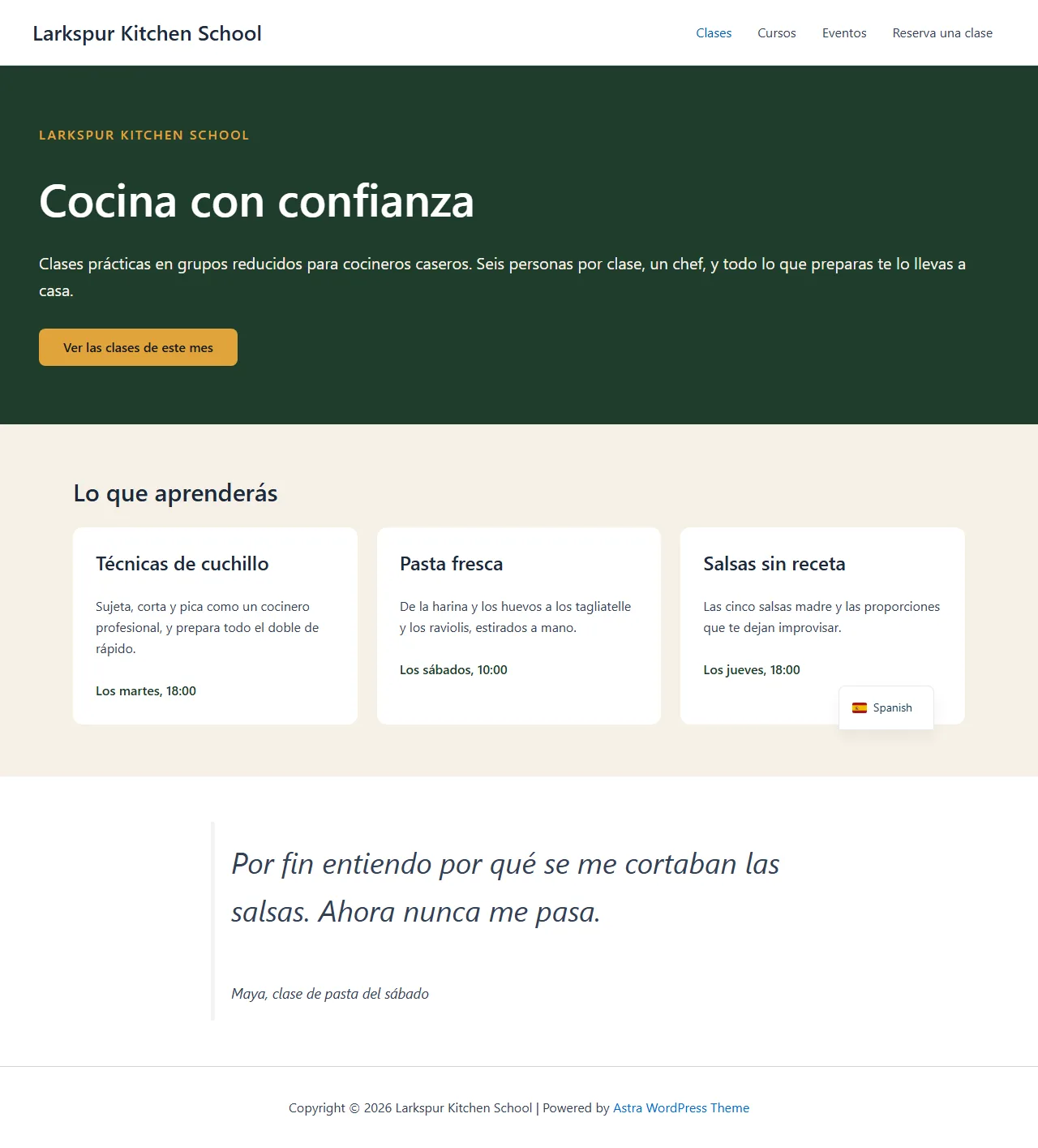
The same page in Spanish, without the visual editor.
TranslatePress translates the page as visitors see it. The assistant added Spanish, read every string on the rendered page with its sentence context, and wrote 19 translations back in one call.
Add Spanish to the site with TranslatePress, then translate the Cook with confidence page and its menu. Keep the school’s name in English.
- Recorded
- Plugin
- TranslatePress 3.3.7
- Connection
- EMCP 3.19.0 over MCP (WP-CLI stdio)
- Calls shown
- 5, in the order they ran
- get-page-strings reads the page in TranslatePress’s preview with automatic translation switched off, so no machine translation ran.
- Strings are shared across the site: the menu items translated here read in Spanish on every page.
- 01
translatepress-read · get-setup{}Answer: {"default_language": "en_US", "translation_languages": [], "languages": [{"code": "en_US", "name": "English", "slug": "en", "default": true, "published": true}], "language_limit": 1, "can_add_language": true, "automatic_translation": {"enabled": false, "engine": ""}} - 02
translatepress-write · add-language{"language_code": "es_ES", "slug": "es"}Answer: {"added": "es_ES", "translation_languages": ["en_US", "es_ES"], "change": {"change_id": "d3bb3c678207", "undo": true}} - 03
translatepress-read · get-page-strings{"post_id": 2266, "lang": "es_ES"}Answer: {"post_id": 2266, "lang": "es_ES", "url": "https://elementor-mcp.test/es/cook-with-confidence/", "strings": [{"id": 1, "kind": "text", "accessor": "text", "original": "Larkspur Kitchen School", "text": "Larkspur Kitchen School", "translated": "", "status": 0, "…": "3 more fields"}, {"id": 34, "kind": "text", "accessor": "text", "original": "Classes", "text": "Classes", "translated": "", "status": 0, "…": "3 more fields"}, {"id": 35, "kind": "text", "accessor": "text", "original": "Courses", "text": "Courses", "translated": "", "status": 0, "…": "3 more fields"}, "… 27 more"], "gettext": [{"id": 5, "original": "Skip to content", "text": "Skip to content", "translated": "", "status": 0, "version": "110bc268fbce35b0", "domain": "astra", "…": "2 more fields"}, {"id": 33, "original": "Primary Site Navigation", "text": "Primary Site Navigation", "translated": "", "status": 0, "version": "110bc268fbce35b0", "domain": "astra", "…": "2 more fields"}, {"id": 39, "original": "Main menu toggle", "text": "Main menu toggle", "translated": "", "status": 0, "version": "110bc268fbce35b0", "domain": "astra", "…": "2 more fields"}, "… 3 more"], "total": 36, "counts": {"untranslated": 36, "machine": 0, "reviewed": 0}, "…": "2 more fields"} - 04
translatepress-write · translate-strings{"lang": "es_ES", "post_id": 2266, "strings": [{"id": 34, "translated": "Clases", "version": "110bc268fbce35b0"}, {"id": 35, "translated": "Cursos", "version": "110bc268fbce35b0"}, {"id": 36, "translated": "Eventos", "version": "110bc268fbce35b0"}, "… 16 more"]}Answer: {"lang": "es_ES", "gettext": false, "unchanged": [], "written": 19, "strings": [{"id": 34, "translated": "Clases", "status": 1, "version": "2d995da859ad16d9"}, {"id": 35, "translated": "Cursos", "status": 1, "version": "0525fb67e407c437"}, {"id": 36, "translated": "Eventos", "status": 1, "version": "48e7541779486d80"}, "… 16 more"], "committed": true, "change": {"change_id": "269ca269b791", "undo": true}} - 05
translatepress-read · get-progress{}Answer: {"languages": {"es_ES": {"regular": "{…}", "gettext": "{…}"}}}

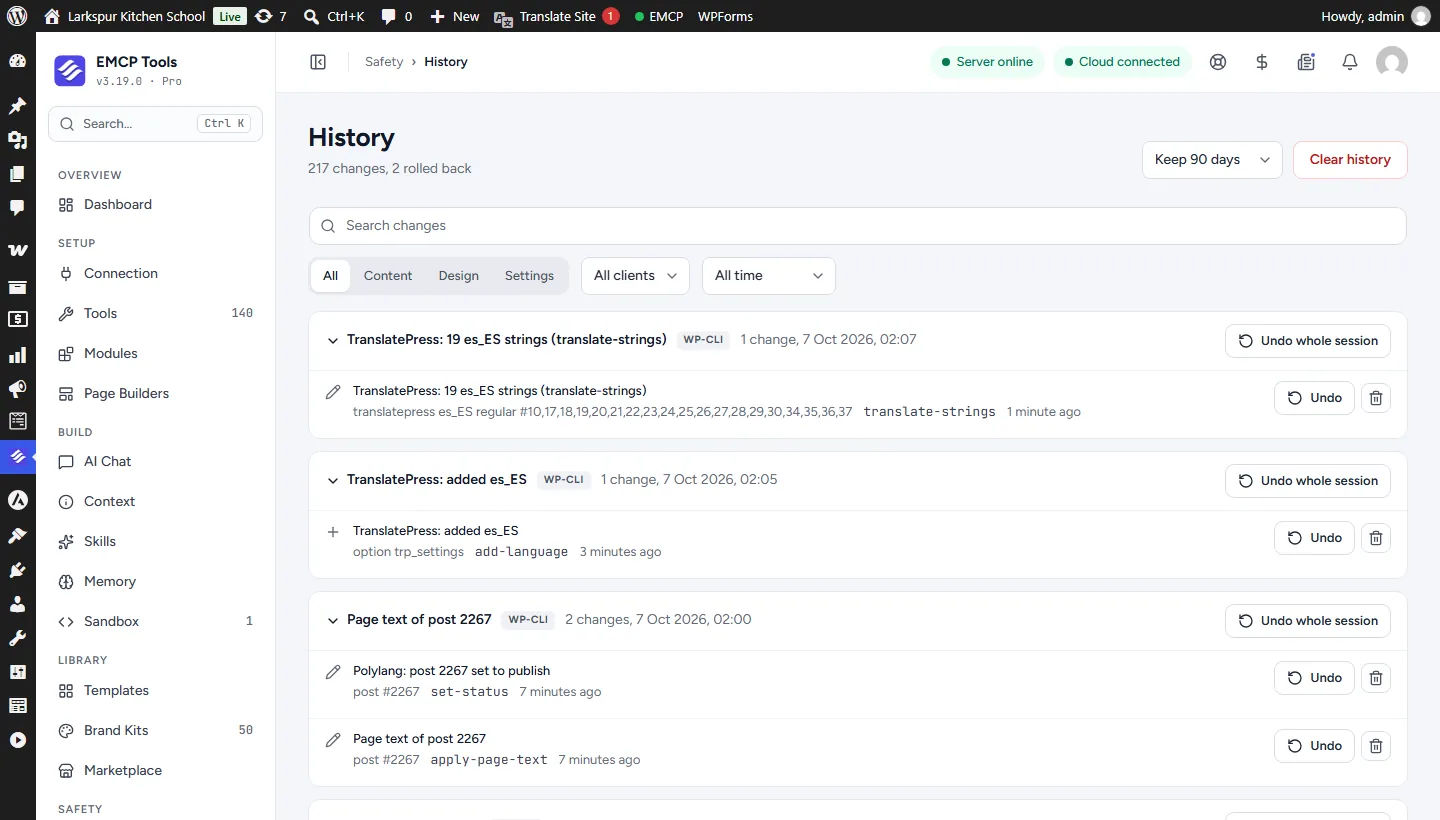
Larkspur Kitchen School is a fictional demonstration, and so are its staff and students. Recorded on our test site on October 7, 2026 with EMCP 3.19.0 and TranslatePress 3.3.7, over a real MCP connection. Email was held on the test site, so nothing was sent. The TranslatePress screens are the plugin’s own; values and ids in the calls are the ones this run returned, with long text shortened.
A practical place to start
From an untranslated page to a reviewed one.
- 01
Read the page's strings
get-page-strings renders the page in TranslatePress's preview and returns every string in page order, drafts included, with the context of the sentence each fragment belongs to.
- 02
Write the translations
translate-strings writes up to 200 translations in one call. Each names the version it read, so a string someone else changed meanwhile is a conflict and nothing is written.
- 03
Review and finish
New translations are saved as machine translated for review. Mark them reviewed, translate theme and plugin text, and check the progress per language.
Built for TranslatePress
TranslatePress translates the page as shown
Every piece of text a visitor sees is a string in TranslatePress’s dictionary, and the same text is one string for the whole site. Translating a menu item or the footer once translates it on every page. EMCP reads those strings straight from TranslatePress’s preview of the page, so your AI works on exactly what visitors see, drafts included.
Sentences, not fragments
A sentence with a link in it reaches TranslatePress as several fragments. Each fragment EMCP returns carries its sentence, so the translation reads naturally instead of word by word. Writes are all or nothing: one bad entry and nothing is saved.
Review stays with a person
Translations land as machine translated, ready for review in TranslatePress’s visual editor. Your AI can mark them reviewed when you say so, and a reviewed translation is never overwritten by accident. Every change is in History in EMCP Tools.
Use the TranslatePress tool reference for operation names and arguments. Sites on Polylang use the Polylang integration.
Get connected
Put TranslatePress in your AI’s toolkit.
- 1
Install TranslatePress
Install EMCP Pro 3.19 or later with TranslatePress 3.x. The free edition is enough.
- 2
Enable the write tool
translatepress-read is on; translatepress-write starts disabled. Enable it under EMCP Tools > Tools > Plugins > TranslatePress and reconnect your AI client.
- 3
Pick the language
Ask your AI to add the translation language, or read the setup TranslatePress already has.
Then connect Claude Code, Claude Desktop, or Cursor to use the TranslatePress tools enabled on your site. Compare Free and Pro access.
A few useful details
Before you connect.
Questions about TranslatePress, supported operations, and the workflow on your site.
Why does context matter?
TranslatePress splits a sentence at every link or bold word. Each fragment comes with the whole sentence, so your AI translates the sentence once and gives each fragment its part.
Does it spend automatic translation credits?
No. EMCP switches TranslatePress's automatic translation off for the request that reads a page, so no engine is called.
Will it overwrite translations I reviewed?
No, unless the call says so. New translations are saved as machine translated so a person can review them.
Can I undo it?
Yes. String writes are recorded in History and undone in one transaction, and language changes are recorded too.
Your tools. Your WordPress site.