
 A brief becomes a real page.
Polylang MCP integration
Translate a whole page into another language in three calls.
EMCP Pro works with Polylang's free edition. It copies a page into the target language with its content and settings, hands your AI the page's text as one numbered list, writes the translation back in a single call and links it to the original. The original page never changes.
Pro integrationPolylang 3.x (free is enough)
A real run on our test site
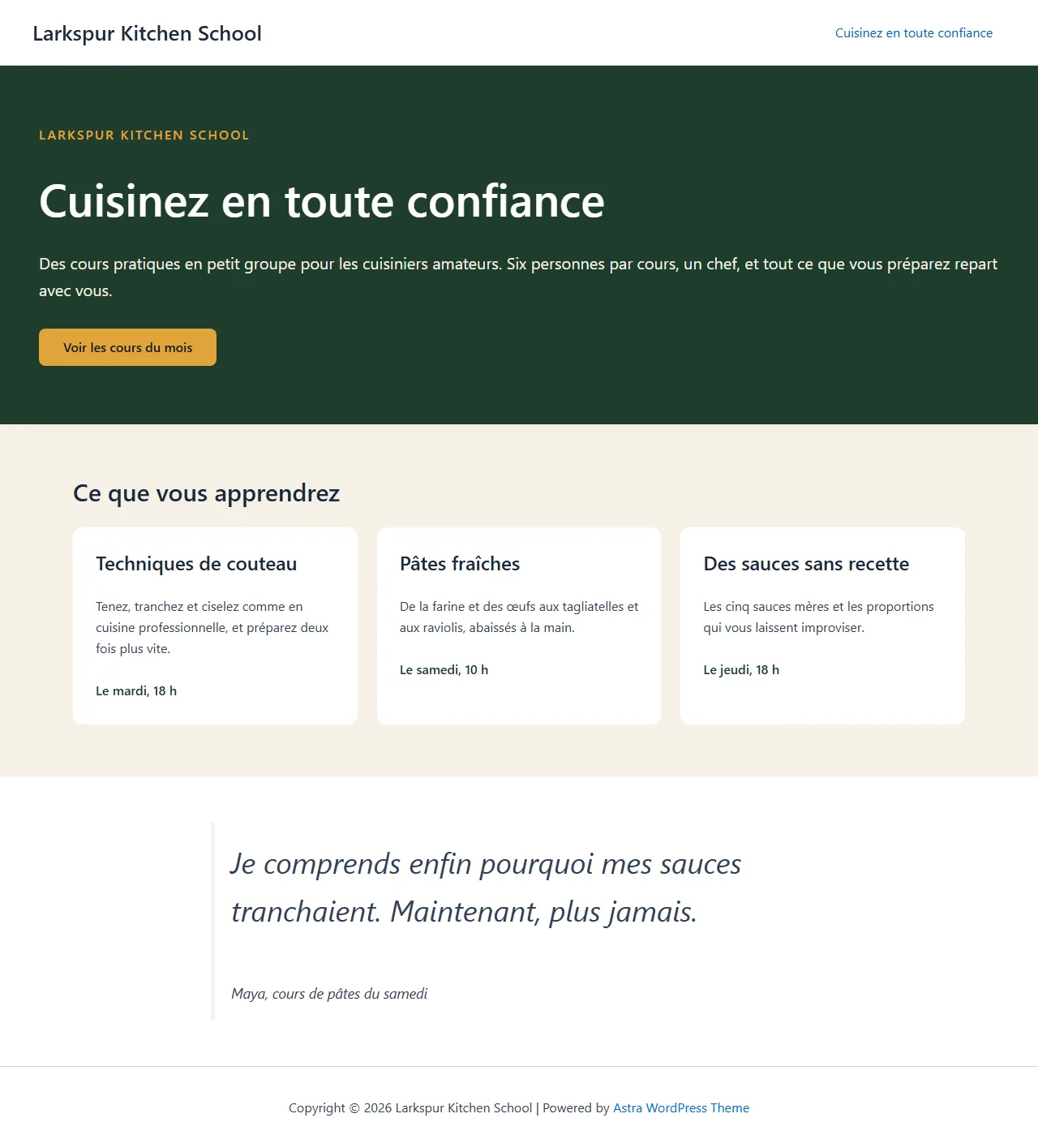
Larkspur Kitchen School, now in French.
We asked an assistant to make a landing page bilingual. It built the English page, set up Polylang’s two languages, copied the page into French, translated every block in one write and published the translation.
Create a landing page for Larkspur Kitchen School with a hero, three class cards and a testimonial. Then add English and French with Polylang, translate the page into French and publish the translation.
- Recorded
- Plugin
- Polylang 3.8.10
- Connection
- EMCP 3.19.0 over MCP (WP-CLI stdio)
- Calls shown
- 7, in the order they ran
- The French copy started as a draft with the slug cook-with-confidence-fr: Polylang free does not allow the same slug in two languages.
- apply-page-text checked all 16 segments before writing any of them, and the English page was never touched.
- 01
create-post{"post_type": "page", "status": "publish", "title": "Cook with confidence", "content": "<!-- wp:cover {\"customOverlayColor\":\"#1F3D2B\",\"dimRatio\":100,…", "meta": {"site-post-title": "disabled", "ast-site-content-layout": "full-width-container", "site-content-style": "unboxed", "site-sidebar-layout": "no-sidebar"}}Answer: {"post_id": 2266, "status": "publish", "permalink": "https://elementor-mcp.test/cook-with-confidence/"} - 02
polylang-write · add-language{"locale": "fr_FR", "slug": "fr", "name": "Français"}Answer: {"language": {"name": "Français", "slug": "fr", "term_group": 0, "term_id": 54, "locale": "fr_FR", "is_rtl": false, "w3c": "fr-FR", "…": "15 more fields"}, "change": {"change_id": "08f4a64c5bc2", "undo": true}} - 03
polylang-write · assign-language{"lang": "en", "post_type": "page", "without_language": true}Answer: {"lang": "en", "assigned": 8, "remaining": 0, "change": {"change_id": "9770451d7ea8", "undo": true}} - 04
polylang-write · create-translation{"post_id": 2266, "lang": "fr"}Answer: {"post_id": 2267, "lang": "fr", "title": "Cook with confidence", "slug": "cook-with-confidence-fr", "status": "draft", "password_protected": false, "untranslated_terms": [], "…": "6 more fields"} - 05
polylang-read · get-page-text{"post_id": 2267}Answer: {"post_id": 2267, "builder": "gutenberg", "hash": "4fed9163d9ab20b43810beee49e46d0bfedf60abeb0a12177f30a4def57992cb", "segments": [{"key": "post:title", "kind": "text", "text": "Cook with confidence", "where": "Title"}, {"key": "block:0.0:content", "kind": "html", "text": "Larkspur Kitchen School", "where": "core/paragraph, content"}, {"key": "block:0.1:content", "kind": "html", "text": "Cook with confidence", "where": "core/heading, content"}, "… 15 more"], "total": 18, "next_cursor": null, "skipped": []} - 06
polylang-write · apply-page-text{"post_id": 2267, "based_on": "4fed9163d9ab20b43810beee49e46d0bfedf60abeb0a12177f30a4def57992cb", "segments": [{"key": "post:title", "text": "Cuisinez en toute confiance"}, {"key": "block:0.1:content", "text": "Cuisinez en toute confiance"}, {"key": "block:0.2:content", "text": "Des cours pratiques en petit groupe pour les cuisiniers amate…"}, "… 13 more"]}Answer: {"post_id": 2267, "applied": 16, "page_after_hash": "2f4d95938070b4d19d041aa5d57d9a157afe3f8806686d71f4ee7561f1f61f31", "change": {"change_id": "002145569c25", "undo": true}} - 07
polylang-write · set-status{"post_id": 2267, "status": "publish"}Answer: {"post_id": 2267, "status": "publish", "url": "https://elementor-mcp.test/fr/cook-with-confidence-fr/", "change": {"change_id": "8576ee7b84c5", "undo": true}}
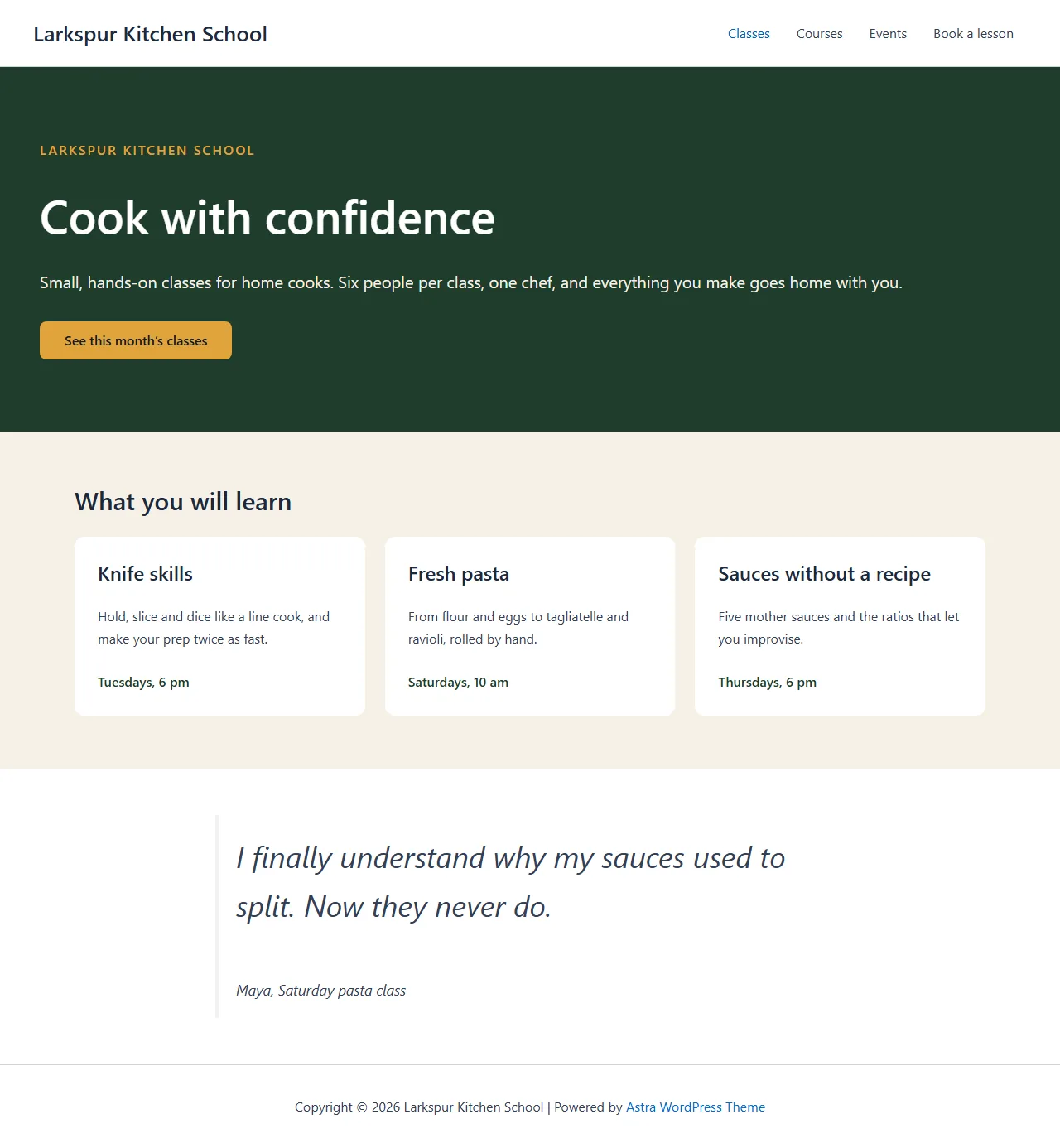

Larkspur Kitchen School is a fictional demonstration, and so are its staff and students. Recorded on our test site on October 7, 2026 with EMCP 3.19.0 and Polylang 3.8.10, over a real MCP connection. Email was held on the test site, so nothing was sent. The Polylang screens are the plugin’s own; values and ids in the calls are the ones this run returned, with long text shortened.
A practical place to start
From one language to the next, page by page.
- 01
Copy the page
create-translation copies the page into the target language as a linked draft, with its Elementor or block content, template, password and featured image, and maps its parent and categories to their translations.
- 02
Translate its text
get-page-text returns every translatable string as a numbered list: widget and block text, links, alt text, the title, the excerpt and the SEO title and description. apply-page-text writes the translated list back in one call.
- 03
Publish and link
Publish the translation, give each menu location a menu per language, and translate categories and theme strings. Every step is in History.
Built for Polylang
A translation that starts as a faithful copy
EMCP copies the page with everything Polylang links per language: the Elementor or Gutenberg content, page settings, template, password and featured image. The copy’s parent page and categories are mapped to their translations, and a category with no translation yet is listed so your AI can create it. The copy is a draft until you publish it.
Text in, text out
Your AI never edits page markup by hand. get-page-text reads every translatable string as a numbered segment, from Elementor widget text and links to block captions and the Yoast, Rank Math or SEOPress title and description. apply-page-text writes the translated list back in one call, after checking every segment. Large pages can go in batches.
The original stays as it is
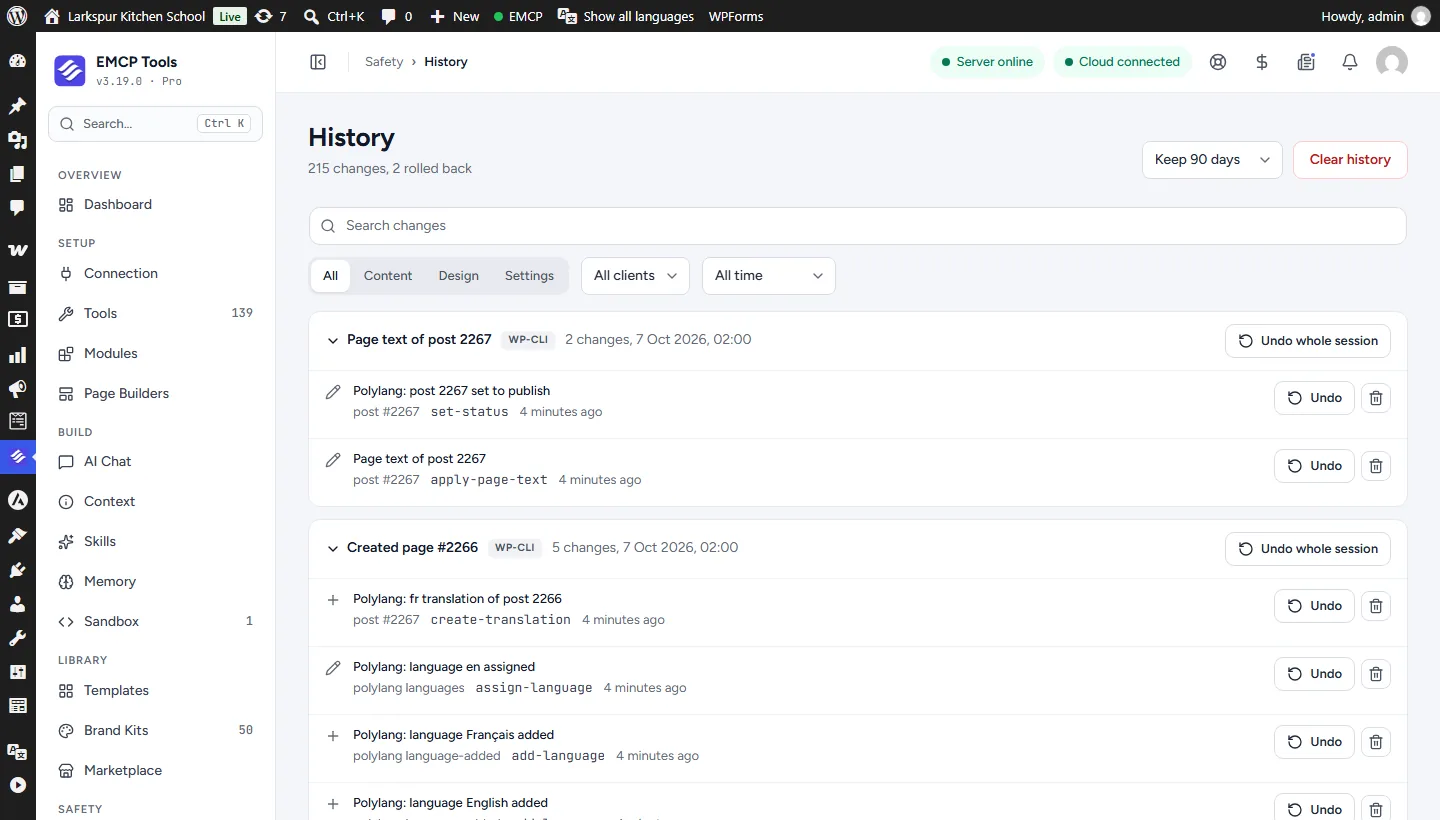
Polylang can copy dates, page order, custom fields and categories between translations. EMCP holds that copying back for what it writes, so publishing the French page never moves the English one. Every write is in History in EMCP Tools and can be undone there.
Use the Polylang tool reference for operation names and arguments. If your site uses TranslatePress instead, see the TranslatePress integration.
Get connected
Put Polylang in your AI’s toolkit.
- 1
Install Polylang
Install EMCP Pro 3.19 or later with Polylang 3.x. The free edition is enough.
- 2
Enable the write tool
polylang-read is on; polylang-write starts disabled. Enable it under EMCP Tools > Tools > Plugins > Polylang and reconnect your AI client.
- 3
Add your languages
Ask your AI to add each language and assign the default language to content that existed before Polylang, 500 posts per call.
Then connect Claude Code, Claude Desktop, or Cursor to use the Polylang tools enabled on your site. Compare Free and Pro access.
A few useful details
Before you connect.
Questions about Polylang, supported operations, and the workflow on your site.
Do I need Polylang Pro?
No. The free edition is enough. Polylang Pro features such as shared slugs, translated slugs and machine translation are not used.
Will translating change the original page?
No. While EMCP writes a translation it holds back Polylang's copying for the fields it writes. If Polylang copies something anyway, EMCP reverses its own write and records an entry in History that restores it.
What if one segment is wrong?
apply-page-text checks every segment first. One bad segment and nothing is written, so a page is never left half translated.
Can I undo a translation?
Yes, from History. A copy that someone edited since is not deleted, and a language that pages use is not removed.
Your tools. Your WordPress site.