
 A brief becomes a real page.
LifterLMS MCP integration
Build the course, price it and bundle it, in one conversation.
EMCP Pro runs LifterLMS's own abilities, which use its REST controllers, so LifterLMS validates and stores every change. Create courses with sections, lessons and quizzes, give them access plans, bundle them into memberships and enrol students, with versions, checks and History undo on top.
Pro integrationLifterLMS 10.x
A real run on our test site
Two access plans, and a quiz EMCP checked twice.
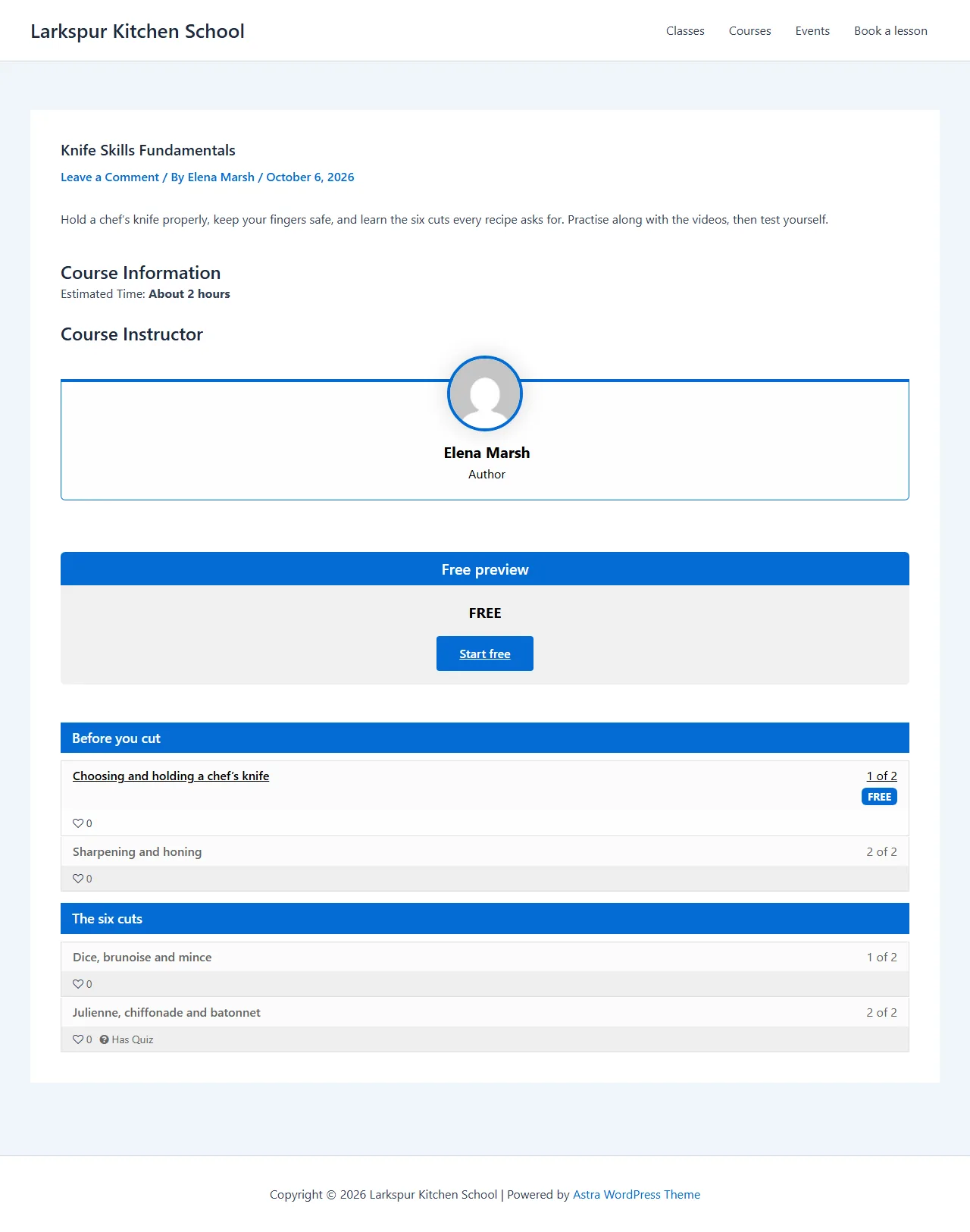
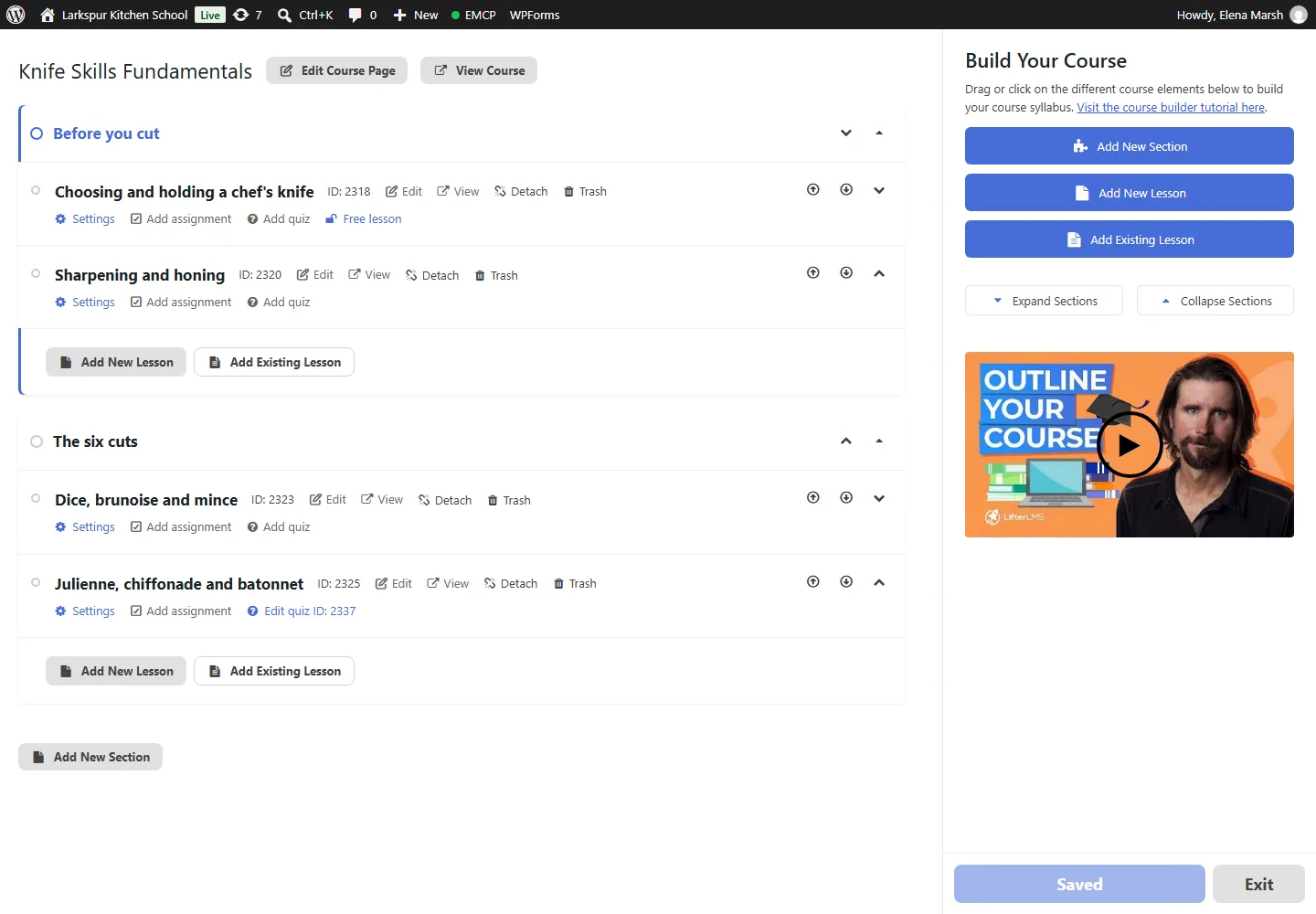
The assistant built a LifterLMS course with two sections, four lessons, a quiz and two access plans, published it and enrolled a student.
Build a LifterLMS course called Knife Skills Fundamentals with two sections and four lessons. Make the first lesson a free preview, add a three-question quiz with three attempts, a free plan and a $49 plan, publish it and enrol Sam.
- Recorded
- Plugin
- LifterLMS 10.3.0
- Connection
- EMCP 3.19.0 over MCP (WP-CLI stdio)
- Calls shown
- 11, in the order they ran
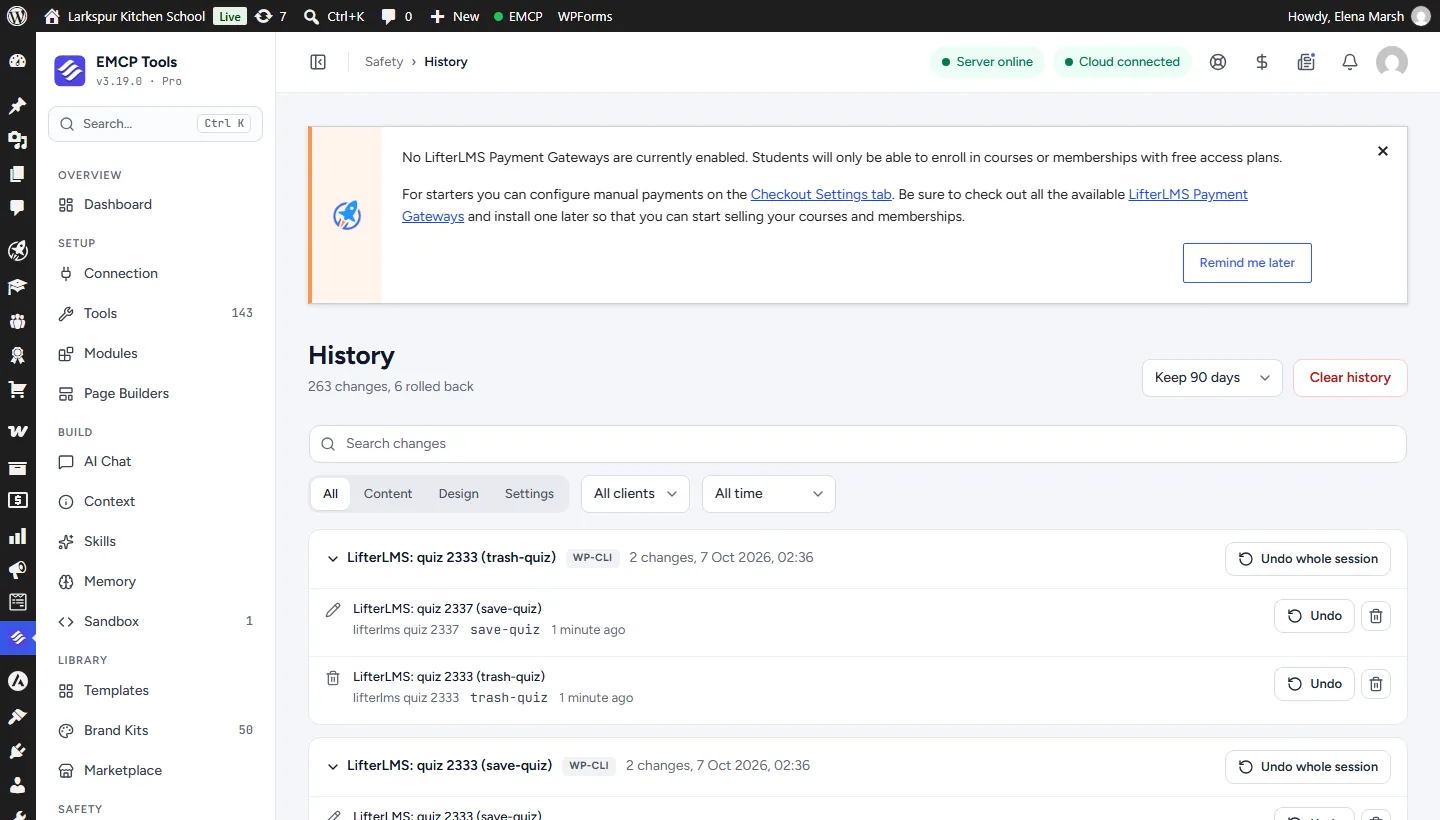
- The first save-quiz was refused. EMCP reads every write back, and LifterLMS had not stored allowed_attempts because limit_attempts was off. EMCP put everything back. Sent again with limit_attempts: true, the quiz saved.
- The lesson photos were removed again with update-lesson, because LifterLMS shows them as large tiles in the syllabus.
- 01
lifterlms-write · create-course{"title": "Knife Skills Fundamentals", "content": "<p>Hold a chef's knife properly, keep your fingers safe, and …", "excerpt": "Six cuts, safe technique and twice-as-fast prep.", "featured_media": 2289, "length": "About 2 hours"}Answer: {"id": 2315, "status": "draft", "course_version": "6f3a96836501924e", "version": "6f3a96836501924e", "change": {"change_id": "6d5bb08705d8", "undo": true}} - 02
lifterlms-write · create-section{"course_id": 2315, "course_version": "6f3a96836501924e", "title": "Before you cut"}Answer: {"id": 2317, "kind": "section", "version": "", "course_version": "8048c881682f6be6", "change": {"change_id": "e41131538352", "undo": true}} - 03
lifterlms-write · create-lesson{"section_id": 2317, "course_version": "8048c881682f6be6", "title": "Choosing and holding a chef's knife", "content": "<p>The pinch grip, the claw hand, and why a sharp knife is th…", "public": true}Answer: {"id": 2318, "kind": "lesson", "version": "5304f1bddb9e5ffd", "course_version": "3b19839eeb299e77", "change": {"change_id": "cde70db132ba", "undo": true}} - 04
lifterlms-write · create-section{"course_id": 2315, "course_version": "3b335960e0faf7aa", "title": "The six cuts"}Answer: {"id": 2322, "kind": "section", "version": "", "course_version": "e94a58ad98677ba2", "change": {"change_id": "9ce2b24aeab7", "undo": true}} - 05
lifterlms-write · create-lesson{"section_id": 2322, "course_version": "e94a58ad98677ba2", "title": "Dice, brunoise and mince", "content": "<p>From onion to garlic, the same three movements at three si…", "featured_media": 2290}Answer: {"id": 2323, "kind": "lesson", "version": "2908ef1b43c2c2f9", "course_version": "d55a21bb3e388b90", "change": {"change_id": "731baa104a19", "undo": true}} - 06
lifterlms-write · save-quizRefused{"lesson_id": 2325, "course_version": "ccc874f63dc41572", "title": "Six cuts quiz", "settings": {"passing_percent": 75, "allowed_attempts": 3}, "questions": [{"title": "Which grip gives you the most control?", "question_type": "choice", "points": 1, "choices": "[3 items]"}, {"title": "A brunoise is smaller than a dice.", "question_type": "true_false", "points": 1, "choices": "[2 items]"}, {"title": "Which cuts make thin strips?", "question_type": "choice", "multi_choices": true, "points": 2, "choices": "[3 items]"}]}Refusal: LifterLMS did not store the change as written; it was put back. - 07
lifterlms-write · save-access-plan{"post_id": 2315, "course_version": "ccc874f63dc41572", "title": "Free preview", "price": 0, "enroll_text": "Start free"}Answer: {"id": 2331, "post_id": 2315, "course_version": "71b1a09e9a918369", "change": {"change_id": "f5bd96d7ff38", "undo": true}} - 08
lifterlms-write · save-access-plan{"post_id": 2315, "course_version": "71b1a09e9a918369", "title": "Full course", "price": 49, "visibility": "featured", "enroll_text": "Enroll for $49"}Answer: {"id": 2332, "post_id": 2315, "course_version": "dd6b82cc677479da", "change": {"change_id": "4d7e783765c7", "undo": true}} - 09
lifterlms-write · set-course-status{"course_id": 2315, "course_version": "dd6b82cc677479da", "status": "publish"}Answer: {"id": 2315, "status": "publish", "course_version": "5194e49979079861", "version": "5194e49979079861", "change": {"change_id": "3a7cb632cff2", "undo": true}} - 10
lifterlms-write · enrol-student{"post_id": 2315, "user_id": 3}Answer: {"post_id": 2315, "user_id": 3, "status": "enrolled", "courses": [], "change": {"change_id": "a7d2230020f3", "undo": true}} - 11
lifterlms-write · save-quiz{"lesson_id": 2325, "course_version": "5194e49979079861", "title": "Six cuts quiz", "settings": {"passing_percent": 75, "limit_attempts": true, "allowed_attempts": 3}, "questions": [{"title": "Which grip gives you the most control?", "question_type": "choice", "points": 1, "choices": "[3 items]"}, {"title": "A brunoise is smaller than a dice.", "question_type": "true_false", "points": 1, "choices": "[2 items]"}, {"title": "Which cuts make thin strips?", "question_type": "choice", "multi_choices": true, "points": 2, "choices": "[3 items]"}]}Answer: {"id": 2337, "version": "94bde1962c3e4b4e", "questions": 3, "change": {"change_id": "986b264fca10", "undo": true}}
Larkspur Kitchen School is a fictional demonstration, and so are its staff and students. Recorded on our test site on October 7, 2026 with EMCP 3.19.0 and LifterLMS 10.3.0, over a real MCP connection. Food photos from Pexels. Email was held on the test site, so nothing was sent. The LifterLMS screens are the plugin’s own; values and ids in the calls are the ones this run returned, with long text shortened.
A practical place to start
From a syllabus to a course people can buy.
- 01
Build the course
Create the course, its sections and lessons, and a quiz per lesson with choice, picture choice, true or false and content questions.
- 02
Give it access plans
save-access-plan adds a free or paid plan to the course; a course needs a plan before visitors can enrol themselves.
- 03
Bundle and enrol
Create a membership with auto-enrol courses, then enrol students. Enrolling in the membership enrols them in its courses, and History puts the whole set back exactly.
Built for LifterLMS
LifterLMS’s own API, with safeguards on top
LifterLMS ships its own WordPress abilities for courses, lessons, quizzes, plans, memberships and enrolments. EMCP runs them in-process and adds versions, a read-back of every write, recovery when a multi-step change fails half way, and History undo. Updates change only the fields you name.
A curriculum that stays in order
LifterLMS renumbers lessons around any item it places, so EMCP snapshots the whole curriculum around every change and can put it back exactly. reorder-curriculum sets the full order in one call, every section and lesson exactly once.
Memberships that bring their courses
A membership’s auto-enrol courses come with every enrolment, and leave with every cancellation unless another membership still covers them. EMCP treats the whole set as one change, so History restores every course enrolment, trigger and level it touched.
Use the LifterLMS tool reference for operation names and arguments. Sites on Tutor LMS use the Tutor LMS integration.
Get connected
Put LifterLMS in your AI’s toolkit.
- 1
Install LifterLMS
Install EMCP Pro 3.19 or later with LifterLMS 10.x.
- 2
Enable the write tool
lifterlms-read is on; lifterlms-write starts disabled. Enable it under EMCP Tools > Tools > Plugins > LifterLMS and reconnect your AI client.
- 3
Start from get-setup
It reports the version, the question types, the difficulties and categories, and whether you may enrol students.
Then connect Claude Code, Claude Desktop, or Cursor to use the LifterLMS tools enabled on your site. Compare Free and Pro access.
A few useful details
Before you connect.
Questions about LifterLMS, supported operations, and the workflow on your site.
LifterLMS has its own abilities. Why use EMCP?
EMCP runs them and adds what they lack: versions, exact checks, recovery from a half-finished change, History undo, and refusals for anything that would remove students' work.
How do membership enrolments work?
Enrolling a student in a membership enrols them in its auto-enrol courses, and cancelling it cancels them, unless another membership of theirs covers a course. The answer lists every course that changed.
Can it delete courses?
It moves courses, lessons, quizzes and memberships to the trash, because a permanent delete would take a quiz's attempts or a course's access plans with it.
What does undo refuse?
Anything students built on, even with force: a course once anyone enrolled, a lesson once a student completed it, a quiz once students took it.
Your tools. Your WordPress site.