
 A brief becomes a real page.
TablePress MCP integration
Turn a list of figures into a table on the page.
EMCP Pro builds and edits tables through TablePress's own model. Create a table from rows of data, change a few cells or the whole grid, import CSV, HTML, JSON, XLSX or ODS files, and place the table on an Elementor or Gutenberg page. Every change names the version it read, so a newer edit is never lost.
Pro integrationTablePress 3.x (free is enough)
A real run on our test site
A price table that works out its own totals.
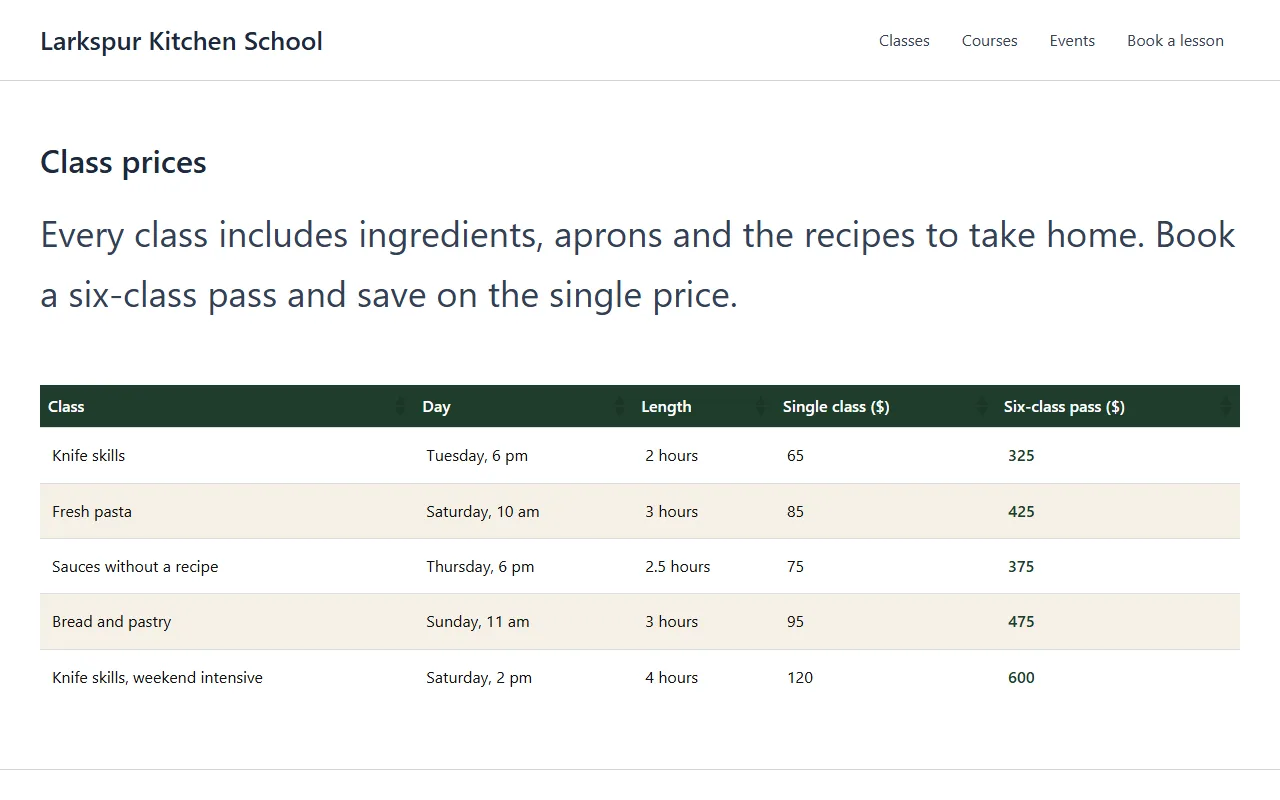
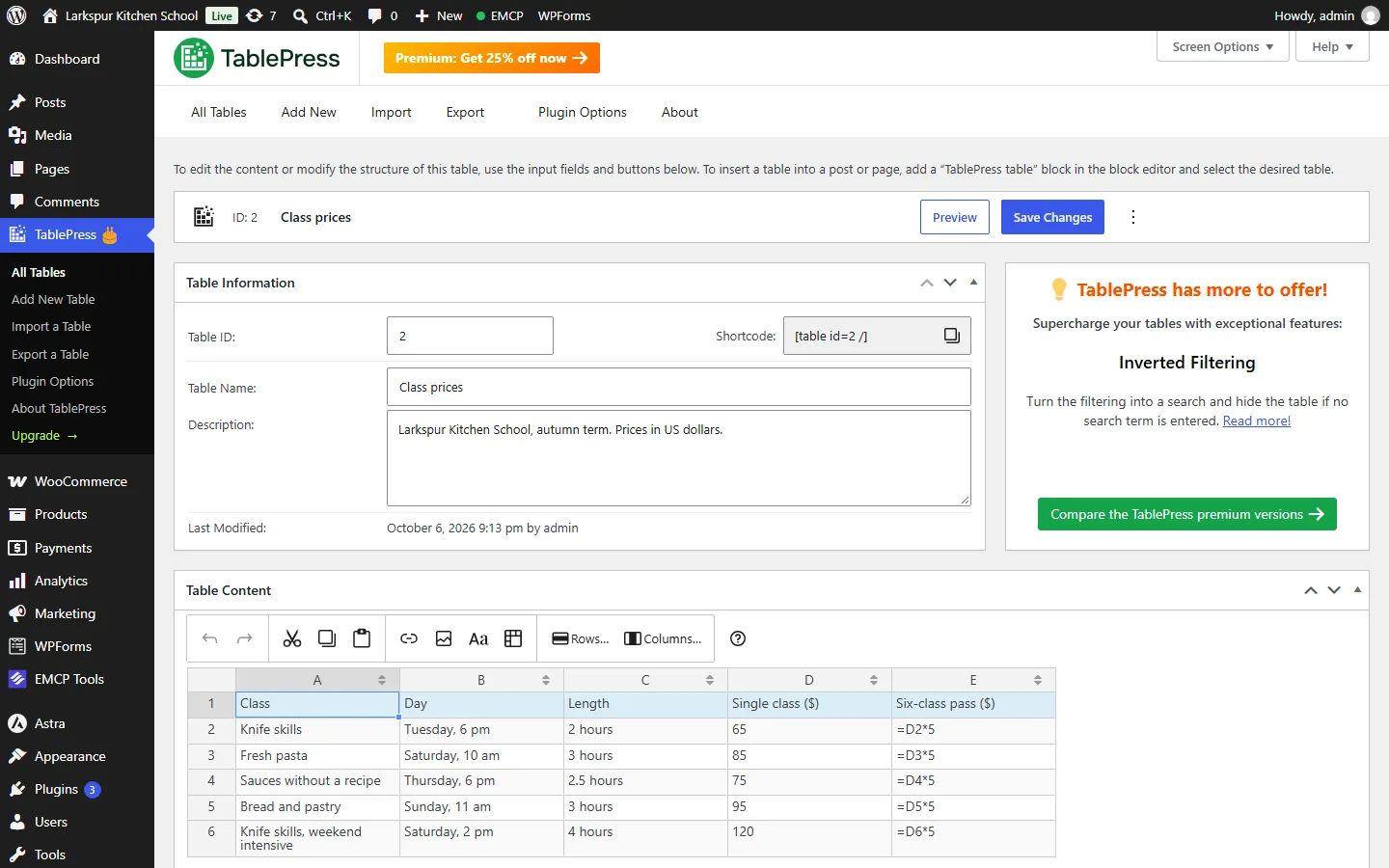
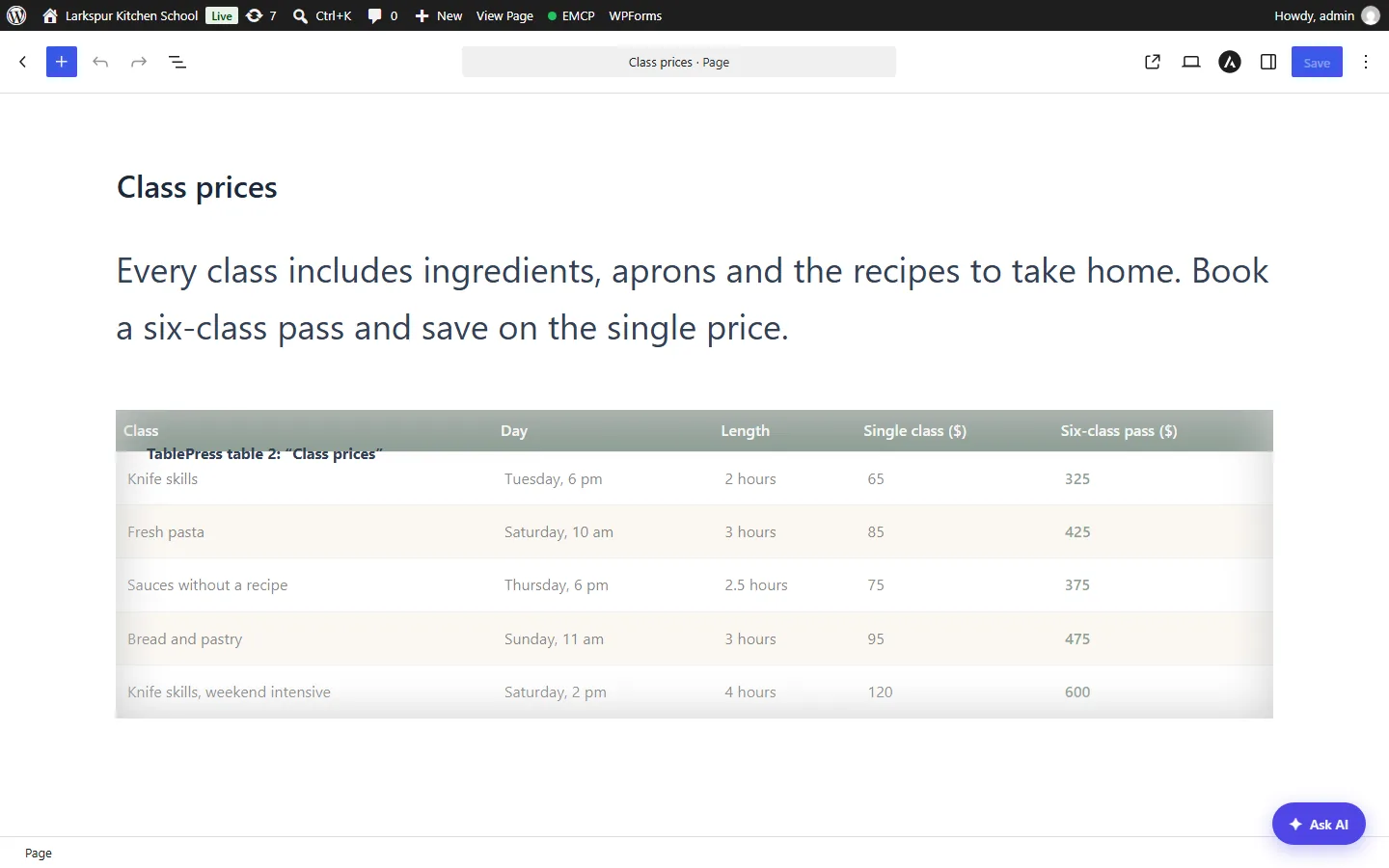
The assistant built the term’s price table with formulas, raised one price, added a row, styled it in the school’s colours and placed it on a page.
Create a TablePress table of our autumn classes with the day, the length, the single price and a six-class pass worked out as five times the single price. Put it on a Class prices page, style the header in our dark green, and drop the search box and paging.
- Recorded
- Plugin
- TablePress 3.4
- Connection
- EMCP 3.19.0 over MCP (WP-CLI stdio)
- Calls shown
- 10, in the order they ran
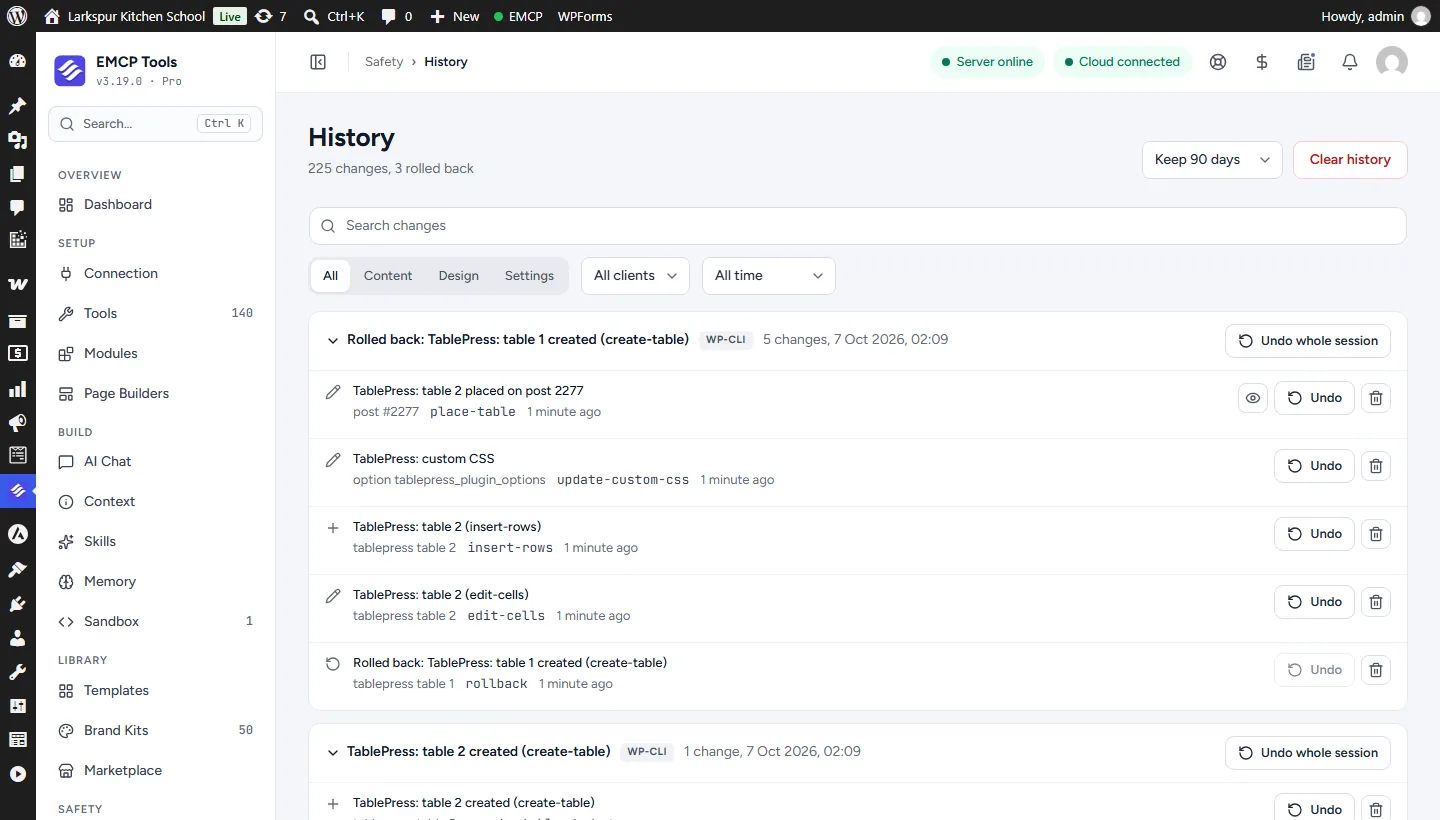
- The first attempt stored the prices as “$65”, which a formula cannot multiply. The assistant undid that table through History (rollback-change) and created it again with plain numbers.
- The first stylesheet also coloured the last header cell dark green on dark green. A second update-custom-css limited that rule to the body cells.
- 01
create-post{"post_type": "page", "status": "publish", "title": "Class prices", "content": "<!-- wp:paragraph {\"fontSize\":\"large\"} --> <p class=\"has-larg…", "meta": {"site-sidebar-layout": "no-sidebar"}}Answer: {"post_id": 2277, "status": "publish", "permalink": "https://elementor-mcp.test/class-prices/"} - 02
tablepress-write · create-table{"name": "Class prices", "description": "Larkspur Kitchen School, autumn term", "data": [["Class", "Day", "Length", "… 2 more"], ["Knife skills", "Tuesday", "2 hours", "… 2 more"], ["Fresh pasta", "Saturday", "3 hours", "… 2 more"], "… 2 more"]}Answer: {"id": "1", "version": "5aeeac25fc1797b9", "rows": 5, "columns": 5, "shortcode": "[table id=1 /]", "change": {"change_id": "d8a4006377c2", "undo": true}} - 03
rollback-change{"id": "d8a4006377c2"}Answer: {"rolled_back": "d8a4006377c2", "compensating": "7fac35a10170"} - 04
tablepress-write · create-table{"name": "Class prices", "description": "Larkspur Kitchen School, autumn term. Prices in US dollars.", "data": [["Class", "Day", "Length", "… 2 more"], ["Knife skills", "Tuesday, 6 pm", "2 hours", "… 2 more"], ["Fresh pasta", "Saturday, 10 am", "3 hours", "… 2 more"], "… 2 more"]}Answer: {"id": "2", "version": "9c8f2e35a842ea22", "rows": 5, "columns": 5, "shortcode": "[table id=2 /]", "change": {"change_id": "31d4692844a3", "undo": true}} - 05
tablepress-write · edit-cells{"table_id": "2", "version": "9c8f2e35a842ea22", "cells": [{"row": 5, "column": 4, "value": "95"}]}Answer: {"id": "2", "version": "3f1a618b52e27947", "rows": 5, "columns": 5, "shortcode": "[table id=2 /]", "change": {"change_id": "24d41a8e6bf3", "undo": true}} - 06
tablepress-write · insert-rows{"table_id": "2", "version": "3f1a618b52e27947", "at": 6, "rows": [["Knife skills, weekend intensive", "Saturday, 2 pm", "4 hours", "… 2 more"]]}Answer: {"id": "2", "version": "269d58122e8b23f6", "rows": 6, "columns": 5, "shortcode": "[table id=2 /]", "change": {"change_id": "dc2eebdd7d28", "undo": true}} - 07
tablepress-write · place-table{"table_id": "2", "post_id": 2277}Answer: {"post_id": 2277, "builder": "blocks", "table_id": "2", "change": {"change_id": "46c0fae05352", "undo": true}} - 08
tablepress-read · render-table{"table_id": "2"}Answer: {"table_id": "2", "html": "<table id=\"tablepress-2\" class=\"tablepress tablepress-id-2\"> …"} - 09
tablepress-write · update-table{"table_id": "2", "version": "269d58122e8b23f6", "options": {"datatables_filter": false, "datatables_paginate": false, "datatables_lengthchange": false, "datatables_info": false}}Answer: {"id": "2", "version": "70ce0a49eea6ec38", "rows": 6, "columns": 5, "shortcode": "[table id=2 /]", "change": {"change_id": "114bebfe917d", "undo": true}} - 10
tablepress-write · update-custom-css{"use_custom_css": true, "custom_css": ".tablepress-id-2 thead th{background:#1F3D2B;color:#FFFFFF;fo…"}Answer: {"use_custom_css": true, "custom_css": ".tablepress-id-2 thead th { background: #1F3D2B; color: #FFFF…", "served_from_file": false, "change": {"change_id": "4e20e5646cc3", "undo": true}}
Larkspur Kitchen School is a fictional demonstration, and so are its staff and students. Recorded on our test site on October 7, 2026 with EMCP 3.19.0 and TablePress 3.4, over a real MCP connection. Email was held on the test site, so nothing was sent. The TablePress screens are the plugin’s own; values and ids in the calls are the ones this run returned, with long text shortened.
A practical place to start
From data to a table visitors can read.
- 01
Create the table
create-table takes a name and the cells as rows, with the first row as the header. Or import a CSV, HTML, JSON, XLSX or ODS file.
- 02
Check it rendered
render-table shows the table as visitors will see it, with formulas such as =SUM(B2:B9) worked out.
- 03
Place it on a page
place-table adds the TablePress widget to an Elementor page or the TablePress block to any other page, with shortcode options such as hidden columns.
Built for TablePress
Tables from data, not by hand
Give your AI the figures and it builds the table: rows and columns, a header row, a name and a description. Change a few cells with edit-cells, add or remove rows and columns, or replace the whole grid with update-table. Rows and columns are numbered from 1, the way people count them.
Imports that stay safe
Files go through TablePress’s own importer, one file per call. EMCP reads XLSX and ODS files but refuses other archives, so a ZIP can never unpack into the site. HTML in cells is kept as long as the user may save it: a save that TablePress would strip of an administrator’s HTML is refused instead.
On the page, in the builder you use
place-table adds the TablePress widget to an Elementor page and the TablePress block, with its shortcode inside, to a Gutenberg page, so the block editor shows it as valid content. Every change is in History in EMCP Tools.
Use the TablePress tool reference for operation names and arguments, and the Elementor integration for the page around the table.
Get connected
Put TablePress in your AI’s toolkit.
- 1
Install TablePress
Install EMCP Pro 3.19 or later with TablePress 3.x. The free edition is enough.
- 2
Enable the write tool
tablepress-read is on; tablepress-write starts disabled. Enable it under EMCP Tools > Tools > Plugins > TablePress and reconnect your AI client.
- 3
Ask for a table
Give your AI the data or a file, and the page it belongs on.
Then connect Claude Code, Claude Desktop, or Cursor to use the TablePress tools enabled on your site. Compare Free and Pro access.
A few useful details
Before you connect.
Questions about TablePress, supported operations, and the workflow on your site.
Which files can it import?
CSV, HTML, JSON, XLSX and ODS, one file at a time, through TablePress's own importer.
Does it support formulas?
Yes. Cells keep their formulas, and render-table shows the worked-out values.
Which pages show a table?
find-usage lists the pages that show it, through the TablePress widget, block or shortcode.
Can I undo changes?
Yes. Edits, new tables, deletes, renames and custom CSS changes are all in History, and an undo refuses to overwrite a newer change unless forced.
Your tools. Your WordPress site.