
 A brief becomes a real page.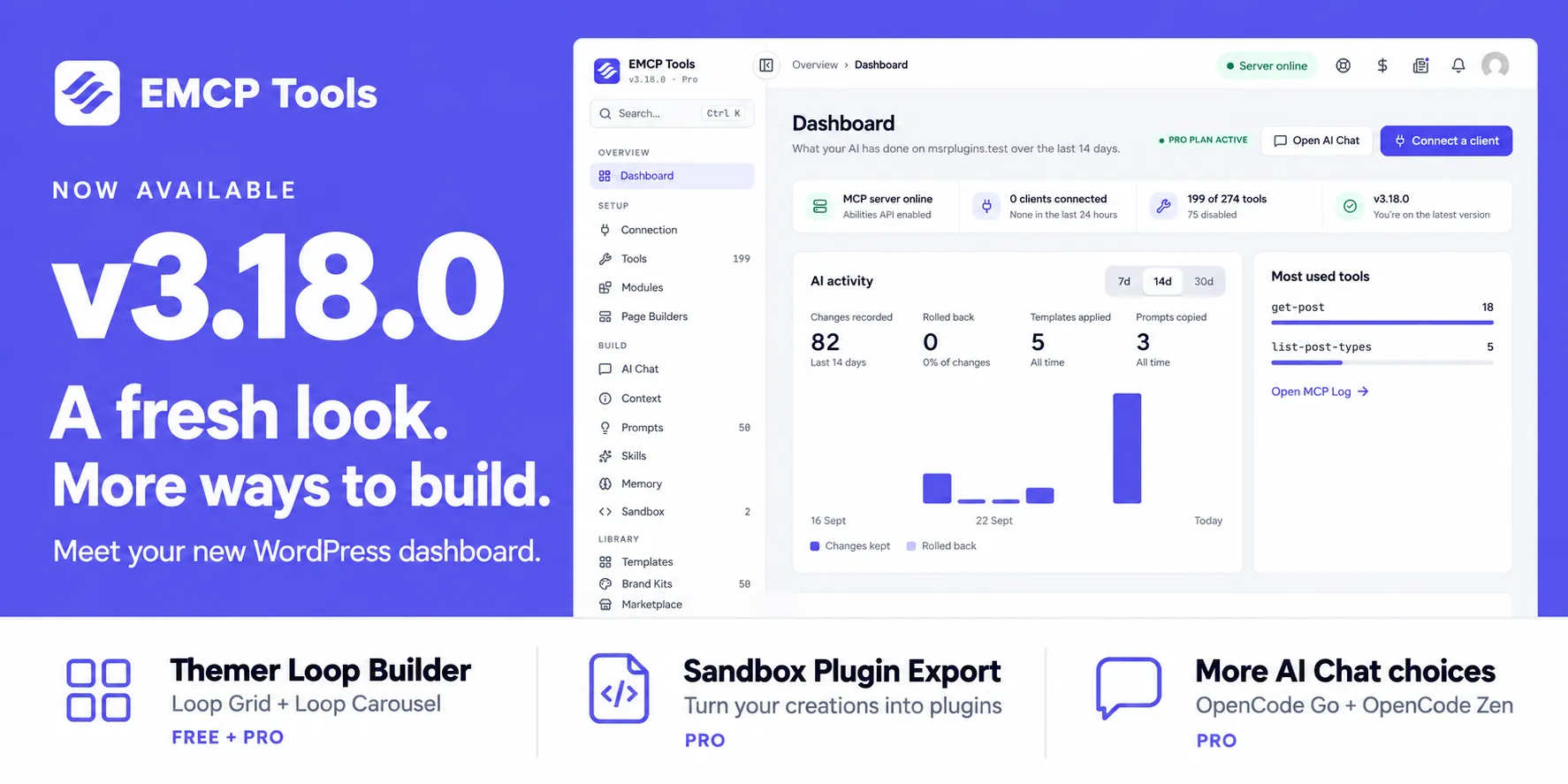
An agency hands a client site to an AI agent for an afternoon. By evening the pages look different, but nobody can say exactly what changed, which client made the change, or how to put one section back without touching the rest. The record was scattered across a change list, a request log and the agent’s chat history.
EMCP Tools 3.18.0 puts that record in one place. Every admin screen was rebuilt around what your AI did on the site: what it changed, what it called, what needs a person to look at, and how to undo it. The release also adds a loop builder to EMCP Themer, a way to export Sandbox work as a standalone plugin, and scheduled backups on Pro.
Version 3.18.0 is now available. Download the free release, or update Pro through Freemius.
One admin, grouped by what you are doing
Every EMCP Tools screen now sits inside one frame. A grouped sidebar shows counts beside its items. Press Ctrl or Cmd + K to search screens, tools, prompts and templates from anywhere. A notifications drawer, a save bar that warns before you leave with unsaved changes, and a recovery panel for a screen that fails to load complete the frame. The redesign changes the admin only: no MCP tools were added or removed.
The Dashboard: what your AI did this week
The Dashboard opens on the last 7, 14 or 30 days of AI activity. A daily chart shows changes kept and changes rolled back. Beside it are tool calls and errors (on Pro, templates applied and prompts copied), the most used tools, and the five newest changes, each with an Undo button. A health strip at the top reports the MCP server, connected clients, enabled tools and your version.
Needs your attention lists the things a person should act on: the MCP server switched off, changes History could not record, sandbox items awaiting review, disabled tools, plugin and theme updates, and EMCP Cloud disconnected while Marketplace items depend on it. On Pro it also flags no backup in 14 days or a failed scheduled backup. Dismiss an item and it stays gone until its situation changes.
Connecting a client, confirmed
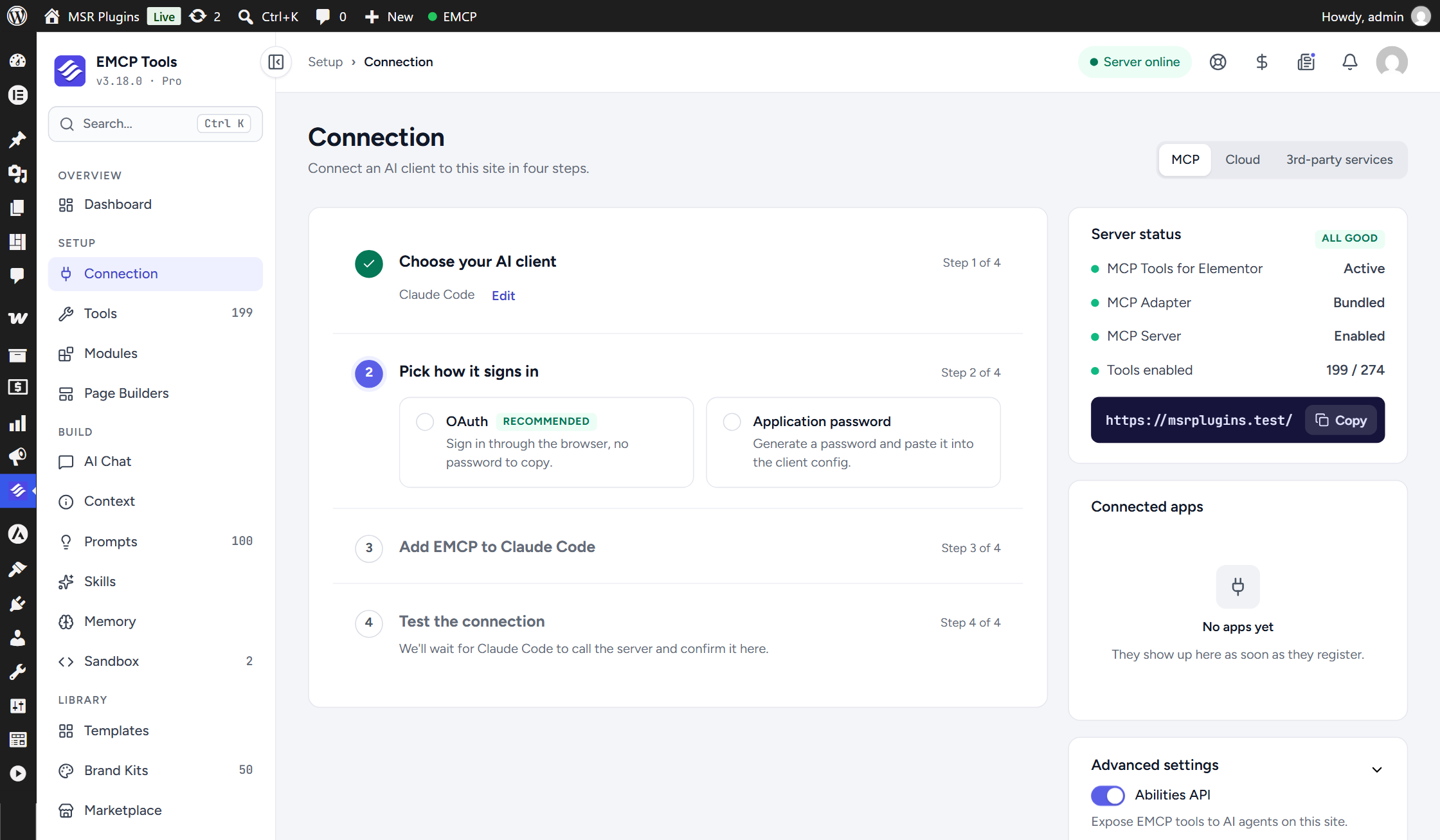
The Connection screen is now a four-step setup. Choose your AI client, choose how it signs in (OAuth, an application password, or WP-CLI on local sites), follow that client’s own steps, then wait. The last step watches for the client’s first MCP call and confirms when it arrives, so you know it works before asking for pages.
History you can read by session
History now groups changes by the AI session that made them. Search them, filter by kind, client and date, and open a before and after diff where one is available. Undo a single change, or undo a whole session newest first. Choose whether History keeps 30, 90, 180 or 365 days.
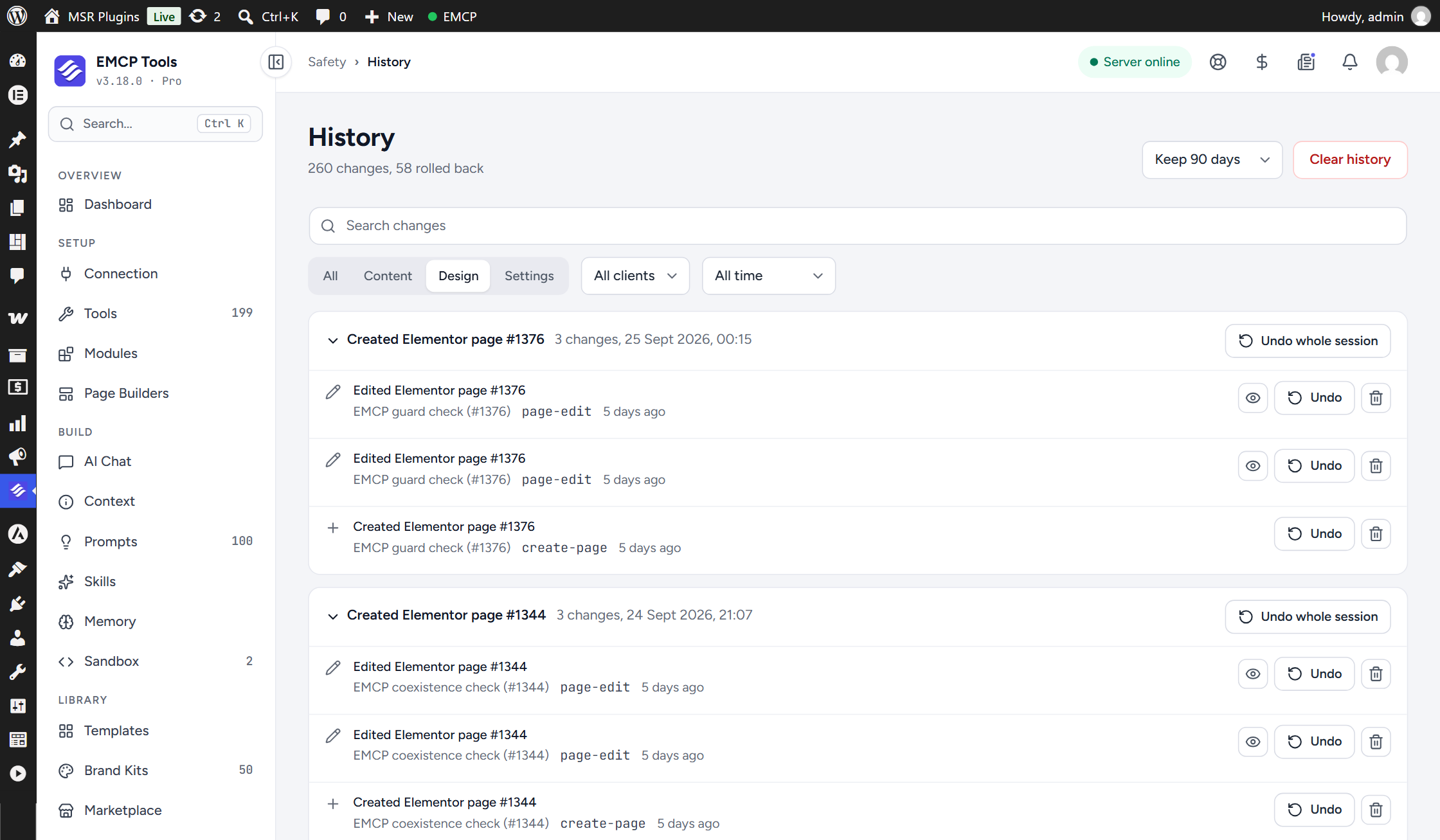
History now has its own database table. Your existing history moves there on the first admin page load after updating.
The new MCP Log sits beside it: every MCP request with its client, session, sign-in method, status and timing, with filters, totals and a CSV export.
Loops in EMCP Themer
EMCP Themer gains a loop template type, the Loop Item, which holds one post card. Two Elementor widgets and two Gutenberg blocks repeat it:
- Loop Grid: responsive columns, masonry, equal height, a wider first card, and pagination as numbers, previous/next, load more or infinite scroll.
- Loop Carousel: slides per view, autoplay, loop, fade and coverflow effects, arrows and three dot styles.
An Elementor card can be repeated by the Gutenberg block, and the other way round. Every field inside a card shows that card’s post, including dynamic tags and ACF fields. Queries cover posts of any type, the current archive, related posts, a manual selection and WooCommerce products.
The free tier includes one Loop Item and every widget and block option. Pro adds unlimited Loop Items and, for the Loop Grid widget, alternate templates at chosen grid positions. The Themer MCP tools accept type: loop, so an agent can build a card and place a grid end to end. See the Loop Builder guide.
Sandbox work that outlives the plugin (Pro)
Sandbox > Export as plugin packages every active Sandbox widget, block and PHP snippet as a standalone plugin ZIP. The exported plugin stays dormant while EMCP Tools is active and takes over on the first request after EMCP is deactivated. Widget types, block names, snippet functions and the [emcp_snippet] shortcode keep their names, so existing pages keep rendering. Read the Sandbox Export guide.
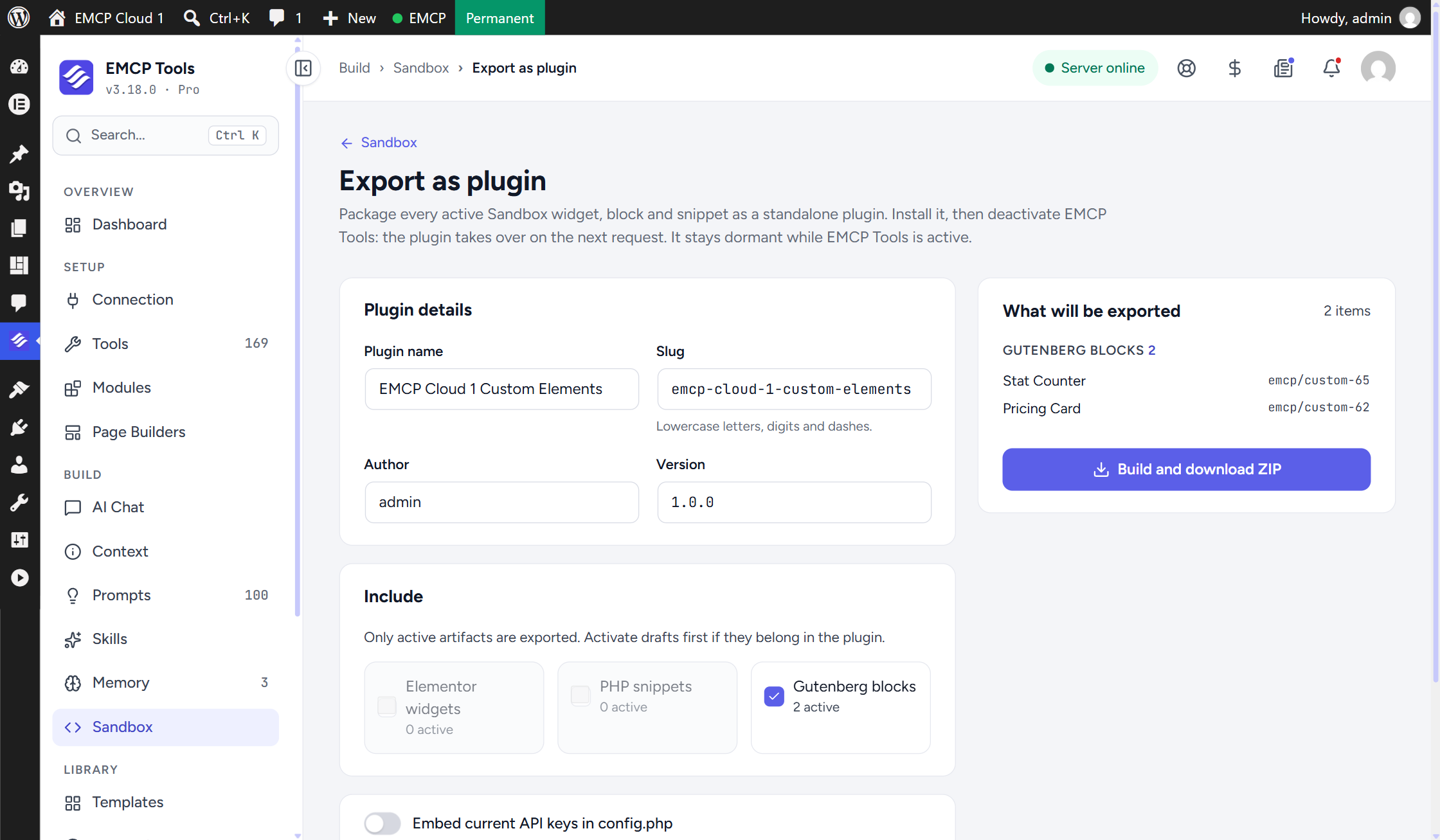
Sandbox items created over MCP are now always drafts. An agent can create and edit custom widgets, blocks and snippets, but activation happens on the Sandbox screens.
Scheduled backups, skills and prompts
- Scheduled backups (Pro) run daily or weekly at a set time through WP-Cron, in short steps, and keep the newest copies you choose. If WP-Cron stalls, continue the backup from the Backup & Migrate screen.
- Custom skills (Pro) let you write your own agent playbooks under Skills > Custom skills: a name, a short description and Markdown instructions. See Agent Skills.
- The Pro prompt library grows to 100 prompts across 20 categories: the 50 landing-page prompts plus 50 complete-website prompts in 10 new categories.
- Customize a prompt before you copy it: page builder, business name, brand colours, fonts and content facts, with a live preview. On Pro, Use in AI Chat opens AI Chat in a new tab with the prompt filled in. See Using prompts.
- AI Chat (Pro) adds OpenCode Go and OpenCode Zen as providers. Their requests go through a server relay, and your key stays on the server. A new chat also suggests six starter prompts. See AI Chat.
Alongside Elementor’s own MCP server
Elementor 4.3 ships its own MCP server, and both now run side by side. EMCP refuses to write to a page another user has open in the editor with unsaved changes, tells an open editor when a page changed, and tells a connected agent which server to use for which job. The admin bar item now reads EMCP.
Smaller changes and fixes
- Redirects match query strings. A redirect can match
/page?ref=adwhile another redirect for the same path catches the rest. Existing redirects behave as before. See Redirects. - Blank padding sides (#151). A padding, margin, border radius or border width sent with some sides blank no longer makes Elementor drop the whole rule.
- Curated widget settings (#152). 55 curated parameters used names Elementor does not recognise. All are corrected or removed; values sent under the old names never took effect, so send them again.
- Themer dynamic images. Binding Featured Image, Site Logo or Author Avatar to an Elementor image or background no longer crashes the page.
Upgrading
- Reconnect your AI clients after updating. A client that stays connected through the update keeps running the previous version, and its changes are not recorded in History until it reconnects.
- EMCP Themer is off by default on new installs. Turn it on from EMCP Tools > Modules. Sites that already use it keep it on.
- History moves to its own table on the first admin page load after updating.
Update from your WordPress dashboard, or download the free release. The full list of changes is in the changelog.